
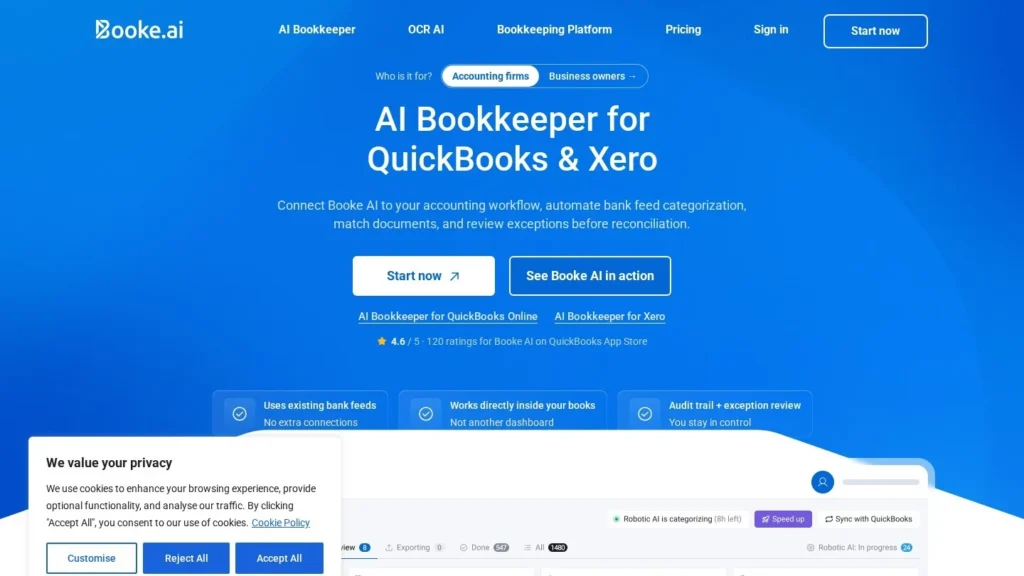
Booke AI is an AI Bookkeeper for bookkeepers and accounting firms that categorizes bank feed transactions every day in QuickBooks Online, runs the daily bank reconciliation process in Xero, matches receipts and asks clients about unclear items. It is best for firms with many small clients on those two ledgers. Reputation is the main area to improve: Trustpilot reviewers rate it 2.6 out of 5 and describe reconciliation errors and support issues.
Pricing is published at $129 per business a month, with custom pricing and white-label for accounting firms. This review is based on Booke AI’s published pricing and product pages and public reviews as of October 2026; we have not tested it hands-on.
Daily Bank Feed Categorization at $129 per Business
- Starting price: $129 per business a month on the AI Bookkeeper Business plan; accounting firm pricing is by request.
- What it does: daily bank feed categorization in QuickBooks Online, daily bank reconciliation in Xero, document matching and one-click client queries.
- Firm features: multi-client dashboard, white-label client experience and priority onboarding on the Accounting Firms plan.
- Reputation: 4.6 from 120 ratings on the QuickBooks App Store, per Booke, and 2.6 from 18 reviews on Trustpilot, with accuracy and support feedback.
- Our score: 8.2/10, with clear pricing and easy setup, and room to grow in user sentiment.
Booke’s Prices and Product Claims on Record
Booke AI is a small vendor, so most of its numbers are prices and product figures. Each fact below was checked on the linked page.
| Fact | Detail | Source and date |
|---|---|---|
| Business plan | $129 per business per month | Booke AI pricing page, October 2026 |
| Firm plan | Pricing by request; adds multi-client management, white-label and priority onboarding | Booke AI pricing page, October 2026 |
| Proration | Adding a business mid-period triggers a prorated charge for the rest of the period | Booke AI pricing page, October 2026 |
| Speed claim | 80% faster transaction categorization, per Booke | Booke AI comparison page, checked August 23, 2026 |
| Ledgers | Two-way integrations with Xero, QuickBooks and Zoho Books; daily bank feed work in QuickBooks Online and Xero | Booke AI comparison page, checked August 23, 2026 |
| App store rating | 4.6 out of 5 from 120 ratings on the QuickBooks App Store, as cited by Booke | Booke AI comparison page, checked August 23, 2026 |
| Security | AES-256 encryption, GDPR compliance and audit by Intuit and Xero, as stated by Booke | Booke AI comparison page, checked August 23, 2026 |
| Trustpilot | 2.6 out of 5 from 18 reviews; 66% one-star | Trustpilot, October 2026 |
The split in ratings is the fact buyers should weigh most. Booke cites a strong score on the QuickBooks App Store, while Trustpilot reviewers, a smaller group, are mostly unhappy and point to reconciliation errors and missed demos. Both can be true: the product may work well for straightforward QuickBooks Online files while struggling with messier ones.
The 80% faster categorization figure is Booke’s own and is not tied to a named customer, so measure your current minutes per client per month before the trial and compare after.
The $129 price is the other clear number. It makes Booke one of the few bookkeeping agents a firm can try without a sales process, which lowers the cost of finding out which group of reviewers your experience matches.
Working on Top of the Client’s Existing Ledger
Booke AI works on top of the client’s existing ledger rather than replacing it. The daily cycle looks like this, based on Booke’s published product pages.
- Connect the ledger. Link a QuickBooks Online, Xero or Zoho Books file. Booke uses the bank feeds already in the ledger, so no duplicate bank connection is needed.
- Categorize daily. In QuickBooks Online, Booke categorizes bank feed transactions each day. In Xero, it performs the daily bank reconciliation process.
- Match documents. OCR reads bills, invoices and receipts, and Booke matches them to transactions.
- Ask the client. For unclear transactions or missing receipts, it sends a client query or missing document request with one click.
- Route exceptions. Transactions outside the firm’s thresholds and rules go to an exception queue for human review, with an audit trail.
- Prepare reconciliation. In QuickBooks Online it handles categorization, matching and reconciliation preparation; in Xero it also carries out supported bank feed reconciliation actions.
Rules, Thresholds and the Exception Queue
The setting that matters most is how much Booke is allowed to decide alone. Firms define custom thresholds and rules, and anything that falls outside them goes to the exception queue rather than straight into the books. A cautious setup routes more transactions to review at first and loosens thresholds client by client as the AI’s choices prove reliable. Because each client has its own isolated model, what Booke learns about one client’s vendors does not bleed into another client’s books, which matters for firms handling businesses in different industries.
Inconsistency detection adds a second check, flagging entries that do not fit a client’s usual patterns. Combined with the activity journal, a reviewer can see what the AI changed and why it flagged an item, which helps when a client later asks how a transaction was coded.
Tools for Firms
Firms get a multi-client performance dashboard, an activity journal, inconsistency detection, an accounts payable workflow with bulk document import, interactive reports and tasks, and a feature that turns client emails into tasks. The Accounting Firms plan adds a white-label client experience, so clients see the firm’s brand when they answer queries. Booke says each client gets an isolated AI model that learns that client’s patterns.
What a Typical Week Looks Like
In practice, a bookkeeper using Booke spends less time coding transactions line by line and more time working the exception queue. Each morning the new bank feed items are already categorized and matched where documents exist. Items without receipts have triggered requests to clients, and client emails that need action have become tasks. The bookkeeper reviews flagged items, answers anything the client could not, checks the reconciliation prep and moves to the next client from the multi-client dashboard. Month-end becomes a review of work already done rather than a catch-up session, provided the daily cycle keeps running cleanly.
Rules, Exceptions and Month-End Stay With the Bookkeeper
A bookkeeper sets the rules and thresholds, reviews exceptions, checks reconciliations and handles month-end adjustments, payroll entries and anything outside the bank feed. Booke does not prepare tax returns, financial statement packages or advisory work. Given the Trustpilot feedback about reconciliation errors, firms may want to review AI reconciliations closely until they trust them for each client.
One Published Plan and a Quoted Firm Option
Booke AI publishes one price and quotes the firm plan.
| Plan | Price | Billing | What’s Included | Limits |
|---|---|---|---|---|
| AI Bookkeeper (Business) | $129 per business per month | Monthly or annual toggle; prorated mid-period adds | Daily categorization, document matching, missing document requests, thresholds and rules, exception review with audit trail, OCR, email and chat support, QuickBooks and Xero integration | One business per subscription unit |
| AI Bookkeeper (Accounting Firms) | Pricing by request | Custom | Everything in Business plus multi-client management, white-label client experience, custom firm pricing and priority onboarding | Requires a call with Booke |
Ten Clients at the Business Rate Comes to $15,480
Small bookkeeping practice, 10 clients. At the Business rate, 10 x $129 = $1,290 a month, or $15,480 a year. A firm that size should ask for Accounting Firms pricing, which is set by request.
Growing firm, 25 clients. At the same rate, 25 x $129 = $3,225 a month, or $38,700 a year. At this volume, firm pricing and white-label are worth negotiating.
Adding a client mid-month. A business added halfway through a monthly period would cost about $64.50 for the rest of that period under Booke’s proration rule, then the full $129 at renewal.
Hidden and variable costs. There is no free plan, so the trial itself costs at least one month at $129 per business. Review time does not disappear, and early weeks may need more of it while rules are tuned. Firms with clients outside QuickBooks Online, Xero and Zoho Books need another tool for those files.
Booke AI Compared With Digits, Truewind and Karbon AI
These are the most relevant alternatives for bookkeeping and accounting firms comparing AI agents.
| Tool | Starting Price | Free Plan | Main Strength | Main Trade-Off | Best For |
|---|---|---|---|---|---|
| Booke AI | $129 per business a month | No | Daily categorization and client queries on top of QuickBooks Online and Xero, self-serve | Mixed Trustpilot sentiment; three ledgers supported | Bookkeepers on QuickBooks Online or Xero |
| Digits | $65 a month per business | No | AI-native general ledger with categorization, reconciliation and close review | Replaces the client’s ledger | Startups and small businesses |
| Truewind | Custom quote | No | Workpaper agents for close, reconciliations and fund accounting | No public pricing | CAS firms, controllers and nonprofits |
| Karbon AI | $59 per user a month (Team, annual) | No | AI coworker for firm workflow and email | Does not do bookkeeping itself | Firms organizing client work |
Booke AI and Digits are the two published, per-business options. Digits is cheaper per entity but asks the client to move to its ledger, while Booke leaves QuickBooks Online or Xero in place, which most firms prefer. Truewind handles more complex close work for a quoted price. Karbon AI can run alongside any of them to manage the firm’s workflow. For a small practice the choice often comes down to two questions: will your clients accept a ledger change, and how much review time can you give an AI tool while it learns. If the answers are no and plenty, Booke is the natural trial. More options are on our accounting firm agents page.
Bookkeepers Juggling Many QuickBooks Online or Xero Clients
- Bookkeepers with many QuickBooks Online or Xero clients: daily categorization and reconciliation prep target the most repetitive part of the job.
- Firms tired of chasing receipts: one-click client queries and missing document requests move that follow-up into the tool.
- Firms that want a branded client experience: the Accounting Firms plan includes white-label.
- Xero-based practices: Booke’s Xero workflow goes further than categorization, carrying out supported bank reconciliation actions each day.
- Small business owners who keep their own books: the Business plan is self-serve. See our small business agents page.
QuickBooks Desktop Users and Zero-Error Shops May Need More Review
- QuickBooks Desktop users: Booke supports QuickBooks Online, and one reviewer said the site implied otherwise.
- Firms that need near-zero reconciliation errors without extra review: some Trustpilot reviews describe incorrect reconciliations and duplicates.
- Close and workpaper-heavy practices: Truewind covers workpapers and complex close better.
- Tax or audit work: look at Black Ore for returns or DataSnipper for audit testing.
- Firms that need a sales-led evaluation with references: some reviewers report missed demos, so firms that rely on a guided buying process may want to confirm a demo time in writing.
Trustpilot Accuracy Feedback and Demo Scheduling
- Accuracy reports: Trustpilot reviewers describe incorrect AI reconciliations, duplicate transactions, misclassified bills and currency display errors.
- Support and demos: the most common reviewer comment is about demos cancelled or missed without notice, and some reviewers report slow support; Booke says it changed its processes.
- Refunds: one reviewer said a refund for a paid trial was refused, so read the terms before paying.
- Ledger coverage: QuickBooks Online, Xero and Zoho Books are supported.
- Cost at scale: per-business pricing grows with every client unless you negotiate firm pricing.
- Client experience: client queries go out from the tool, so check how messages look and who they come from before switching on white-label or sending to important clients.
- Vendor size: Booke is a small company, so ask about data export and what happens to client files if you leave.
Run a Controlled Trial Before Relying on the Reconciliations
Booke AI is worth a controlled trial for bookkeepers on QuickBooks Online or Xero who want daily categorization, document matching and client follow-up without changing ledgers. It scores 8.2/10 on our scale: published pricing, a self-serve start and real agent work earn points, and its 2.6 Trustpilot rating from 18 reviews, with feedback about reconciliation accuracy and support, is the main area to improve.
Its design is sensible: it leaves the ledger in place, keeps clients in the loop through queries, sends edge cases to people and logs what it did. Accuracy at scale is the area to watch, since it matters most for a bookkeeping tool.
Start with one or two clients with clean, high-volume bank feeds. Set conservative thresholds so more transactions go to review, check every reconciliation for the first month and track how many corrections you make, noting whether they cluster around certain vendors or transaction types. If the correction rate falls, expand and ask for Accounting Firms pricing before you pass 10 clients. If it does not, Digits or Truewind may be the better route. Compare other bookkeeping agents on our accounting agents page.
Booke Pricing for Businesses and Accounting Firms
How Much Does Booke AI Cost?
The AI Bookkeeper Business plan is $129 per business per month. Accounting firms can request custom pricing, which adds multi-client management, white-label and priority onboarding.
Does Booke AI Work With QuickBooks Desktop?
No. Booke works with QuickBooks Online, Xero and Zoho Books. A Trustpilot reviewer said the website suggested Desktop support.
Does Booke AI Reconcile Accounts Automatically?
In Xero it performs the daily bank reconciliation process and supported bank feed reconciliation actions. In QuickBooks Online it categorizes, matches and prepares reconciliations. Exceptions outside your rules go to human review.
Is Booke AI Reliable?
Reviews are mixed. Booke cites a 4.6 rating from 120 ratings on the QuickBooks App Store, while Trustpilot shows 2.6 from 18 reviews with feedback about accuracy and support. Pilot on a few clients and review its work closely.
Can Clients Answer Booke’s Questions Directly?
Yes. Booke’s Client Query Tool sends clients a question about a transaction with one click, and missing document requests ask them to upload receipts or invoices. On the Accounting Firms plan, those requests can carry the firm’s branding through the white-label option.
How Does Booke AI Compare With Digits?
Digits starts at $65 a month per business but replaces the client’s ledger with its own. Booke costs $129 per business and works on top of QuickBooks Online or Xero, keeping the existing ledger as the system of record.
User Reviews
Nobody has rated it here yet. Be the first AI Agents Choice user to rate Booke AI.