
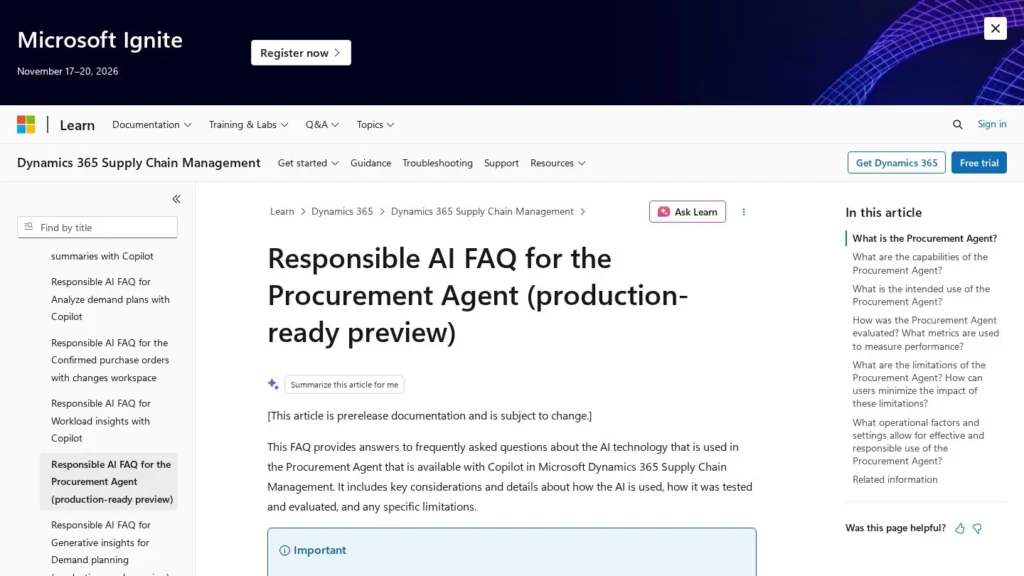
For manufacturers already on Dynamics 365 Supply Chain Management, Microsoft’s Procurement Agent comes with the license. Supply Chain Management lists at $210 per user per month and Premium at $300, both paid yearly, and Microsoft shows the agent preview in both. It reads supplier emails, sorts confirmations from change requests and rejections, lines up purchase order updates for a buyer to approve and drafts follow-ups on late or unconfirmed orders.
It is best for Dynamics 365 customers whose buyers handle a heavy load of supplier email. Points to plan for are that it runs inside that ERP, it is currently a production-ready preview, and every run draws on Copilot Studio credits that need budgeting and monitoring. We rate it 7.9/10 on our scale. We have not used the agent ourselves; this review is based on Microsoft’s documentation and pricing pages and independent partner analysis.
Procurement Agent Facts for Dynamics 365 Shops
- The agent is included with Dynamics 365 Supply Chain Management, which lists at $210 per user per month, or $300 for Premium with 1,000 Copilot Credits per user per month.
- It classifies vendor emails into confirmations, change requests, rejections or other, and proposes matching purchase order updates for buyers to approve.
- Impact analysis labels supplier changes by their effect on inventory, production and customer deliveries before anyone accepts them.
- It remains a production-ready preview, and runs consume Copilot Studio credits; agents can stop if credits run out.
- Against Didero and Tacto, it is cheaper to add for existing Dynamics 365 shops, while companies on another ERP will need one of the standalone tools.
What Microsoft’s Documentation Says the Agent Will and Won’t Do
Microsoft’s documentation is unusually specific about what this agent does and does not do. These are the facts that matter for a buying decision.
| Fact | Detail | Source and Date |
|---|---|---|
| Base license | Dynamics 365 Supply Chain Management at $210 per user per month, paid yearly | Microsoft pricing page, viewed November 2026 |
| Premium license | $300 per user per month, paid yearly, including 1,000 Copilot Credits per user per month | Microsoft pricing page, viewed November 2026 |
| Agent availability | Procurement Agent (Preview) listed in both editions | Microsoft pricing page, viewed November 2026 |
| Credit discount | Prepaid Copilot Credit commit units save up to 20% against pay-as-you-go | Microsoft pricing page, viewed November 2026 |
| Launch | Announced as the Supplier Communications Agent, one of ten autonomous agents for Dynamics 365 | Microsoft, October 22, 2024 |
| Status | Production-ready preview; FAQ last updated May 13, 2026 | Microsoft Learn FAQ, May 2026 |
| Email categories | Four: purchase order confirmation, requested changes, rejection, other | Microsoft Learn FAQ, May 2026 |
| Model | Follow-up emails generated with GPT-4o | Microsoft Learn FAQ, May 2026 |
| Billing mechanism | Agent use is charged through Copilot Studio credits; agents can be deactivated if credits run out | Logan Consulting analysis, August 25, 2026 |
| Activity history | Kept for 90 days by default unless the Dataverse retention job is changed | Logan Consulting analysis, August 25, 2026 |
| Prerequisites | Finance and Operations 10.0.44 or later, linked Dataverse and the Copilot for Finance and Operations solution | Logan Consulting analysis, August 25, 2026 |
The pricing facts cut both ways. If you already pay for Supply Chain Management, the agent is close to free to try, with credits as the main new cost. If you do not, the agent is the smallest part of a full ERP decision that starts at $210 per user per month.
The preview status and the credit mechanics matter more than any feature. Microsoft frames the agent as production-ready, but the terms are still prerelease, and an agent that stops when credits run out is something a buying team that comes to rely on it needs to plan for.
How the Procurement Agent Handles Supplier Email
The Procurement Agent runs inside Dynamics 365 Supply Chain Management and works on the same purchase order, vendor and inventory data your buyers use. It has two halves: supplier communications and impact analysis, which can be enabled together or separately.
Reading Supplier Emails
- Connect: an admin grants access to the relevant buyers’ mailboxes and picks all vendors or specific vendor addresses. Each vendor record needs an email address.
- Schedule: the buyer sets how often emails are analyzed.
- Classify: each email becomes a confirmation, a change request, a rejection of the whole order, or other.
- Match: for confirmations and changes, the agent finds the purchase orders involved and maps the email’s details to system fields, showing current and new values side by side.
- Apply: a review page lists the classified emails with summaries, and the buyer applies the updates they accept.
Chasing Suppliers
Buyers create or adjust saved queries, with defaults for unconfirmed orders and late deliveries. For each group of orders, they set the tone, length and urgency of the email. The agent writes subjects and text from purchase order lines and related records using GPT-4o. By default the buyer reviews, edits and sends each email. An admin can turn on automatic sending through a feature flag, and Microsoft recommends doing that only after a long period of reviewing drafts.
Impact Analysis
When a supplier asks to change a date or quantity, the agent checks the proposal against inventory, production schedules and customer deliveries and labels it as having impact or no impact, with downstream context. It runs automatically on change requests from configured email sources and, if enabled, on vendor collaboration portal messages. Buyers can also run a manual simulation when a change arrives by phone or another unsupported channel.
Decisions the Procurement Agent Leaves to Buyers
The agent does not pick commercial concessions, alternate suppliers, expediting methods or customer promises. It ignores emails from vendors you have not configured and puts anything outside its four categories into other. Microsoft’s FAQ says generated content should never be used without review and publishes no accuracy figures, so keep a person in the loop.
Dynamics 365 Prerequisites for the Agent
Prerequisites listed by Logan Consulting include Finance and Operations version 10.0.44 or later, a linked Dataverse environment, the Copilot for Finance and Operations solution, the Copilot feature flag and billing setup. An Azure subscription is needed for agents and pay-as-you-go billing. Plan for an administrator, a mailbox security review and a test period on a few vendors before widening scope.
A Typical Morning
In practice, a buyer opens the review page and finds the overnight supplier emails already sorted. Confirmations that match the order are ready to accept in bulk. A supplier pushing a delivery date out by a week appears with the old and new dates side by side and an impact label showing whether a production order or customer shipment depends on it. A rejection is flagged for the buyer to find another source, which the agent will not do. The follow-up queue holds drafted reminders for orders that are still unconfirmed, ready to edit and send.
Extending It
Teams can build their own agents in Copilot Studio using the Dynamics 365 ERP MCP server, and Microsoft has highlighted partner agents for warehousing, inventory rebalancing and inbound loads. Those are separate from the Procurement Agent and carry their own setup.
Dynamics 365 Licenses and Copilot Credits
Microsoft publishes license prices. The agent is not sold separately, but its runs use Copilot Studio credits.
| Plan | Price | Billing | What’s Included | Limits |
|---|---|---|---|---|
| Supply Chain Management | $210 per user per month | Paid yearly | Core SCM, AI and machine learning, Procurement Agent preview | No Copilot Credits listed |
| Supply Chain Management Premium | $300 per user per month | Paid yearly | Adds full demand planning, capacity and storage, Procurement Agent preview | 1,000 Copilot Credits per user per month |
| Copilot Studio pre-purchase | Not listed per credit | Upfront commit | Prepaid credits, up to 20% savings, pay-as-you-go overflow | Azure subscription required |
| Copilot Studio pay-as-you-go | Not listed per credit | Billed on use | Pay only for credits consumed | Azure subscription required |
License Math for Dynamics 365 Buying Teams
These scenarios use Microsoft’s list prices; credit consumption depends on email volume and run frequency, and Microsoft does not list a per-credit price on the page we reviewed.
- A mid-size manufacturer with 10 buyers on standard licenses: 10 x $210 x 12 comes to $25,200 a year in licenses the company is likely already paying. The new cost is Copilot Studio credits for the agent’s runs.
- The same team on Premium: 10 x $300 x 12 is $36,000 a year, an extra $10,800, which brings 1,000 Copilot Credits per user per month, or 10,000 a month across the team, plus full demand planning.
- A company not yet on Dynamics 365: the agent cannot be bought alone. The real cost is an ERP project, and a standalone agent such as Didero or Tacto is the faster route.
Watch for other costs: Azure setup, the admin time to configure mailboxes and vendors, and the operational cost of agents pausing if credits run out mid-month.
Dynamics 365 Procurement Agent Compared With Didero, Tacto, Keelvar and QAD Champion AI
Purchase order agents split into ERP-native features and standalone tools that sit next to any ERP.
| Agent | Starting Price | Free Plan | Main Strength | Main Trade-Off | Best For |
|---|---|---|---|---|---|
| Dynamics 365 Procurement Agent | $210 per user per month (SCM license) | No | Native to Dynamics 365 data, with impact analysis | Only for Dynamics 365 SCM; preview | Existing Dynamics 365 manufacturers |
| Didero | About $250 per workflow per month (reported) | No | Chases suppliers and updates several ERPs | Another vendor to manage | Manufacturers on any ERP |
| Tacto | Custom quote | No | RFQs, confirmation checks and price benchmarks | Quote-only pricing | Mid-size manufacturers |
| Keelvar | Custom quote | No | Runs sourcing events and optimizes awards | Not for purchase order follow-up | Large enterprises with many tenders |
| QAD Champion AI | Custom quote | No | Agents inside QAD Adaptive ERP | Only for QAD customers | QAD manufacturers |
The choice usually follows your ERP. Dynamics 365 shops should try Microsoft’s agent first because it reads live data with no extra connector; QAD shops have Champion AI; everyone else should look at Didero or Tacto. Keelvar solves a different problem, running competitive bids before an order exists. More options are on our AI agents for manufacturing page.
If you do run Dynamics 365, a fair test is to compare the agent against a standalone tool on the same vendors for a month, tracking the share of emails classified correctly, the time from supplier email to updated purchase order and how often impact analysis flags a real problem.
Existing D365 Shops Buried in Supplier Confirmations
- Dynamics 365 Supply Chain Management customers: the agent is listed in both editions, so the barrier to a pilot is configuration and credits.
- Buying teams flooded with supplier email: confirmations and date changes are the routine work it classifies and maps.
- Planners worried about knock-on effects: impact analysis shows whether a supplier’s change touches production or customer orders.
- IT teams already invested in Copilot Studio: the same credits and tools extend to custom agents.
SAP, Oracle and NetSuite Users or Teams Running Sourcing Events
- Companies on other ERPs: SAP, Oracle, NetSuite and QAD users need tools such as Didero or QAD Champion AI.
- Teams wanting sourcing automation: Keelvar runs competitive bids, which this agent does not.
- Buyers needing guaranteed availability: preview terms and credit-based deactivation call for careful planning before use in critical processes.
- Firms with phone-heavy suppliers: the agent reads email and the vendor portal; phone changes need manual simulation.
Preview Terms and Credit Planning in Dynamics 365
- Preview terms: the agent is a production-ready preview under supplemental terms, and details may change before general availability.
- Credit exhaustion: agents can be deactivated when Copilot credits run out; set alerts and budgets.
- Automatic sending: off by default; turn it on only after reviewing drafts for a long period, as Microsoft advises.
- Data permissions: Microsoft warns companies to protect business data so it cannot be manipulated to steer the AI.
- Naming confusion: documents use both Supplier Communications Agent and Procurement Agent for the same offering.
- Short history: activity history defaults to 90 days, which may not satisfy audit needs without changing retention.
From Supplier Communications Agent to Procurement Agent
Microsoft announced the Supplier Communications Agent on October 22, 2024, as one of ten autonomous agents for Dynamics 365, describing it as an agent that monitors supplier performance, flags delays and responds.
In an August 25, 2026 overview, Logan Consulting noted that Microsoft’s documentation now calls the broader experience the Procurement Agent, still a production-ready preview, billed through Copilot Studio credits. Microsoft’s responsible AI FAQ for the agent was last updated on May 13, 2026.
Dynamics 365 Procurement Agent on Our Scale
The Dynamics 365 Procurement Agent scores 7.9/10 on our scale. For companies already on Dynamics 365 Supply Chain Management, it is the obvious first agent to pilot: it is listed in the license, works on live purchase order data, keeps buyers in control by default and adds impact analysis that standalone tools rarely match. Microsoft’s documentation is also clearer than most vendors’ about limits.
The score reflects a few constraints. It runs inside one ERP, it is still a preview, credit consumption is variable, and public user ratings have not appeared yet. Treat it as a strong option for existing Dynamics 365 shops, while companies on other ERPs will want a standalone tool. Start with a handful of high-volume vendors, measure classification accuracy and time saved, and set credit alerts before widening scope.
Buyer Questions About the Dynamics 365 Procurement Agent
Is the Procurement Agent Included in Dynamics 365 Supply Chain Management?
Microsoft’s pricing page lists the Procurement Agent preview in both the $210 Supply Chain Management and $300 Premium editions. Agent runs consume Copilot Studio credits, and Premium includes 1,000 credits per user per month.
Is the Supplier Communications Agent the Same as the Procurement Agent?
Yes. Microsoft announced it as the Supplier Communications Agent in 2024, and its current documentation describes the Procurement Agent, which combines supplier communications with impact analysis.
Does the Agent Update Purchase Orders on Its Own?
No. It classifies supplier emails and proposes field updates side by side, and the purchaser reviews and applies them. Only outbound follow-up emails can be sent automatically, and only if an admin enables that feature.
Can I Use It With SAP or NetSuite?
No. The agent runs inside Dynamics 365 Supply Chain Management. Companies on other ERPs should look at standalone purchase order agents such as Didero.
What Happens If We Run Out of Copilot Credits?
According to partner analysis, agents can be deactivated when credits run out. Microsoft offers prepaid credit commitments with pay-as-you-go coverage for overflow, which reduces that risk.
User Reviews
Nobody has rated it here yet. Be the first AI Agents Choice user to rate Procurement Agent in Dynamics 365 Supply Chain Management.