
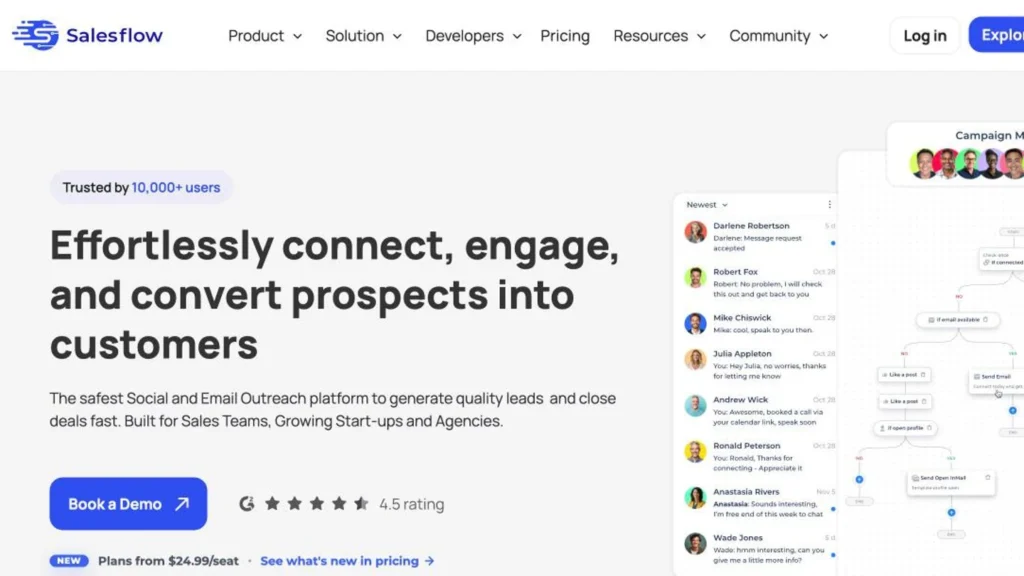
Salesflow Turns One LinkedIn Profile Into a Scheduled Outreach Machine
Salesflow sends LinkedIn connection requests, follow-ups and InMails on a schedule, then sorts the replies. It says more than 10,000 users run outreach on it, and it holds 4.3 out of 5 on G2 from 141 reviews. Seats start from $99 a month and drop to $24.99 at 100 seats.
We researched Salesflow for sales teams and lead generation agencies. In our view, it gives the most value to teams that run LinkedIn outreach for many reps or clients. However, a single seat costs more than several rivals. We score Salesflow 8.5 out of 10.
Salesflow Facts for Outbound Teams
- G2 rating: 4.3 out of 5 from 141 reviews.
- Seat prices: from $99 on Basic, $70 on Starter, $39.95 on Pro, $29.98 on Agency and $24.99 on Enterprise.
- Monthly caps: 400 invites, 2,000 follow-up messages and 800 Open InMails.
- Every plan includes a shared LinkedIn and Sales Navigator inbox, plus HubSpot, Sales Navigator and Zapier links.
- Basic offers a free trial, and no credit card is required.
Salesflow Numbers We Collected From Its Pricing and Feature Pages
We compiled these facts from the Salesflow pricing page, its features page and its G2 listing. Each row links to the page we read.
| Fact | Detail | Source |
|---|---|---|
| Users | 10,000+ users | Salesflow pricing page |
| Review rating | 4.3 out of 5 from 141 reviews | G2 listing |
| Entry price | From $99 a seat on Basic, 1 seat minimum | Salesflow pricing page |
| Lowest seat price | From $24.99 a seat on Enterprise, 100 seats minimum | Salesflow pricing page |
| Invite cap | Up to 400 connection invites a month | Salesflow features page |
| Message cap | Up to 2,000 follow-up messages a month | Salesflow features page |
| InMail cap | Up to 800 Open InMails a month, 50 a day | Salesflow features page |
| Group and event messages | Up to 1,000 a month to joined groups and events | Salesflow features page |
| Integrations | HubSpot (beta), Zapier, Google Sheets add-on, API, CSV | Salesflow features page |
| Commitment | Annual commitment, billed monthly, on Agency and Enterprise | Salesflow pricing page |
Two facts matter most for a buyer. First, the seat price falls by about 75% between Basic and Enterprise. So Salesflow rewards teams that buy many seats at once. Second, the monthly caps set the real output of each seat.
In our math, 400 invites a month is about 13 a day over 30 days. That pace is gentle on a LinkedIn account. However, teams that want more volume per rep should plan more seats.
How a Salesflow Campaign Runs From List to Reply
Salesflow runs in the browser as a web app. A rep or manager sets up the list, the copy and the schedule. Then the campaign sends on its own.
Building the Lead List
There are three ways to build a list. Basic Search filters by location, job title and company size. Sales Navigator support lets users build a search in Salesflow or upload a saved one. CSV import accepts URLs, names, companies and custom fields.
Blacklists keep chosen contacts out of results. A manager can set a blacklist as the default and share it with the team. So reps do not contact current customers by mistake.
Connection Campaigns and Follow-Up Sequences
Next, the connection campaign sends invites, up to 400 a month. Several connection campaigns can run at once. Then follow-up sequences send up to 2,000 messages a month.
Messages use variables such as first name and company. Cadences are scheduled in advance. So once a rep presses start, the steps go out without daily clicks.
Open InMail and Group Messages
Salesflow also reaches people outside a rep’s network. It sends up to 800 Open InMails a month, capped at 50 a day, to profiles that accept them. It can also message up to 1,000 members a month in groups and events the rep has joined.
Email as a Second Channel
A campaign can add email next to LinkedIn. So a lead who ignores an invite can still get an email step. CSV export also moves contacts to an email tool or a CRM.
The AI-Tagged Inbox
All replies land in one inbox for LinkedIn and Sales Navigator. AI reply detection shows which replies look positive and which need more work. Filters and tags help a rep work through the list.
AI Copywriting Templates in Beta
Salesflow offers AI copywriting templates inside message sequences. The feature is in beta. So reps should read each AI draft before it goes into a live sequence.
Steps That Stay With the Rep
Salesflow does not pick your market or write your offer. Instead, a person sets the targets, the message copy and the cadence. Also, a rep still handles the actual sales talk once a lead replies.
Team Dashboards and Agency Controls in Salesflow
Salesflow includes tools for managers. A global dashboard tracks every rep’s activity in one view. Managers can follow productivity and targets there.
Analytics cover daily stats, messages sent, replies, tags and connections. They also show replies after each follow-up step and the share of invites accepted. So a manager can see which step in a sequence works.
Agency features vary by plan. The plan list includes a white-label URL, access and UI customization, API access and early feature access. A dedicated CSM and priority support also appear on the list, so ask which tier includes each one.
Seat management changes by tier too. Seats are added one at a time on some plans and in batches of 5 or 10 on others. So an agency can grow with its client list.
A First Month on Salesflow for a Five-Rep Team
We mapped a common setup onto the published limits. Say a B2B software firm gives five reps a Starter seat each. The bill is $350 a month.
In week one, the manager uploads a saved Sales Navigator search for each rep. Next, the manager adds current customers to a shared blacklist. Then each rep writes a short invite note and a three-step follow-up.
After that, the campaigns run on their own. Each seat can send up to 400 invites in the month, so the team can reach about 2,000 people. Follow-ups go out on the set cadence, within the 2,000-message cap per seat.
In week two, replies start to land in the shared inbox. AI reply detection flags the positive ones first. So reps book calls from the warm replies before they work the rest.
By week four, the manager reads the analytics. The dashboard shows accepted invites and replies after each follow-up step. As a result, the team can rewrite the weakest step for next month.
Moving Salesflow Leads Into HubSpot, Sheets and Email Tools
Leads do not have to stay in Salesflow. A native HubSpot link, still in beta, sends contacts to the CRM. A two-way Zapier app connects other tools.
For reporting, a Google Sheets add-on and an API token sync dashboard data. CSV export also moves contacts into an email campaign or another CRM. So a team can keep its current sales stack and add Salesflow on top.
Salesflow Plans and Seat Minimums
Prices are shown per seat per month, as from figures.
| Plan | Price per Seat | Minimum Seats | Billing | How to Start |
|---|---|---|---|---|
| Basic | From $99 | 1 | Monthly | Try for free, no card |
| Starter | From $70 | 5 | Monthly | Book a demo |
| Pro | From $39.95 | 20 | Monthly | Book a demo |
| Agency | From $29.98 | 50 | Annual commitment, billed monthly | Book a demo |
| Enterprise | From $24.99 | 100 | Annual commitment, billed monthly | Book a demo |
All plans include multichannel outreach, the unified inbox, inbox management and campaign analytics. They also include native HubSpot, Sales Navigator and Zapier links, plus standard email support.
Salesflow Monthly Cost at Four Team Sizes
We worked out the minimum monthly bill at each tier from the published from prices.
- A founder with 1 seat: Basic costs $99 a month, or $1,188 a year.
- A team of 5 reps: Starter costs $70 a seat, so $350 a month or $4,200 a year.
- A team of 20 reps: Pro costs $39.95 a seat, so $799 a month or $9,588 a year.
- An agency with 50 client seats: Agency costs $29.98 a seat, so about $1,499 a month on an annual commitment.
A Pro team pays about 40% of the Basic seat price. However, Agency and Enterprise lock in a year, so model churn in client accounts first.
Output per seat matters too. Each seat sends up to 400 invites and 2,000 messages a month. So a 5-seat team can send about 2,000 invites a month in total.
Salesflow Next to Expandi, HeyReach, SalesRobot and Waalaxy
We compared Salesflow with four LinkedIn outreach tools on our site. Prices come from each vendor’s published plans.
| Tool | Starting Price | Free Plan | Main Strength | Main Gap | Best For |
|---|---|---|---|---|---|
| Salesflow | From $99 a seat; $24.99 at 100 seats | No; free start | Seat prices drop sharply at volume | Higher single-seat price | Teams and agencies with many seats |
| Expandi | $79 per account a month billed annually | No | Cloud sequences with branching logic | Per-account price for big teams | Consultants and agencies |
| HeyReach | $79 per sender a month | No | Many LinkedIn senders in one place | Built around agency volume | Lead generation agencies |
| SalesRobot | $39 per account a month billed annually | No | Connection, message and InMail steps | Fewer team controls | Founders and small teams |
| Waalaxy | €19 per user a month | No | Low entry price | Lighter agency features | Freelancers and recruiters |
Salesflow leans toward larger teams that buy many seats. On the other hand, Waalaxy and SalesRobot cost less for one user. HeyReach and Expandi target agencies and senders at scale. For more options, see our LinkedIn outreach agents and lead generation agents.
Sales Teams That Fit Salesflow Best
- Teams of 20 or more reps: Pro drops the seat price to $39.95.
- Lead generation agencies: the Agency plan drops seats to $29.98, and white-label options appear in the plan list.
- HubSpot users: the native link and Zapier app move leads into the CRM.
- Sales Navigator users: saved searches upload straight into a campaign.
- Managers who track reps: one dashboard shows every rep’s activity.
Users Who May Prefer a Different LinkedIn Tool
- Solo founders on a budget: Waalaxy or SalesRobot cost less for one seat.
- Teams that want AI to write every message: AI templates are still in beta in Salesflow.
- Agencies that avoid annual terms: Agency and Enterprise need a yearly commitment.
- Reps who need very high volume per account: the 400-invite monthly cap sets a ceiling.
Account Safety and Contract Points in Salesflow
First, respect LinkedIn limits. Salesflow caps invites at 400 a month and Open InMails at 50 a day. Still, each rep owns the account at risk, so keep messages relevant.
Second, read the commitment terms. Agency and Enterprise require an annual commitment, billed monthly. A G2 community thread also asks about canceling after a free trial. So note your trial end date.
Third, confirm the final price. All tiers show from prices. So ask for a written quote for your seat count.
Finally, check the beta features. AI copywriting templates and the HubSpot link are both labeled beta. So test them on a small campaign before you scale.
How We Reached 8.5 for Salesflow
We score Salesflow 8.5 out of 10. Autonomy rates well, because campaigns send invites, follow-ups and InMails on a set schedule. Still, a rep writes the copy and handles each reply.
Setup is self-serve on Basic with a free start, while larger plans begin with a demo. Pricing value is good for teams, with seat prices of $99 on Basic and $24.99 on Enterprise. However, a single seat costs more than several rivals.
Integrations cover Sales Navigator, HubSpot, Zapier, Google Sheets and an API. User sentiment is good at 4.3 out of 5 from 141 G2 reviews. For sales teams and agencies running LinkedIn outreach across many seats, Salesflow is a sensible tool to trial.
Questions Sales Leaders Ask About Salesflow
How Much Does Salesflow Cost per Seat?
Basic costs from $99 a seat with 1 seat minimum. Starter costs from $70 for 5 seats, Pro from $39.95 for 20 and Agency from $29.98 for 50. Enterprise costs from $24.99 for 100 seats.
Can I Try Salesflow for Free?
Yes. Basic has a free start, and no credit card is required. Larger plans begin with a demo call.
How Many LinkedIn Invites Can Salesflow Send?
Salesflow caps connection invites at 400 a month. Follow-up sequences can send up to 2,000 messages a month. Open InMails reach up to 800 a month, at 50 a day.
Can Salesflow Message People Outside My Network?
Yes, in two ways. It sends Open InMails to profiles that accept them, up to 800 a month and 50 a day. It can also message members of groups and events you have joined, up to 1,000 a month.
Is Salesflow Good for Lead Generation Agencies?
The plan list includes white-label URLs, UI customization, API access and seat batches, which vary by plan. The Agency plan costs from $29.98 a seat for 50 seats. It needs an annual commitment, billed monthly.
Does Salesflow Connect to HubSpot?
Yes. Salesflow has a native HubSpot link, which is in beta. It also has a two-way Zapier app, a Google Sheets add-on and an API token.
How Does Salesflow Compare With Expandi?
Both run cloud LinkedIn campaigns. Expandi starts at $79 per account a month billed annually. Salesflow starts from $99 a seat, but its price falls to $39.95 at 20 seats.

User Reviews
Nobody has rated it here yet. Be the first AI Agents Choice user to rate Salesflow.