
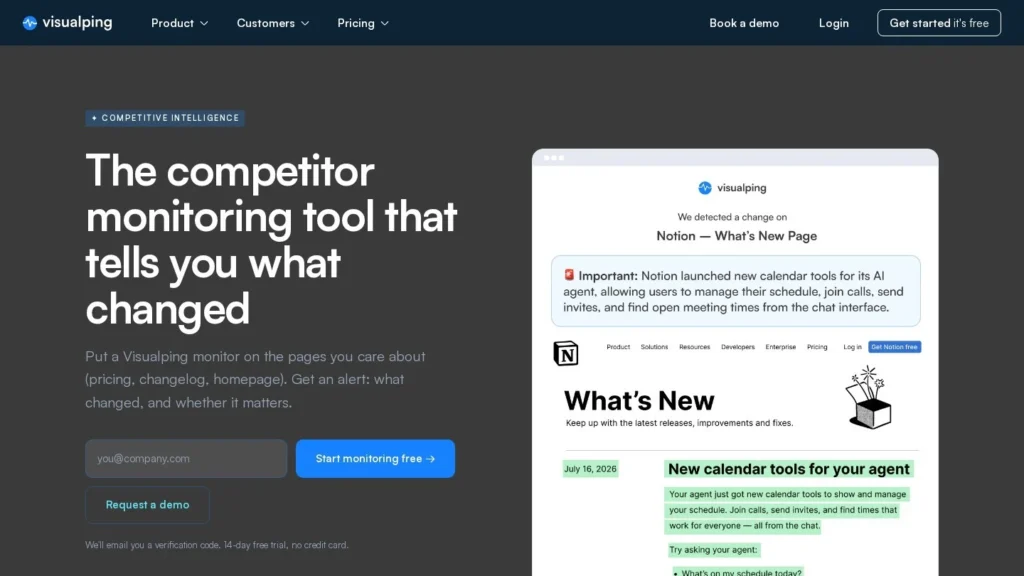
Visualping is a website change monitor with an AI layer: it checks the pages you choose on a schedule, writes a summary of what changed and flags whether the change matters, using rules you write in plain language. It fits marketing, product and pricing teams that want to know when a competitor edits its pricing page, launches a product or posts news. The free plan covers 5 pages, and paid plans start at $14 a month.
Visualping tells you what moved. It does not write battlecards or brief sellers, so teams that need that layer will pair it with a competitive intelligence platform or do the analysis themselves. Visualping reports more than 2 million users, and G2 reviewers give it 4.6 out of 5 across 513 reviews. It scores 9.0/10 on our scale.
Visualping for Competitor Tracking in Five Points
- The free plan includes 150 checks a month on 5 pages, with AI summaries, the REST API and the MCP server.
- Each change gets an AI summary and an important-or-not flag; you can define what counts as important in plain language.
- Business plans cost $140 to $350 a month for 20,000 to 50,000 checks and add Slack, Teams and Google Sheets alerts.
- Visualping says teams at 85% of Fortune 500 companies use it, and more than 2 million users run monitors.
- An MCP server, in public beta since July 2026, lets ChatGPT, Claude and Cursor create monitors and read changes.
Visualping by the Numbers
Visualping publishes its usage data on its competitor monitoring page and its plan details on the pricing page.
| Fact | Detail | Source and Date |
|---|---|---|
| Founded and HQ | 2015, Vancouver, British Columbia | Visualping release via AB Newswire, July 1, 2026 |
| Users | More than 2 million people and teams | Visualping release, July 1, 2026 |
| Fortune 500 reach | Teams at 85% of Fortune 500 companies | Visualping competitor monitoring page |
| Competitor-tracking users | More than 17,000 users said at signup they watch competitors | Visualping competitor monitoring page |
| Monitors running | 2 million; more than 1 in 4 detected a change in the last 30 days | Visualping competitor monitoring page |
| Change rate | About 1 in 9 of 56 million page checks over three months caught a change | Visualping competitor monitoring page |
| Entry price | Free for 5 pages; Personal 1K at $14 a month or $120 a year | Visualping pricing page |
| Business entry | Business 20K at $140 a month or $1,200 a year, 200 pages, 5 users | Visualping pricing page |
| MCP server | Public beta on every plan, for ChatGPT, Claude and Cursor | Visualping release, July 1, 2026 |
| G2 rating | 4.6 out of 5 from 513 reviews | G2 |
The change-rate figures are the most useful for planning. If roughly 1 in 9 checks catches a change, a team watching 50 competitor pages daily will see a steady stream of alerts, and many of them will be minor. That is why the importance flag and custom criteria matter: they decide whether the alert feed stays readable.
The scale numbers, 2 million users and 85% of the Fortune 500, show a mature product with a long track record. Visualping has been running since 2015, which counts for a tool that will hold years of page history.
How Visualping Watches a Competitor Page
Setting up a monitor takes a URL and a schedule. The rest runs on its own until a change appears.
Choosing Pages and Areas
Paste a competitor’s pricing, product, careers or news page into Visualping or add it from the Chrome extension. You can watch the whole page or select one area, such as the pricing table, so changes elsewhere do not trigger alerts. Bulk creation helps when a team wants to add dozens of pages at once.
Running Each Check in a Real Browser
Visualping loads the page in a real browser, so pages built with JavaScript render properly. Actions run first when needed: log in, click a tab, type in a field, choose a region or close a cookie banner. Paid plans can check as often as every 2 minutes; the free plan checks hourly at most.
Comparing Versions and Writing the Summary
Each check is compared with the last version. When something moved, Visualping saves a screenshot and timestamp and writes an AI summary in plain language. It then marks the change important or not and states why, such as a new product or a discount.
Custom Rules for What Counts as Important
Teams can describe what they care about, for instance “only alert me when a plan price or plan name changes.” Visualping AI checks every change against that instruction. For competitor monitoring this is the setting that matters most, because it separates a rival’s price cut from a footer edit.
Sending Alerts Where the Team Works
Alerts go to email on every plan, SMS from Personal 5K up, and Slack, Microsoft Teams and Google Sheets on Business plans. Webhooks, Telegram, n8n, the REST API and the MCP server are on every plan. Scheduled reports combine changes across a competitor set into one email, which suits a weekly review meeting.
Building a Competitor Watchlist Page by Page
The pages worth watching are the ones where a rival has to show its hand. Most competitor programs on Visualping cover a short list per rival:
- Pricing page: Watch the plan table only. Price, plan name and feature-limit changes are the alerts sales and finance ask about first.
- Product or features page: New sections usually mean a launch. A daily scan is enough for most teams.
- Changelog or release notes: These pages change often, so an importance rule such as “flag only new features” keeps the feed short.
- Careers page: A run of new engineering or sales roles in a region can hint at expansion before any announcement.
- Newsroom and blog: Press releases on funding, partnerships or acquisitions. A weekly report is often enough here.
For five rivals with five pages each, that is 25 monitors. Scanned daily, they use 25 × 30 = 750 checks a month, which fits Personal 1K. Scanned hourly, they need 18,000 checks and a Business plan.
A Pricing Team’s Week With Visualping
Take a software company tracking the pricing pages of six rivals, scanned every hour, with a rule to flag only changes to plan names or prices. On Wednesday one rival raises its mid-tier plan. Visualping’s next check catches it, saves the before-and-after screenshots, writes a summary and flags it important. The alert lands in the pricing team’s Slack channel. Other edits that week, such as a new testimonial, are recorded but not flagged. On Friday the weekly report shows everything that moved across all six sites.
Six pages scanned hourly use 6 × 24 × 30 = 4,320 checks a month, which fits Personal 5K at $35 a month for one user. Slack alerts, though, require a Business plan.
Visualping Plans, Check Quotas and Real Costs
Visualping prices by checks per month. Every plan includes AI summaries, the important flag, actions, the API and the MCP server.
| Plan | Monthly | Annual | Checks, Pages and Users | Notes |
|---|---|---|---|---|
| Free | $0 | Not offered | 150 checks, 5 pages, 1 user | Hourly checks at most |
| Personal 1K | $14 | $120 a year | 1,000 checks, 10 pages, 1 user | Checks every 15 minutes at most |
| Personal 5K | $35 | $300 a year | 5,000 checks, 20 pages, 1 user | SMS alerts start here |
| Personal 10K | $70 | $600 a year | 10,000 checks, 40 pages, 1 user | Checks every 2 minutes |
| Business 20K | $140 | $1,200 a year | 20,000 checks, 200 pages, 5 users | Slack, Teams, Google Sheets |
| Business 30K | $210 | $1,800 a year | 30,000 checks, 300 pages, 7 users | Advanced reports and labels |
| Business 40K | $280 | $2,400 a year | 40,000 checks, 400 pages, 9 users | Premium proxies on request |
| Business 50K | $350 | $3,000 a year | 50,000 checks, 500 pages, 11 users | Team user management |
| Solutions | Quote | Quote | Custom | Managed service |
Three Monitoring Budgets Worked Out
- A founder watching 10 rival pages every 6 hours: 10 × 4 × 30 = 1,200 checks a month, just over Personal 1K. Personal 5K covers it at $35 a month or $300 a year.
- A marketing team watching 100 pages daily with Slack alerts: 100 × 30 = 3,000 checks, but 100 pages and Slack need a Business plan. Business 20K costs $140 a month or $1,200 a year.
- A pricing team watching 30 pages every hour: 30 × 24 × 30 = 21,600 checks, above the 20,000 limit. Business 30K covers it at $210 a month or $1,800 a year.
Annual billing saves about 29% on Business 20K: $1,680 a year billed monthly against $1,200 billed annually. API calls count against the same check quota, so teams pulling data into other systems should budget extra checks.
Visualping Compared With Klue, Crayon and Prisync
Visualping sits at the alerting end of competitor monitoring. Klue and Crayon add analysis and seller enablement, and Prisync focuses on product prices.
| Agent | Starting Price | Free Plan | Main Strength | Main Weakness | Best For |
|---|---|---|---|---|---|
| Visualping | Free; $14 a month | Yes | Any page, AI importance flags, published prices | Leaves analysis to the team | Teams that want change alerts |
| Klue | Quote-based | No | Deal Tips and battlecards for sellers | No published pricing | B2B sales teams with a CI owner |
| Crayon | Quote-based | No | Field Agent capture and Gartner Leader placement | High cost per reviewer data | Enterprise product marketing teams |
| Prisync | $99 a month | Trial | Product price and stock tracking with repricing | Focused on e-commerce catalogs | Online stores |
Many teams start with Visualping and move to Klue or Crayon when they need battlecards and seller briefings. Online stores that care about product prices across hundreds of SKUs will get more from Prisync. Browse the full list in our competitor monitoring agents guide or the web scraping agents category.
Marketing and Pricing Teams on a Modest Budget
- Startups and small marketing teams: The free plan and $14 entry price cover a handful of rival pages with AI summaries.
- Pricing and product managers: Area selection and custom importance rules catch price and plan changes without noise from the rest of the page.
- Teams that work in Slack or Teams: Business plans post alerts with the AI summary into a shared channel.
- Developers and AI tool users: The REST API and MCP server let ChatGPT, Claude, Cursor or internal scripts read and create monitors.
- Compliance and regulatory watchers: Visualping lists regulatory monitoring as a common use, and the same setup works for policy pages.
When a Full Intelligence Platform Fits Better
- Sales teams that need guidance inside deals: Visualping does not connect to a CRM or brief reps. Klue or Crayon cover that job.
- Retailers tracking thousands of SKUs: A price monitoring tool with product matching, such as Prisync, handles catalogs better than page-by-page monitors.
- Teams that want analysis written for them: Summaries describe each change, but turning a set of changes into strategy stays with your team.
- Programs that rely on call and CRM data: Visualping reads public web pages only. Win-loss notes, call transcripts and deal data live in the tools Klue and Crayon connect to.
Check Budgets, Noise and Page Access in Visualping
- Check quotas: Frequent checks across many pages use quota fast. Work out pages × checks per day × 30 before choosing a plan.
- Alert noise: About 1 in 9 checks catches some change, per Visualping. Write custom importance rules early.
- Channel limits: Slack, Teams and Google Sheets alerts start at Business 20K, so a team on a Personal plan gets email and SMS only.
- Protected pages: Visualping does not solve CAPTCHAs or bypass anti-crawling tools, so some heavily protected pages may not be checkable.
- Security paperwork: Visualping links a trust center but lists no certifications on its pricing page; ask for documentation if your policy requires it.
Visualping Opens Its Monitors to AI Agents
On July 1, 2026, Visualping launched the public beta of its MCP server, which lets ChatGPT, Claude and Cursor create and edit monitors in plain language and read change summaries. The server is available on every plan, including Free, and can be added as a custom connector.
Visualping as a First Step in Competitor Tracking
Visualping scores 9.0/10 on our scale. Published prices, a usable free plan, quick setup and AI importance flags make it a low-risk way to start watching rivals, and the API and MCP server let teams build on top of it.
Its scope is alerts. It could add more help turning a week of changes into insight, and it could publish security certifications for buyers who need them. For teams that later want battlecards and seller briefings, Klue and Crayon pick up where Visualping stops.
A practical way to start is the free plan on one rival’s pricing page with a custom rule for price changes. If the alerts prove useful after a month, add the other rivals and move to the plan the check arithmetic points to. The 14-day Business trial is the time to test Slack alerts and reports with the wider team, since it needs no card and nothing is charged when it ends.
Visualping Questions From Marketing and Pricing Teams
Is Visualping Free?
Yes. The free plan covers 5 pages and 150 checks a month, with hourly checks at most, AI summaries, the API and the MCP server. Paid plans start at $14 a month or $120 a year.
How Does Visualping Decide a Change Is Important?
Visualping AI labels every change important or not and gives a reason. You can add your own criteria in plain language, and each change is scanned against them.
Can Visualping Send Alerts to Slack?
Yes, on Business plans, which start at $140 a month or $1,200 a year. Personal plans send email, and SMS from Personal 5K up.
Does Visualping Work With ChatGPT or Claude?
Yes. Its MCP server, in public beta since July 2026, works with ChatGPT, Claude and Cursor to create monitors and read summaries.
How Is Visualping Different From Klue or Crayon?
Visualping watches pages and reports changes. Klue and Crayon are competitive intelligence platforms that also build battlecards and brief sellers, priced by quote.
User Reviews
Nobody has rated it here yet. Be the first AI Agents Choice user to rate Visualping.