
Steel is an open-source browser API for AI agents. It starts cloud browsers on demand that your agent can drive with Puppeteer, Playwright or Selenium, handles stealth, proxies and captchas, and records sessions for debugging. You can use Steel Cloud on usage-based pricing or run the same software yourself. It is best for developers building agents and scrapers who want low entry costs and the option to self-host. One thing to plan for is the step between plans: after the free tier, the next plan costs $250 a month.
The free Launch tier includes $30 of usage, about 300 browser hours at $0.10 an hour, billed by the minute. We rate Steel 8.4/10 on our scale. We have not used it hands-on; this review is based on Steel’s pricing documentation and blog, its GitHub repository and a Fly.io customer story.
Steel From $0 Plus Usage, or $250 on Scale
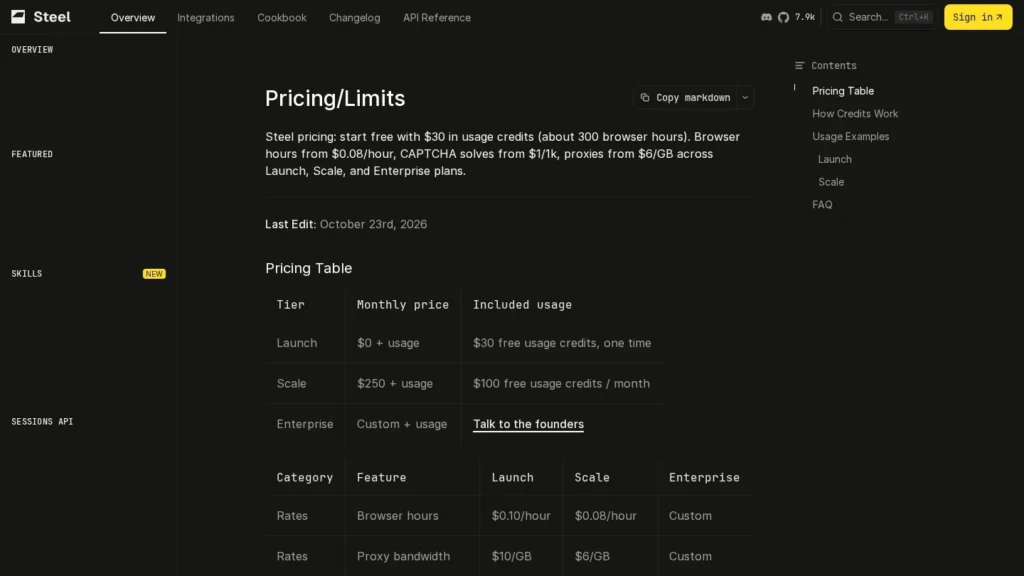
- Starting price: $0 plus usage on Launch, with a $30 one-time credit; Scale $250 a month with $100 of usage included.
- Open source: Steel Browser is Apache-2.0 licensed with about 7,600 GitHub stars and can be self-hosted with Docker.
- Meters: browser hours from $0.08 to $0.10, proxies from $6 to $10 per GB, captchas from $1 to $3 per 1,000.
- Limits: 15-minute sessions on Launch, 1 hour on Scale and up to 24 hours on Enterprise.
- Our score: 8.4/10, strong on pricing transparency and openness, with lower autonomy marks because buyers bring their own agent logic.
Meter Rates, Limits and the Fly.io Story
Steel publishes its meter rates and limits in its documentation. These are the figures we confirmed on its pages, its GitHub repository and Fly.io’s customer story.
| Fact | Detail | Source and Date |
|---|---|---|
| Launch tier | $0 plus usage, with a $30 one-time credit valid for 90 days | Steel pricing docs |
| Launch rates | $0.10 per browser hour, $10 per GB of proxy data, $3 per 1,000 captcha solves | Steel pricing docs |
| Scale plan | $250 per month with $100 of usage included; $0.08 per hour, $6 per GB, $1 per 1,000 solves | Steel pricing docs |
| Session limits | 15 minutes and 10 concurrent on Launch; 1 hour and 100 on Scale; up to 24 hours and 1,000+ on Enterprise | Steel pricing docs |
| Credit value | About 300 browser hours on Launch and 1,250 on Scale if all credit goes to hours | Steel pricing docs |
| Pricing overhaul | Bundles replaced by metered Launch, Scale and Enterprise plans | Steel blog, June 26, 2026 |
| Open source | 7.6k stars and 970 forks; Apache-2.0 license | GitHub |
| Founders | Hussien Hussien and Nasr Mohamed | Fly.io customer story |
| Customers | Thousands of free users and hundreds of paying customers | Fly.io customer story |
The meter rates make Steel easy to model. At $0.10 an hour on Launch, an agent that uses a browser for six minutes per task costs one cent per task in browser time, before proxies and captchas. The $30 starting credit is enough to prototype seriously.
The open-source numbers matter for risk. An Apache-2.0 project with thousands of stars and nearly 1,000 forks can be audited, forked and self-hosted, so a team is not locked into Steel Cloud if pricing or terms change.
Steel Supplies the Browser, Your Code Drives It
Steel provides the browser. Your code, or an agent framework, decides what to do in it.
Steel Cloud or Self-Hosted Docker
- Pick hosted or self-hosted: sign up for Steel Cloud on Launch, or run the open-source image with Docker, Docker Compose, or one-click deploys on Railway or Render.
- Install an SDK: the typed steel-sdk packages for Node and Python work with both Steel Cloud and self-hosted instances.
- Create a session: the sessions API starts a browser that keeps cookies and local storage.
- Connect your automation: drive the browser with Puppeteer, Playwright or Selenium over the Chrome DevTools Protocol.
- Enable extras: proxies, captcha solving, stealth and custom extensions as needed; on Launch, captcha and Steel proxies need a $10 deposit.
What the Platform Provides
- Session management: browser state, cookies and local storage persist across a session.
- Anti-detection: stealth plugins and fingerprint management.
- Network: proxy chain management and Steel-provided proxies, plus dedicated IPs at $5 each on Scale.
- Captcha solving: billed per 1,000 solves.
- Debugging: a session viewer UI shows what the browser is doing.
- Quick actions: endpoints for scraping, screenshots, PDFs and page-to-markdown or readability conversion.
How Steel Cloud Runs
According to Fly.io’s customer story, Steel runs on Fly Machines rather than Kubernetes. An orchestrator routes each session to a ready browser and scales instances up and down with demand, and traffic runs through WireGuard tunnels so browser instances stay off the public network. The service runs in multiple US regions.
Agent Logic and Credentials Remain the Developer’s Job
Developers write or choose the agent logic, manage credentials for sites the agent logs in to, decide which sites to automate and monitor runs. Steel does not decide what to do on a page.
Good First Projects
Steel suits jobs where a plain HTTP request fails and a real browser is needed: pages that render with JavaScript, sites behind a login, or flows that need a screenshot or PDF as proof. Its quick endpoints also make it a simple way to give an AI assistant clean page text through page-to-markdown conversion without writing a full browser script.
Spending the $30 Credit on Real Tasks
- Use the $30 credit: run real tasks, not just a hello-world page.
- Time sessions: billing is per minute, so measure average session length per task.
- Test hard sites: try a target with bot defenses, with and without stealth and proxies.
- Check the 15-minute cap: make sure long tasks fit on Launch, or plan for Scale.
- Try self-hosting: run the Docker image once so you know the fallback works.
Where Steel Fits in an Agent Stack
Steel is one layer of a browser agent. Above it sits the agent framework or your own code, which decides what to click and type, and the AI model that reads pages and plans steps. Below it sit the target websites. Because Steel exposes standard browser control over CDP, most agent frameworks that can drive Puppeteer, Playwright or Selenium can point at a Steel session instead of a local browser, which makes it straightforward to move a prototype from a laptop to the cloud.
That standard interface is also an exit route. If you later move to another hosted provider or to self-hosting, your automation code needs few changes, since it talks to a browser rather than to a proprietary agent.
One Metered Model Across Three Plans
Since June 2026 Steel has used one metered model across three plans. Browser hours are billed by the minute, rounded up, and usage beyond included credit is billed at the plan’s rates.
| Plan | Price | Billing | What’s Included | Limits |
|---|---|---|---|---|
| Launch | $0 plus usage | Usage | $30 one-time credit valid 90 days; $0.10 per hour, $10 per GB proxies, $3 per 1,000 captchas | 10 concurrent, 15-minute sessions, 3 seats, 60 requests a minute, 7-day retention |
| Scale | $250 per month plus usage | Monthly | $100 of usage a month; $0.08 per hour, $6 per GB, $1 per 1,000 captchas; dedicated IPs $5 each | 100 concurrent, 1-hour sessions, unlimited seats, 600 requests a minute, 14-day retention |
| Enterprise | Custom plus usage | Contract | Reserved browser pools, SLAs, custom rates | 1,000+ concurrent, sessions up to 24 hours |
| Self-hosted | Free software | Your infrastructure | Open-source Steel Browser under Apache-2.0 | You run and secure the servers |
From a $30 Prototype to a Small Production Product
A developer prototyping an agent. The $30 Launch credit covers about 300 browser hours at $0.10, enough for months of testing at modest volume.
A small product using 200 browser hours a month. On Launch that is $20 a month in browser time, before proxies and captchas, with 15-minute sessions and 10 at once.
A growing product using 2,000 browser hours a month. On Scale, 2,000 hours at $0.08 cost $160; the included $100 covers 1,250 hours, so the bill is $250 plus $60, or $310 a month before proxies and captchas.
Hidden and variable costs. Proxy bandwidth and captcha solves are metered separately, and Launch needs a $10 deposit before captcha solving or Steel proxies work. Self-hosting avoids Steel’s fees but adds server and engineering costs.
Steel Compared With Browserbase, Anchor Browser and Browser Use
All four give AI agents browsers. They differ on price steps, openness and how much agent logic they include.
| Tool | Starting Price | Free Plan | Main Strength | Main Trade-Off | Best For |
|---|---|---|---|---|---|
| Steel | $0 plus usage; Scale $250 per month | Yes (one-time credit) | Open source and self-hostable with per-minute meters | Large jump to the paid plan | Developers who want openness and low entry cost |
| Browserbase | Free; Developer $20 per month | Yes | Hosted fleet with Stagehand and low paid entry | Not self-hostable | Teams scaling hosted agents |
| Anchor Browser | Free; paid from $50 per month | Yes | Reliable logged-in sessions for agents | Higher paid entry than Browserbase | Agents that must log in to sites |
| Browser Use | Free; pay as you go | Limited | Open-source agent that drives the browser | Less infrastructure control | Developers who want a ready agent |
Steel and Browserbase are the closest match. Browserbase’s $20 and $99 plans fill the gap that Steel leaves between free and $250, while Steel’s self-hosting option and Apache-2.0 code give more control. Anchor Browser focuses on authenticated sessions, and Browser Use supplies the agent itself. More options are on our browser automation agents and open-source agents pages.
The choice between these comes down to three questions. Do you need to run browsers on your own servers? Then Steel’s open-source code is the deciding factor. Do you want a cheap paid tier between free and enterprise? Browserbase covers that range better. Do you want the agent as well as the browser? Then Browser Use, or an agent product such as Skyvern or Airtop, will save engineering time. You can prototype on two of these at once, since both Steel and Browserbase offer free starting usage, and compare success rates on your own target sites.
Open-Source Fans and Data-Control Teams
- Developers who want open source: the browser API is Apache-2.0 and can be forked or self-hosted.
- Teams with data-control needs: self-hosting keeps browser sessions on your own infrastructure.
- Prototypers: the $30 credit and per-minute billing make early testing cheap.
- High-volume products: Scale rates of $0.08 an hour and $1 per 1,000 captchas suit sustained use.
Non-Coders and Teams Between Launch and Scale
- Non-technical users: an end-user agent such as Fellou or Claude in Chrome is simpler.
- Teams in the middle: if you outgrow Launch but cannot justify $250 a month, Browserbase’s lower tiers may fit better.
- Long-running sessions on a budget: Launch caps sessions at 15 minutes.
- Buyers who need certifications: the Steel pages we reviewed do not yet list any, so ask directly.
The Jump From Launch Limits to $250 a Month
Mind the price step. Launch suits prototypes and light production, but its 15-minute sessions and 10 concurrent browsers can become limiting as usage grows, and the next plan is $250 a month. Model your volume before committing.
Legacy plans exist. Steel’s June 2026 change kept existing Starter, Developer and Startups customers on their old plans until they switch, so pricing you see in older guides may not match the current page.
Self-hosting carries its own costs. Running Steel Browser yourself requires servers with Chrome, scaling, monitoring and security updates. It is the right choice for data control, not usually for saving money at small scale.
Credentials and recordings need policies. Sessions keep cookies and local storage, and the session viewer shows what the browser did. Decide who can see sessions, how logins are stored and how long data is kept; retention is 7 days on Launch and 14 on Scale.
Responsible automation sits with the developer. Stealth, proxies and captcha solving can be used in ways that breach site terms or privacy law. Clear each target and handle personal data carefully.
June 2026’s Switch to Metered Pricing
On June 26, 2026, Steel overhauled its pricing, replacing subscription bundles with Launch, Scale and Enterprise plans on a single metered model for browser hours, proxy bandwidth, captcha solves and scraping, as part of its third Launch Week.
Finally, watch the request limits as well as the browser limits. Launch allows 60 API requests a minute and three seats, while Scale allows 600 requests a minute and unlimited seats, so a team with several developers or a busy job queue may reach Scale for those reasons before browser hours become the constraint.
Hosted Browsers With a Self-Hosting Exit Make Sense
For developers who want hosted browsers for agents with a clear path to self-hosting, yes. Steel scores 8.4/10 on our scale. It publishes every meter rate, bills by the minute, gives new accounts $30 of usage and releases its browser API as Apache-2.0 open source, which few rivals match.
It is infrastructure, so it scores lower on autonomy and setup than end-user agents, and a middle tier between free and $250 a month would help small teams. Prototype on Launch, measure minutes per task, and compare the Scale bill with Browserbase’s plans before you grow.
Sessions, Proxies and Billing in Steel, Clarified
How Much Does Steel Cost?
Launch is free up front with a $30 one-time credit and bills $0.10 per browser hour. Scale costs $250 a month with $100 of usage included and lower rates. Enterprise is quoted.
Is Steel Open Source?
Yes. Steel Browser is released under the Apache-2.0 license on GitHub, where it has about 7,600 stars, and can be self-hosted with Docker.
Does Steel Work With Playwright?
Yes. Steel sessions can be controlled with Puppeteer, Playwright or Selenium through the Chrome DevTools Protocol, and Steel offers Node and Python SDKs.
Is There a Free Plan?
Yes. The Launch tier has no subscription fee and includes a one-time $30 usage credit valid for 90 days. After that, you pay only for browser hours, proxies and captchas used.
How Long Can a Steel Session Run?
Up to 15 minutes on Launch, one hour on Scale and up to 24 hours on Enterprise.
How Does Steel Compare With Browserbase?
Both host browsers for AI agents. Steel is open source and self-hostable with a free tier and a $250 Scale plan; Browserbase is hosted only, with plans at $20 and $99 a month.
User Reviews
Nobody has rated it here yet. Be the first AI Agents Choice user to rate Steel.