
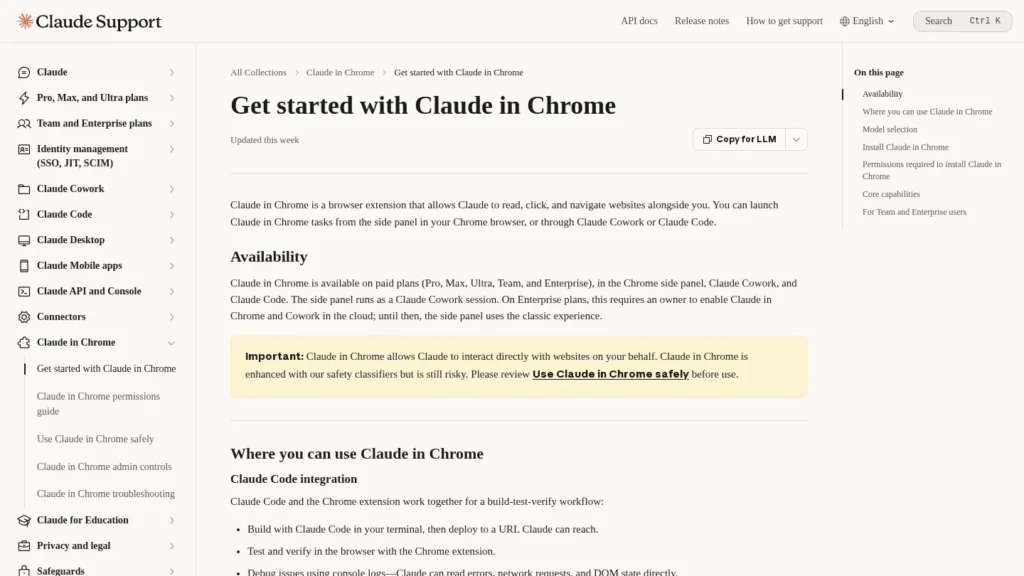
Claude in Chrome is Anthropic’s browser agent: an extension that lets Claude read pages, click, type, move between pages and fill forms in your own Chrome browser, across several tabs and on a schedule. It is best for Claude subscribers who spend time on repetitive web chores in sites they are already signed in to, and for developers who want Claude Code to test web apps in a real browser. The main point to plan for is safety, which Anthropic addresses openly: an agent acting in logged-in sites can be manipulated by what it reads.
It is included in every paid Claude plan, from Pro at $17 a month billed annually. We rate it 8.7/10 on our scale. We have not tested it hands-on for this review; it is based on Anthropic’s help center and pricing pages and news coverage.
Part of Claude Pro From $17 a Month, Not the Free Plan
- Starting price: included with Claude Pro at $17 a month billed annually or $20 monthly; not on the free plan.
- What it does alone: reads, clicks, types, moves between pages and fills forms across a group of tabs, and runs saved shortcuts on a schedule.
- Where it works: Google Chrome on desktop only, in any site where you are signed in.
- Safety: classifiers review actions and Claude pauses for approval, and Anthropic advises users to stay careful because browser use still carries some risk.
- Our score: 8.7/10, strong on autonomy and setup, with room to grow through support for more browsers and further protection against prompt injection.
Plans, Rollout Dates and Confirmed Facts
These are the facts we confirmed on Anthropic’s pages and in news coverage of the wider rollout.
| Fact | Detail | Source and Date |
|---|---|---|
| Plans that include it | Pro, Max, Ultra, Team and Enterprise | Claude help center |
| Pro price | $17 per month billed annually ($200 up front) or $20 monthly | Claude pricing |
| Max price | $100 per month, with five times Pro usage | Claude help center |
| Ultra price | $200 per month; Max 20x subscribers moved to Ultra with no price change | Claude help center |
| Team seats | Standard $20 annually or $25 monthly; premium $100 annually or $125 monthly | Claude pricing |
| Browser support | Google Chrome only; not other Chromium browsers or mobile | Claude help center |
| Schedules | Shortcuts can repeat daily, weekly, monthly or yearly | Claude help center |
| Wider rollout | Opened to all paid subscribers after starting on the $200 Max tier | Engadget, December 19, 2025 |
The pricing facts matter most for buyers. There is no extra charge for the browser agent, so its real cost is the Claude plan you need for the amount of work you hand it. Light users can stay on Pro; people who run long multi-tab tasks every day will feel usage limits sooner and may need Max or Ultra.
The rollout history matters too. Anthropic started with its most expensive tier, then opened the extension to every paid plan in December 2025 alongside Claude Code integration and workflow recording, which suggests a product moving from preview to everyday use.
A Side Panel Using Your Own Signed-In Browser
Claude in Chrome runs in a side panel next to the page you are on. It uses your browser, your cookies and your signed-in sessions, which is what makes it useful and why it calls for care.
A Paid Plan, the Extension and a Supported Browser
- Subscribe: you need a paid Claude plan: Pro, Max, Ultra, Team or Enterprise.
- Install: add the extension from the Chrome Web Store. Other Chromium browsers and mobile devices are not supported.
- Sign in: connect the extension to your Claude account and open the side panel.
- Enterprise only: an owner must enable Claude in Chrome and Cowork; until then users see the classic side panel.
- Read the safety guide: Anthropic asks users to review its guidance on using the extension safely before starting.
Reading, Clicking and Filling Forms Across Tabs
- Acts on pages: reads content, clicks, types, moves between pages and fills forms.
- Works across tabs: tabs dragged into Claude’s tab group are available to it at once, for comparisons or multi-site tasks.
- Runs on a schedule: shortcuts can repeat daily, weekly, monthly or yearly from the clock icon.
- Repeats recorded workflows: in the classic side panel you can record a task once and save it.
- Reuses prompts: saved prompts are available by typing a slash in chat.
Approval and Safety Controls
The side panel starts in automatic approval mode. Claude works continuously, reviews each action for safety and pauses to ask you when approval is needed, and the panel remembers if you switch modes. Claude can also intervene when it detects a high-risk website. On Team and Enterprise plans, admins can restrict where it works with site allowlists and blocklists.
For Developers
With Claude Code, the extension supports a build, test and verify loop in a real browser: Claude can read console logs, network requests and the page’s DOM to check whether a change works. That makes it useful for front-end debugging and for checking flows that need a logged-in session.
Inside Cowork and Desktop
Claude Cowork and the Desktop app can open Chrome to carry out the browser part of a larger task. You connect it under Settings, Customize, Connectors. Tasks that need local files require the Desktop app to be open and connected.
You Pick the Tabs and Approve the Pauses
You decide which tabs Claude can use, approve the steps it pauses on and check results. Anything involving money, account settings or sensitive data deserves close supervision or should be kept out of Claude’s tab group altogether.
Low-Risk Chores to Hand Over First
The extension earns its keep on chores that are tedious but low risk: copying details from several open pages into a form, compiling a comparison of products across tabs, clearing a backlog of routine admin in a web app you use daily, or checking a set of pages for broken flows after a site change. Start with tasks where a mistake is easy to spot and undo, and move to anything involving payments or personal data only after you trust how it behaves.
Three Recurring Tasks as the Test
Because the extension comes with your plan, the trial is really a test of which chores to hand over. Pick three recurring tasks and run each several times.
- Completion rate: how often Claude finishes the task without you stepping in.
- Pause frequency: how often it stops to ask for approval, and whether those pauses are on the right steps.
- Time saved: minutes for you to do the task by hand versus minutes to set up and check Claude’s run.
- Errors: any wrong field, wrong click or wrong page, and whether you would have caught it.
- Usage: how much of your plan’s allowance a run consumes, to decide whether Pro is enough.
If a task fails often, break it into smaller steps or record it as a workflow in the classic side panel so Claude repeats a known path.
No Separate Fee Beyond Your Claude Plan
There is no separate price for the extension. It comes with these Claude plans:
| Plan | Price | Billing | What’s Included | Limits |
|---|---|---|---|---|
| Free | $0 | None | Claude chat | No Claude in Chrome |
| Pro | $17 per month annually ($200 up front) or $20 monthly | Monthly or annual | Claude in Chrome and other Pro features | Standard usage limits |
| Max | From $100 per month | Monthly | Five times Pro usage every five hours and every week | Web subscription price |
| Ultra | $200 per month | Monthly | Higher usage; replaced Max 20x | Usage-based limits apply |
| Team | $20 or $25 per standard seat; $100 or $125 per premium seat | Annual or monthly | Admin site allowlists and blocklists | Seat-based |
| Enterprise | Contact sales | Contract | Owner-controlled enablement and admin controls | Must be enabled by an owner |
Weekly Admin on Pro and a Heavy Daily User
An individual automating weekly admin. Pro on annual billing costs $200 a year, or $240 a year on monthly billing.
A heavy daily user. If long multi-tab tasks hit Pro limits, Max costs $1,200 a year and Ultra $2,400 a year.
A 10-person team. Standard Team seats cost $2,400 a year on annual billing or $3,000 a year monthly, and give admins site allowlists and blocklists.
Hidden and variable costs. Usage limits are shared with everything else you do in Claude, so browser tasks compete with chat and coding for the same allowance.
Claude in Chrome Compared With Comet, Opera Neon and ChatGPT Work
Each of these puts an AI agent in the browser, but they differ on whether you switch browsers and what it costs.
| Tool | Starting Price | Free Plan | Main Strength | Main Trade-Off | Best For |
|---|---|---|---|---|---|
| Claude in Chrome | $17 per month (Claude Pro, annual) | No | Works in your existing Chrome with scheduling, recording and Claude Code | Chrome only; not on free plan | Claude subscribers and developers |
| Comet by Perplexity | Free | Yes | Free AI browser with built-in assistant | Requires switching browsers | Individuals who want a free AI browser |
| Opera Neon | Free; Neon Standard reported at $19.90 per month | Limited | Agentic browser that runs research and web tasks | New browser to adopt | AI power users open to a new browser |
| ChatGPT Work | Free on desktop; $20 per month (Plus) | Limited | Multi-step research, reports and tasks in ChatGPT | Different ecosystem | Teams already on ChatGPT |
Claude in Chrome’s advantage is that you keep Chrome, its extensions and your sign-ins. Comet and Opera Neon ask you to adopt a new browser, and ChatGPT Work suits teams already paying for ChatGPT. Developers building their own browser agents should look at infrastructure such as Browserbase or Browser Use instead. More options are on our browser automation agents page.
A useful way to choose among them is to ask where your work already happens. If your day runs in Chrome with a set of extensions and saved logins, an agent that lives in Chrome avoids a migration. If you are happy to switch browsers for a free tool, Comet is the low-cost test. If your company standardizes on ChatGPT or Google, those ecosystems’ agents fit procurement more easily. And if you are building automation for customers rather than for yourself, a browser infrastructure product is the better foundation, since it gives you isolated, scalable sessions instead of your personal browser.
Existing Subscribers With Repetitive Web Chores
- Existing Claude subscribers: it costs nothing extra on any paid plan.
- People with repetitive web chores: forms, data entry across tabs and recurring checks suit scheduled shortcuts.
- Front-end developers: Claude Code can test changes against console, network and DOM data in a real browser.
- Teams with admin needs: Team and Enterprise plans add site allowlists and blocklists.
Edge, Brave and Mobile-First Users
- Users of other browsers: Edge, Brave, Arc and other Chromium browsers are not supported.
- Mobile-first users: it does not run on phones or tablets.
- People handling sensitive accounts: banking, health or admin consoles are best kept outside the reach of any browser agent.
- Free plan users: it needs a paid Claude subscription.
Hidden Instructions on Web Pages
Prompt injection is the main thing to guard against. A web page, email or document can contain hidden instructions meant to redirect an agent. Anthropic says that even with its safety classifiers, using Claude in Chrome still carries risk. Limit the tabs you give Claude, keep sensitive sites out of its tab group and stay in a mode where it asks before significant actions.
Your sessions are its sessions. Because it works in your signed-in browser, Claude can act with the same access you have. That is the point of the product, and it means a mistake can send a message, change a setting or submit a form in your name.
Background work has limits. Scheduled tasks run only while Chrome is open, and tasks that need local files need the Claude Desktop app connected. Workflow recording is available only in the classic side panel, not in the Cowork-based panel.
Team rollouts need rules. Before giving staff the extension, decide which sites are allowed, use the admin allowlist and blocklist on Team and Enterprise plans, and tell people which tasks are off limits, such as approving payments or changing account permissions. Enterprise owners also control whether the feature is switched on at all.
Usage is shared. Browser tasks draw on the same plan limits as your other Claude use, so heavy automation can push you to a higher tier.
Opened to All Paid Subscribers in December 2025
On December 19, 2025, Engadget reported that Anthropic opened Claude in Chrome to all paid subscribers, expanding it beyond the $200-a-month Max tier and adding Claude Code integration and the ability to record a workflow to teach Claude a task.
No Added Cost Makes It Easy to Try, Rated 7.4
For Claude subscribers who do routine work in the browser, yes, since it adds no cost. Claude in Chrome scores 8.7/10 on our scale. It acts in real, signed-in sites, works across tabs, runs on a schedule and plugs into Claude Code for developers, and Team and Enterprise admins get site controls.
Support for more browsers, a free tier and further progress on the prompt injection issue Anthropic itself flags would lift the score. Start with low-stakes tasks in a dedicated tab group, keep sensitive sites out of reach and expand once you trust how it behaves.
Does Claude in Chrome Come With the Free Plan
Is Claude in Chrome Free?
No. It is included with paid Claude plans: Pro, Max, Ultra, Team and Enterprise. Pro costs $17 a month billed annually or $20 monthly.
Does Claude in Chrome Work in Edge or Brave?
No. Anthropic supports Google Chrome only, not other Chromium-based browsers or mobile devices.
Can Claude in Chrome Run Tasks on a Schedule?
Yes. Shortcuts can run daily, weekly, monthly or yearly. Scheduled work continues only while Chrome is open.
Is Claude in Chrome Safe to Use?
Claude reviews each action with safety classifiers, pauses for approval and can intervene on high-risk sites. Anthropic still says browser use carries some risk, so keep it away from sensitive accounts.
Can Claude in Chrome Use My Logged-In Accounts?
Yes. It works in your own Chrome browser, so it can act in sites where you are already signed in. That is useful for real work and is also why Anthropic advises keeping sensitive sites out of its reach.
How Does Claude in Chrome Compare With Comet?
Comet is a free AI browser you switch to. Claude in Chrome works inside your existing Chrome but needs a paid Claude plan from $17 a month.
User Reviews
Nobody has rated it here yet. Be the first AI Agents Choice user to rate Claude in Chrome.