
Simular makes computer-use agents: AI that operates a whole computer by looking at the screen and using the mouse and keyboard, so it can work in desktop apps and websites that have no API. Its Sai agent runs on a cloud Windows or Linux computer or on your own machine, and once a workflow works, Simular turns it into deterministic code you can inspect and rerun. It is best for operations teams and small businesses with repetitive screen work, and for developers who want an open-source base. Access is still widening: the macOS desktop app is invitation only, and security documentation is light so far.
Sai starts free, and paid plans cost $50 a month on pay as you go or $500 a month for unlimited use. Simular raised a $21.5 million Series A led by Felicis in December 2025. We rate it 8.4/10 on our scale. We have not used it hands-on; this review is based on Simular’s pricing page, documentation and blog, and TechCrunch reporting.
Free Explore, $50 Credits or $500 Unlimited Sai
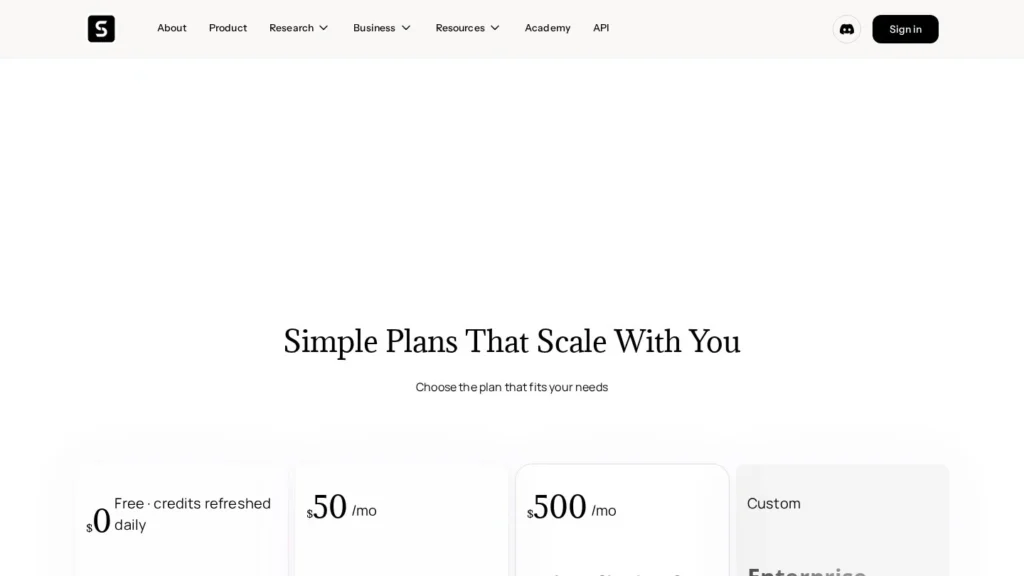
- Starting price: free Explore tier; Pay as you go $50 a month for 50,000 credits; Sai Unlimited $500 a month.
- Whole computer: works across desktop apps and websites through the screen, keyboard and mouse.
- Repeatable: successful runs become deterministic, editable code that can be audited and rerun.
- Backing: about $27 million raised, including a $21.5 million Series A led by Felicis with Nvidia’s NVentures.
- Our score: 8.4/10, high on autonomy, with room to grow on desktop access and security documentation.
Felicis’ $21.5M Round and Simular Pro Facts
These facts come from TechCrunch’s December 2025 report, Simular’s pricing page and its Simular Pro launch post.
| Fact | Detail | Source and Date |
|---|---|---|
| Series A | $21.5 million led by Felicis, with NVentures and South Park Commons | TechCrunch, December 2, 2025 |
| Total raised | About $27 million including a $5 million seed | TechCrunch, December 2, 2025 |
| Other backers | Basis Set Ventures, Flying Fish Partners, Samsung NEXT, Xoogler Ventures and Lenny Rachitsky | TechCrunch, December 2, 2025 |
| Founders | CEO Ang Li and co-founder Jiachen Yang, both formerly at Google DeepMind | TechCrunch, December 2, 2025 |
| Desktop release | Simular 1.0 for macOS released December 1, 2025 | TechCrunch, December 2, 2025 |
| Microsoft program | One of five companies in Windows 365 for Agents | TechCrunch, December 2, 2025 |
| Plans | Explore free, Pay as you go $50 a month, Sai Unlimited $500 a month, Enterprise custom | Simular pricing |
| Pay-as-you-go allowance | 50,000 credits ($50 of usage) a month; up to 5 cloud computers at once | Simular pricing |
| Simular Pro launch | Introduced as a production-ready computer-use agent with neural and symbolic agents | Simular blog, July 8, 2025 |
The funding and investor list matter for a young company. Felicis leading and NVentures joining gives Simular runway and a link to Nvidia, and inclusion in Microsoft’s Windows 365 for Agents program means a major platform is backing its Windows work.
The pricing numbers matter more day to day. Pay as you go gives $50 of usage, covering both AI models and cloud computer time, so a task that keeps a computer running for a long time costs more than a quick one. Sai Unlimited removes that worry for $500 a month, which is a fair comparison point against part of a person’s time on repetitive screen work.
Sai in the Browser, Plus an API and Open Framework
Simular has several pieces that share the same agent technology. Most buyers will start with Sai in the browser, while developers will look at the API and the open-source framework.
The Products
- Sai: Simular’s most capable computer-use agent. You send a task in plain language, and it completes it on a cloud Windows or Linux computer, or on your own Mac or Windows device.
- Simular Pro: a desktop automation app for macOS 15 and later, currently by invitation, with Windows access by application.
- Sai API: lets developers send tasks to Sai programmatically.
- Simulang: a scripting layer that drives apps through the operating system’s accessibility tree, with a command-line tool and a Claude Code skill.
- Agent S: an open-source framework for agents that control computers through the UI on macOS, Linux and Windows.
Neural Plus Symbolic
Simular describes a dual-agent design. A neural agent explores and interprets the interface to find a path through the task. A symbolic agent then converts that exploration into deterministic, editable code for reliable, repeatable runs. TechCrunch described the same idea: once a workflow succeeds, the model writes code that users can inspect and audit. Simular says every action is transparent, traceable and tunable.
Clicking, Typing and Rerunning Workflows Without APIs
- Operates apps and sites: clicks, types and reads screens in software without APIs.
- Runs repeatable workflows: reruns saved workflows from their generated code.
- Works in parallel: on Pay as you go, up to five cloud computers can run at once.
- Handles meetings: with Zoom connected, Sai can list and schedule meetings, share links, check attendance and find recordings and AI Companion summaries.
Approving Zoom Changes and Checking Generated Code
You define the task, check early runs and review the generated workflow code before relying on it. Zoom actions that schedule, change or cancel meetings need your approval first, and changes to recurring meetings are confirmed before they apply to the series.
Real-World Examples
TechCrunch reported early beta customers including a car dealership automating VIN number searches and homeowners associations extracting contract information from PDFs. Simular’s launch post lists examples such as comparing product listings, ranking YouTube creators, running CRM-linked cold email campaigns, sourcing LinkedIn candidates and building and deploying Xcode apps.
Repeat Tasks in Software That Has No API
The best candidates are tasks a person does the same way many times a week in software without an API: copying records from an old desktop system into a web form, looking up identifiers in a portal and logging results in a spreadsheet, or pulling fields out of batches of PDFs. These benefit most from Simular’s approach, since a successful run turns into code that repeats the same steps. One-off tasks get less value from that conversion.
Testing a Stable Workflow on a Cloud Computer
- Pick a stable task: choose a workflow whose screens rarely change, so the generated code has a fair chance.
- Run it on a cloud computer: keep tests off machines that hold personal or production data.
- Read the code: check that the generated workflow does only what you expect, and nothing extra.
- Repeat it: run the saved workflow ten times and count failures; reliability is the whole point of the symbolic layer.
- Change something: alter an input or a screen layout slightly and see whether Sai recovers or fails cleanly.
- Track credits: on Pay as you go, note how much of the $50 allowance each run uses.
Four Monthly Plans and No Annual Option
Simular publishes four plans. All are monthly; Simular says annual plans are not currently offered.
| Plan | Price | Billing | What’s Included | Limits |
|---|---|---|---|---|
| Explore | $0 | Free | Daily refreshed credits, limited access to a cloud Windows computer, workflow creation and testing, community support | Credit amount not stated |
| Pay as you go | $50 per month | Monthly | 50,000 credits ($50 of usage) for AI models and computer time; dedicated Windows or Linux cloud computer billed only while it runs; use on your own Mac or Windows; top-ups | Up to 5 running computers |
| Sai Unlimited | $500 per month | Monthly | Unlimited AI usage within fair use, always-on cloud computer, bring-your-own device with no computer cost, Concierge | One workspace; may switch to an efficiency mode under heavy use |
| Enterprise | Custom | Contract | Everything in Unlimited plus managed scaling, dedicated account team, custom integrations, SLA guarantees | Sales-led |
From a Free Single-Workflow Test to an Ops Lead’s Bill
A small business testing one workflow. Explore costs nothing and includes daily credits and limited cloud computer access, enough to build and test a workflow.
An operations lead running a few workflows daily. Pay as you go costs $50 a month, or $600 a year, with 50,000 credits. Running Sai on your own computer means only AI usage counts against credits, which stretches the allowance.
A team running Sai all day. Sai Unlimited costs $6,000 a year for one workspace. Additional workspaces are upgraded separately.
Hidden and variable costs. On Pay as you go, cloud computer time and AI usage draw on the same credits, so long-running tasks cost more. Top-ups are available at any time.
Simular Compared With Manus, Amazon Nova Act and Skyvern
These agents also complete tasks on screens and websites, but they target different buyers.
| Tool | Starting Price | Free Plan | Main Strength | Main Trade-Off | Best For |
|---|---|---|---|---|---|
| Simular | Free; Pay as you go $50 per month | Yes | Whole-computer agent that turns runs into repeatable code | Desktop app limited to invited macOS users | Teams automating desktop and web screen work |
| Manus | $20 per month (Pro) | Yes | General agent for research, slides and simple apps | Less focus on repeatable desktop workflows | Individuals who want one general agent |
| Amazon Nova Act | $4.75 per agent hour | No | Reliable browser agents on AWS for engineering teams | Browser-focused and developer-oriented | AWS engineering teams |
| Skyvern | $29 per month | No | Automates portals and forms without APIs | Browser only | Developers automating web portals |
Simular is the only one of the four built around the whole computer, including desktop apps, with workflows saved as code. Manus is the easiest general agent for individuals, Nova Act suits AWS developers, and Skyvern focuses on browser portals. More options are on our browser automation agents and workflow automation agents pages.
A useful rule of thumb: if the work lives entirely in a browser, a browser agent or browser infrastructure will usually be cheaper and simpler. If it crosses into desktop software, spreadsheets on a local machine or tools that only run on Windows or macOS, a computer-use agent like Simular is the category built for it.
Ops Teams Stuck With Legacy Desktop Software
- Operations teams with legacy software: desktop apps and portals without APIs are where screen-based agents earn their cost.
- Small businesses with repetitive lookups: examples such as VIN searches and PDF contract extraction fit well.
- Developers: the Sai API, Simulang and the open-source Agent S give room to build.
- Teams that need auditability: generated code can be inspected before a workflow is trusted.
Windows Users and Certification-Bound Organizations
- Windows desktop users who want a local app now: Simular Pro is macOS only, and Windows is by application.
- Regulated organizations: the pricing page does not list certifications.
- People who only need browser help: a browser agent such as Claude in Chrome is simpler.
- Buyers who want annual contracts below Enterprise: plans are monthly only.
An Agent That Runs Python on Your Machine
A computer-use agent can act on anything it can see. Simular’s Agent S documentation warns that the agent runs Python code to control your computer and asks users to take care. Use cloud computers or a dedicated machine for early tests, not a laptop full of personal data.
Access varies by platform. The macOS desktop app requires macOS 15 or later and an invitation, and Windows desktop access is by application, while Sai on cloud computers is the easiest way in.
Read plan terms closely. The pricing page uses Explore, Pay as you go, Sai Unlimited and Enterprise in its table but refers to Plus, Pro and Enterprise in its FAQ, something Simular could align. Sai Unlimited may switch to an efficiency mode under heavy use. Confirm limits before committing.
Security documentation is light so far. Simular describes Enterprise as designed for organizations that need dedicated support and security and lists SLA guarantees there; naming certifications would help buyers. Ask how screens, credentials and recordings are stored.
Plan for maintenance. Deterministic workflows are reliable until the software they drive changes. When a vendor redesigns a screen, a saved workflow may need to be rerun through the neural agent and regenerated. Keep an owner for each workflow and a quick check that alerts you when a run fails.
TechCrunch’s Report on Simular 1.0 for macOS
On December 2, 2025, TechCrunch reported that Simular raised a $21.5 million Series A led by Felicis, with NVentures and South Park Commons, released Simular 1.0 for macOS and was working with Microsoft on a Windows agent as one of five companies in the Windows 365 for Agents program.
On July 8, 2025, Simular introduced Simular Pro, which it called its first production-ready computer-use agent.
Start Free If Your Portals Lack APIs
For teams with repetitive work in desktop apps and portals that lack APIs, Simular is worth a trial on its free tier. It scores 8.4/10 on our scale. It is one of the few agents built for the whole computer, and turning successful runs into inspectable code addresses the reliability problem that holds many computer-use agents back.
The score reflects areas Simular could build on: wider desktop access, consistent plan naming and named certifications. Start on Explore with a cloud computer, build one workflow you do every day, review the generated code, and move to Pay as you go only once it runs reliably.
Computer-Use Agent Questions, Answered for Simular
How Much Does Simular Cost?
Explore is free. Pay as you go costs $50 a month for 50,000 credits, Sai Unlimited costs $500 a month, and Enterprise is quoted. There are no annual plans.
What Is Sai by Simular?
Sai is Simular’s most capable computer-use agent. You give it a task in plain language and it completes it on a cloud Windows or Linux computer, or on your own Mac or Windows device.
Does Simular Work on Windows?
Sai runs on cloud Windows computers and can use your own Windows device. The Simular Pro desktop app is macOS only for now, with Windows access by application.
Is Simular Open Source?
Its Agent S framework is open source and supports macOS, Linux and Windows. Sai and Simular Pro are commercial products.
Who Founded Simular?
Simular was co-founded by CEO Ang Li and Jiachen Yang, who met at Google DeepMind. The company raised a $21.5 million Series A led by Felicis in December 2025, bringing total funding to about $27 million.
How Is Simular Different From a Browser Agent?
Browser agents work inside web pages. Simular operates the whole computer, including desktop apps, and converts successful runs into deterministic code that can be inspected and repeated.
User Reviews
Nobody has rated it here yet. Be the first AI Agents Choice user to rate Simular.