
CodeRabbit Puts an AI Reviewer on Every Pull Request
CodeRabbit reviews each new pull request as soon as it opens. It writes a summary, flags bugs and security issues, and can propose fixes. The company raised a $60M Series B at a $550 million valuation. On G2, it holds 4.4 out of 5 from 142 reviews.
We researched its plans, docs and reviews to judge where it fits. Our view is that CodeRabbit makes the most sense for teams that already ship through pull requests every day. The free plan is real, and paid plans cost $24 per developer a month on annual billing. However, every plan has hourly review limits, and some scans cost extra. We score CodeRabbit 8.9 out of 10.
CodeRabbit Facts for Engineering Leads
- Reviews begin on new pull requests as soon as a repository is connected.
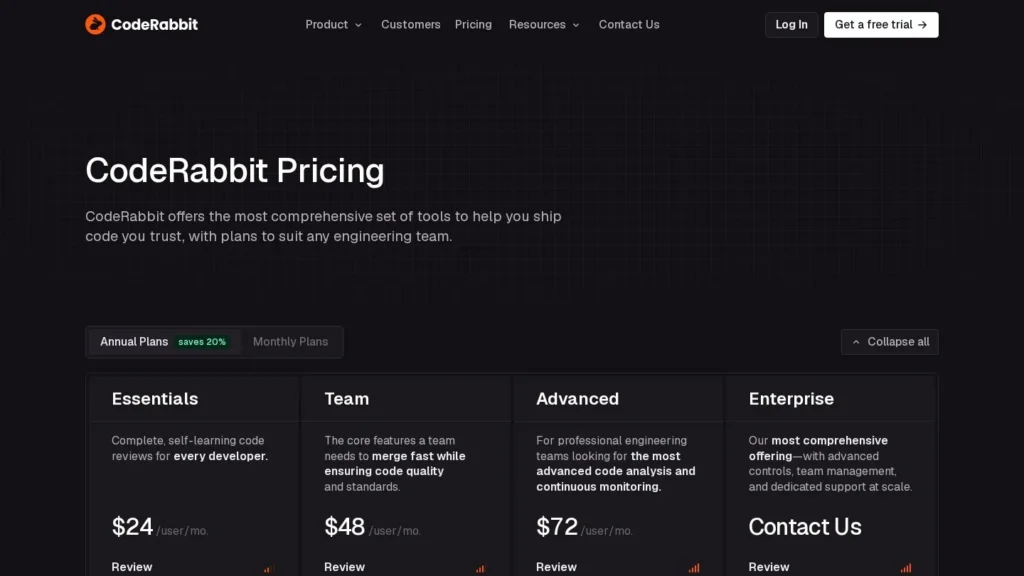
- Paid plans cost $24, $48 or $72 per developer a month billed annually.
- The free plan covers unlimited public and private repositories with summary-only pull request reviews.
- It runs on GitHub, GitLab, Bitbucket and Azure DevOps, in cloud and self-managed form.
- G2 reviewers rate it 4.4 out of 5 across 142 reviews.
CodeRabbit Funding, Plans and Ratings in One Table
We put the main facts about CodeRabbit in one table. Each row links to the page where we read it.
Item Detail Source Series B $60M led by Scale Venture Partners, with NVIDIA’s NVentures CodeRabbit newsroom Valuation $550 million at the Series B CodeRabbit newsroom Product lines Review, Triage, Explain, Secure and Engineer CodeRabbit newsroom Plan prices Essentials $24, Team $48, Advanced $72 per developer a month, billed annually CodeRabbit docs Monthly billing Essentials $30, Team $60, Advanced $90 per developer CodeRabbit docs Free plan Unlimited public and private repositories; summary-only pull request reviews CodeRabbit docs Trial 14-day Advanced trial for new organizations CodeRabbit docs Git platforms GitHub, GitLab, Bitbucket and Azure DevOps, plus self-managed versions CodeRabbit docs Self-hosting Offered to Enterprise customers with 500+ seats CodeRabbit docs User rating 4.4 out of 5 from 142 reviews G2
We ran a few numbers on these facts. Annual billing saves $6 a month per developer on Essentials and $18 on Advanced. For a team of 20 on Advanced, that comes to $4,320 a year. So the billing choice matters almost as much as the plan choice.
The funding also tells a buyer something. A $550 million valuation means investors expect CodeRabbit to keep shipping. In fact, the plan names have already changed once. Essentials used to be called Pro, and Team used to be Pro+. Old blog posts may still use the earlier names.
How a CodeRabbit Review Moves Through a Pull Request
Setup happens at the Git platform level. After a team connects GitHub, GitLab, Bitbucket or Azure DevOps, CodeRabbit begins reviewing pull requests with its default configuration. No one has to tag it on each change.
The First Pass on a New Pull Request
When a developer opens a pull request, the agent reads the change and writes a summary. Then it posts findings on the code. Paid plans also include Change Stack, Semantic Diff and Findings (Explain) views for reading the change.
Fixes, Tests and Finishing Touches
On every paid plan, Autofix can apply suggested changes. Next, the Team plan adds Unit Tests, Finishing Touches and Post-Merge Actions. So a team on Team or Advanced can have the agent generate unit tests for a change. Post-Merge Actions extend its work past the merge itself.
Checks for AI-Written Code
Essentials includes Slop Detection and Pre-Merge Checks. Team allows 10 custom pre-merge checks, and Advanced allows 20. As a result, a team can turn its own review rules into automatic gates.
Security and Impact Views
All paid plans run a security code review with static analysis, secrets, dependency and infrastructure checks. Advanced goes further. It adds Continuous Security Review, PR Security Review and Security Architecture Review. It also adds Blast Radius and Architecture Impact views.
Reviews Before the Pull Request Exists
Developers can also run CodeRabbit in the VS Code extension, in the CLI and inside agent loops. For example, a developer can review local changes before pushing. On the free plan, these IDE and CLI reviews are full reviews, even though pull request reviews are summary-only.
Work That Stays With Developers
CodeRabbit comments, suggests and can commit fixes. Still, a person approves and merges the pull request. Teams also write the custom checks and decide which findings to act on.
CodeRabbit Plans, Limits and Billing Rules
CodeRabbit lists six plans in its docs. We took every figure in this table from its pricing page and plan documentation.
Plan Annual Billing Monthly Billing PR Reviews per Developer per Hour Main Additions Free $0 $0 1, summary only Unlimited repositories; full reviews in IDE and CLI Open source $0 $0 1 to 10, by star count Team features on public repositories Essentials $24 per developer a month $30 5 Autofix, chat, security review, Jira and Linear Team $48 $60 8 Unit tests, Finishing Touches, Triage, post-merge actions Advanced $72 $90 10 Security reviews, Blast Radius, Architecture Impact Enterprise Custom Custom 12 SSO, audit logs, custom roles, API metrics, support SLA
Limits rise with each tier. Essentials reviews up to 150 files per pull request, and Team and above reach 300. Chat allows 50 messages an hour on Essentials, 75 on Team and 100 on Advanced. The pricing page also lists linked repositories at 1, 5, 10 and 20 across the four paid tiers. MCP connections follow the same pattern at 5, 10, 15 and 20.
Paid plans can switch on usage-based reviews for work beyond the hourly limit. A payment method is needed first, and budgets can be capped. Deep Scan, Security Scan and the CodeRabbit Agent are billed separately. When the 14-day trial ends, an organization that does not subscribe drops to the Free plan.
CodeRabbit Costs for Three Team Sizes
We priced three common team shapes from the published per-developer rates. These figures cover seats only. Usage-based reviews and Deep Scan would add to them.
Team Plan Annual Billing per Month Monthly Billing per Month Yearly Saving on Annual Startup, 5 developers Essentials $120 $150 $360 Product team, 12 developers Team $576 $720 $1,728 Platform group, 25 developers Advanced $1,800 $2,250 $5,400
The 12-person team pays $6,912 a year on annual billing. That works out to $2.40 per developer per working day, if we count 20 working days a month. For a tool that reviews every pull request, the seat cost is modest. However, a busy team could hit the 8 reviews per hour cap during a release crunch.
So during the trial, count pull requests per developer in your busiest hour. If that number sits above the plan limit, budget for usage-based reviews or a higher tier.
CodeRabbit Next to Qodo, GitHub Copilot Cloud Agent and Devin
We compared CodeRabbit with three coding agents already reviewed on our site. Prices come from each vendor’s own pages as covered in those reviews.
Agent Starting Price Free Plan Main Job Good Match For CodeRabbit $24 per developer a month, billed annually Yes Reviews every pull request and proposes fixes Teams with heavy pull request traffic Qodo Credits at $0.012 each; 14-day trial No Review agents that check pull requests against team rules Teams that want pooled, credit-based review GitHub Copilot Cloud Agent $10 a month (Copilot Pro) No Takes an issue and returns a pull request Teams that want an agent to write code on GitHub Devin Free; paid plans from $20 a month Limited Autonomous engineer that takes tickets and opens pull requests Teams handing off whole tickets
The split is about the job. CodeRabbit and Qodo review code that people or agents wrote. Copilot Cloud Agent and Devin write the code in the first place. In fact, many teams could run one agent of each kind. For instance, Devin could open a pull request and CodeRabbit could review it. See more options on our coding agents and IT and DevOps agents pages.
Teams That Get the Most From CodeRabbit
- Product teams of 5 to 50 developers who merge pull requests every day.
- Teams that use AI coding tools and want a second check on generated code.
- Companies on GitLab, Bitbucket or Azure DevOps, including self-managed installs.
- Open-source maintainers, who get Team features free on public repositories.
- Security-minded groups that want secrets and dependency checks on each change.
The common thread is volume. CodeRabbit earns its seat price when reviewers are the bottleneck. For example, a team where senior engineers spend hours on first-pass review can hand that pass to the agent. Then people focus on design and edge cases.
When CodeRabbit May Not Be Needed Yet
A solo developer who rarely opens pull requests may get enough from the free plan. The VS Code extension and CLI already give full reviews at no cost. So paying for seats would add little.
Large companies that must keep code on their own servers should talk to sales early. Self-hosting is for Enterprise customers with 500+ seats. Smaller regulated teams could look at the private-network option for self-managed Git platforms instead.
Finally, teams that want an agent to write features from tickets need a different tool. CodeRabbit reviews and fixes code, but it is not a full coding agent for new work. Devin or Copilot Cloud Agent cover that job.
Review Limits and Spend Controls to Plan For
Hourly limits apply per developer on a rolling basis. On Essentials, that is 5 pull request reviews an hour. Most teams will not notice. Still, a release day with many small pull requests could reach it.
Usage-based reviews remove the cap, but they cost money. CodeRabbit offers monthly spending caps and usage controls on paid plans, so set one before the first busy week. Also note that trial overages are free, and the trial allows usage-based reviews unless you opt out.
Next, check the file limit. Essentials reviews up to 150 files per pull request, while higher plans reach 300. On GitHub, reviews above the plan limit but within 300 files can run with usage pricing. Pull requests over 300 files are not supported that way, so split very large changes.
Billing currency also changes the choice. Organizations billed in Indian rupees can pick Essentials or Team after the trial. Advanced is listed for organizations billed in US dollars.
A Two-Week CodeRabbit Trial Plan We Would Follow
The 14-day Advanced trial gives every paid feature at once. So we would plan it in two halves.
In week one, connect one busy repository and leave the defaults on. Ask each developer to react to every finding, either by changing the code or by dismissing it with a reason. Those reactions give you a clean count of useful comments.
In week two, turn on the extra features one at a time. For example, add two custom pre-merge checks from your own style guide. Then try unit test generation on a module with thin coverage. Also watch the Triage queue in Slack for a few days.
At the end, compare three numbers with the weeks before the trial. Look at time to first review, comments per pull request and bugs caught before merge. If the Advanced security features found nothing new, Team or Essentials may cover your needs at a lower seat price.
What 142 G2 Reviewers Say About CodeRabbit
CodeRabbit holds 4.4 out of 5 from 142 reviews on G2. That is a large review count for a code review agent. It points to use across many teams.
The listing lists contextual relevance, code optimization, proactive error detection and collaboration among its features. We would test those claims in the trial. For instance, track how many CodeRabbit comments lead to a code change. If most comments get dismissed, tune the settings or the custom checks.
CodeRabbit Funding Round Coverage
CodeRabbit announced a $60M Series B led by Scale Venture Partners, with participation from NVIDIA’s NVentures. The company valued itself at $550 million in the round. It listed Review, Triage, Explain, Secure and Engineer as its product lines.
Our 8.9 Score for CodeRabbit
We score CodeRabbit 8.9 out of 10. Autonomy rates high because it reviews every pull request without a prompt and can apply fixes and write tests. Ease of setup rates higher still. A team connects its Git platform, and reviews begin with defaults.
Pricing value is good, with a free plan and published prices for every self-serve tier. It loses a little because Deep Scan and extra reviews are billed by usage. Integrations rate well across four Git platforms, Jira, Linear, Slack and MCP. Trust controls such as SSO and audit logs sit on Enterprise. User sentiment rates high on a 4.4 G2 score from 142 reviews.
For a team that merges every day, CodeRabbit is a low-risk trial. Run it for two weeks on your busiest repository. Then judge it by how many of its findings your team acted on.
Questions Developers Ask Before Adding CodeRabbit
Is CodeRabbit Free for Private Repositories?
Yes, the free plan covers unlimited public and private repositories. However, pull request reviews on Free are summary-only. Full free reviews run in the VS Code extension and the CLI.
How Much Does CodeRabbit Cost per Developer?
Essentials costs $24 per developer a month billed annually, or $30 monthly. Team costs $48 or $60, and Advanced costs $72 or $90. Enterprise pricing is set with the account team.
Which Git Platforms Does CodeRabbit Support?
It supports GitHub, GitLab, Bitbucket Cloud and Azure DevOps. It also supports GitHub Enterprise Server, GitLab self-managed and Bitbucket Data Center. A private-network option connects self-managed platforms without inbound access.
Can CodeRabbit Write Unit Tests?
Yes, on the Team plan and above. Team adds Unit Tests, Finishing Touches and Post-Merge Actions. Essentials includes Autofix but not unit test generation.
Can CodeRabbit Run on Our Own Servers?
Self-hosted deployment is offered to Enterprise customers with 500+ seats. Smaller teams on self-managed Git can use the private-network option instead. Ask sales which setup matches your rules.


User Reviews
Nobody has rated it here yet. Be the first AI Agents Choice user to rate CodeRabbit.