
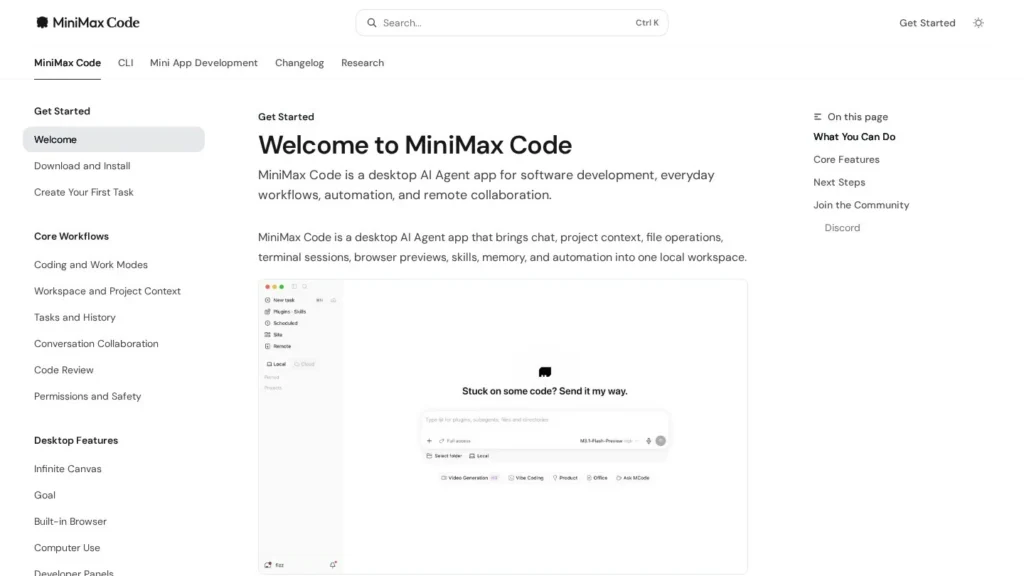
MiniMax Code starts free and costs $22 a month on its Go plan, yet it reaches further than most agents in that price band: it writes and runs code, drives a browser, operates other desktop apps on macOS and Windows, splits big jobs across a team of subagents and repeats work on a schedule. MiniMax renamed its desktop agent app to MiniMax Code on May 29, 2026, and has shipped 45 desktop release entries between May 1 and October 23, 2026, according to its public changelog.
It is best for individuals and small teams who want one inexpensive desktop agent for coding, research, documents and media, and who are comfortable managing permissions on their own machine. Plans, model routing and features changed often in 2026, and scheduled tasks run only while the app is awake, so buyers should plan for change. We rate it 8.7/10 on our scale. We have not used MiniMax Code ourselves; this review is based on MiniMax’s published user guide and changelog, third-party pricing tracking and Product Hunt listings.
MiniMax Code’s Free Tier and Three M Plan Prices
- MiniMax Code has a free tier, and paid M Plans cost $22, $55 or $132 a month, or $220, $550 or $1,320 a year.
- The desktop app was renamed MiniMax Code on May 29, 2026, and logged 45 desktop release entries between May 1 and October 23.
- Agent Team splits and delegates multi-step work, and the agent can run commands, browse and, on macOS and Windows, operate other apps.
- Usage runs on a 5-hour window plus a weekly cap shared across text, image and audio; credit packs from $5 cover overflow.
- Against Manus, Genspark and ChatGPT, it costs about the same to start but runs locally and accepts your own model keys.
Changelog and Pricing Data Trackers Follow
MiniMax publishes an unusually detailed changelog, and third-party trackers follow its pricing closely. These are the figures that matter most to a buyer.
| Fact | Detail | Source and Date |
|---|---|---|
| Rename | Desktop app officially renamed to MiniMax Code with version 3.0.33 | MiniMax changelog, May 29, 2026 |
| New architecture | Version 3.0.20 added agent personas, memory, multi-agent collaboration, MCP, messaging channels and scheduled tasks | MiniMax changelog, May 1, 2026 |
| Release pace | 45 desktop release entries from version 3.0.20 to 3.1.6 | MiniMax changelog, May 1 to October 23, 2026 |
| Current plans | Free, Go $22, Explore $55 and Build $132 a month; Explore and Build give 3 and 7.5 times Go usage | UsagePricing tracker, viewed October 2026 |
| Price rise | Token Plan prices rose 10%: Plus $20 to $22, Max $50 to $55, Ultra $120 to $132 a month | UsagePricing tracker, August 26, 2026 |
| Team plan closed | Token Plan for Teams stopped taking new purchases | UsagePricing tracker, September 5, 2026 |
| Model routing | Requests for M2.5 and M2.7 on M Plan and Token Plan were routed to M3.1 Flash, with allowances unchanged | UsagePricing tracker, October 19, 2026 |
| Check-in points | Daily check-in gives 400 points, 1,000 on days 4 and 7, up to 4,000 a week | MiniMax changelog, August 5, 2026 |
| Computer Use | Returned on macOS and Windows after being temporarily disabled | MiniMax CLI changelog, October 23, 2026 |
| Product Hunt | MiniMax rated 5.0 from 5 reviews, 1.6K followers; H3 video model was #1 of the day on July 31, 2026 | Product Hunt, viewed October 2026 |
Two things matter here. First, MiniMax ships constantly, which means features arrive quickly but also that behavior, limits and even model choices can change under a user mid-subscription, as the October 19 routing change to M3.1 Flash showed. Second, prices have only moved one way so far: a 10% rise on the old Token Plan in August, followed by an M Plan at those higher monthly prices. Buyers who like the product should weigh annual billing against the chance that plans change again.
A Desktop App for Mac and Windows Plus a CLI
MiniMax Code is a desktop app for macOS (Apple silicon and Intel) and 64-bit Windows, with a companion command-line tool. It combines chat, project context, file operations, terminal sessions, browser previews, skills, memory and automation in one local workspace.
Starting a Task
- Install and sign in: download the desktop app for your operating system and sign in.
- Pick a mode: Coding mode keeps development tools visible; Work mode focuses on progress and deliverables for research, documents and everyday workflows.
- Attach a project if needed: linking a local folder lets the agent read project context, run commands, inspect changes and debug pages in its built-in browser.
- Describe the goal: start from the home composer. Plan mode, Goal mode and Deep Research are available for larger jobs.
What the Agent Does on Its Own
For complex work, Agent Team breaks a task into parts, delegates them to subagents and verifies the results. The agent edits files, runs terminal commands, reviews code and shows diffs. Browser Use, upgraded to multi-tab in August 2026, lets it work through websites, and Computer Use lets it operate desktop apps that need a graphical interface; the CLI changelog shows Computer Use returning on macOS and Windows on October 23, 2026 after a period when it was switched off. Scheduled tasks repeat jobs on a timetable, including hourly, and can now continue an existing conversation.
Media is part of the same workspace. Image, speech and H3 video generation feed an Infinite Canvas where assets can be compared and organized, and custom Mini Apps package repeatable tools.
Approving Permissions From the Desk or a Phone
The user approves permission requests, either at the desk or through Remote Control on a phone, which can now connect to several computers. Someone has to review diffs and outputs before they ship, keep an eye on usage windows, and leave the computer awake for scheduled work, because scheduled tasks run only while the desktop app is awake.
Models and Extensions
Users can run MiniMax-managed models, their own MiniMax API key or a custom model provider. Extensions include MCP servers, a Plugin Marketplace, WPS and WeCom plugins, Feishu authorization, skills with auto-discovery and proactive memory. The CLI added programmatic tool calling as a beta on October 26, 2026.
The September 2026 Switch From Token Plan to M Plan
MiniMax moved from its Token Plan to the M Plan with desktop version 3.1.0 on September 30, 2026. Prices below are as tracked by UsagePricing in October 2026 for international card payments.
| Plan | Price | Billing | What’s Included | Limits |
|---|---|---|---|---|
| Free | $0 | None | Limited MiniMax Code access | No API key; no H3 video |
| Go | $22 a month or $220 a year | Monthly or annual | M3.1 Flash text, image and speech; web search; API key for coding tools | No video; 5-hour and weekly usage windows |
| Explore | $55 a month or $550 a year | Monthly or annual | 3 times Go usage; H3 video | Video on the weekly window only |
| Build | $132 a month or $1,320 a year | Monthly or annual | 7.5 times Go usage; H3 video; priority access at peak hours | Shared 5-hour and weekly windows |
| Credit packs | $5, $25 or $100 | One-time, valid one year | 5,000, 25,000 or 100,000 credits for text, image, video, audio and search | Used only after a plan window runs out |
Usage is shared across text, image and audio, and unused usage does not carry over between windows. Existing Token Plan subscribers can keep renewing at their original price; upgrades to the M Plan are one-way and drop legacy perks, and downgrades are not supported.
A Solo User on Go for $220 a Year
These scenarios use the published plan prices. Usage patterns are our own illustrative assumptions.
- A solo user on Go, billed yearly: $220 a year works out to about $18.33 a month. Adding one $25 credit pack for busy weeks brings the year to $245, about $20.42 a month.
- A heavy daily user on Build: paying monthly costs $1,584 a year, against $1,320 billed annually, a saving of $264 or about 16.7%.
- A three-person team on Explore, billed yearly: with Token Plan for Teams closed to new buyers since September 5, 2026, this assumes three individual plans at $550 each, or $1,650 a year, about $137.50 a month for the group.
Variable costs come from hitting the 5-hour or weekly window during crunch periods. Credits cost the same rate in every pack, 1,000 credits per dollar, so there is no bulk discount for buying the $100 pack.
MiniMax Code Compared With Manus, Genspark Super Agent, ChatGPT Work and goose
General-purpose agents split between cloud agents that work in a hosted sandbox and desktop agents that work on your own machine. MiniMax Code is a desktop agent with cloud handoff; Manus and Genspark run in the cloud; ChatGPT Work and goose sit closer to MiniMax.
| Agent | Starting Price | Free Plan | Main Strength | Main Trade-Off | Best For |
|---|---|---|---|---|---|
| MiniMax Code | Free; Go $22 a month | Limited | Coding, browser, computer use and media in one desktop app | Frequent plan and model changes; schedules need the app awake | Hands-on users on Mac or Windows who want a low-cost all-rounder |
| Manus | $20 a month (Pro) | Yes | Parallel sub-agents and hosted web apps in the cloud | Ownership upheaval and data loss reports in 2026 | Users who want results without running anything locally |
| Genspark Super Agent | Free; Plus $19.99 a month billed yearly | Limited | Slides, sheets, docs and phone calls on your behalf | Credits charged for failed attempts | Office deliverables and errands |
| ChatGPT Work | Free on desktop; $20 a month for web and mobile | Limited | Large plugin catalog and scheduled tasks | Usage-based consumption is hard to predict | Teams already standardized on ChatGPT |
| goose | Free | Yes | Open source, local, any model, 70+ MCP extensions | Needs providers and API keys set up | Developers who want full control at no license cost |
On price, the paid entry points cluster around $20 a month, so the choice comes down to where the work runs and what it touches. MiniMax Code bundles video, image and speech generation that goose lacks, and it works on local files in a way Manus and Genspark do not. ChatGPT Work is the closest match feature for feature. For more options, see our general-purpose AI agents and AI coding agents guides, or compare Gemini Spark for Google Workspace users.
Budget Developers Wanting Coding Mode and a CLI
- Developers on a budget: Coding mode, terminal access, code review and diffs come with the $22 Go plan, and the CLI covers terminal-first work.
- Generalists who mix code, documents and media: Work mode, Deep Research, image generation and H3 video sit in the same app, so one subscription covers several tools.
- Users who want model choice: bring-your-own-key and custom providers let you swap models without leaving the app.
- People who supervise from a phone: Remote Control lets you approve permission requests and add instructions while away from the desk.
- Teams in the WPS, WeCom or Feishu ecosystem: dedicated plugins and authorization make it a natural fit.
Linux Users and Anyone Needing Overnight Runs
- Linux users: desktop builds cover macOS and Windows only.
- Anyone who needs unattended overnight runs: scheduled tasks stop when the computer sleeps; a cloud agent such as Manus suits that better.
- Regulated businesses: MiniMax’s agent docs do not yet list compliance certifications, which procurement reviews often ask for.
- Buyers who want a stable product: plans, model routing and features changed many times in 2026.
- Teams that want one shared bill: the team version of the old plan closed to new buyers, so each person needs a plan.
Shared 5-Hour and Weekly Usage Windows
- Usage windows: the 5-hour and weekly limits are shared across text, image and audio, and unused usage disappears. Heavy video or long coding sessions can drain a window quickly.
- Plan changes: the Token Plan rose 10% in August 2026 and was then replaced. Upgrades from legacy plans are one-way and drop perks, and auto-renewal cannot be turned back on once switched off.
- Model routing changes: on October 19, 2026, requests for M2.5 and M2.7 were routed to M3.1 Flash. Output quality and style can shift without any action from the user.
- Local access: the agent can run terminal commands, edit files and operate apps. Use the permission modes, keep important projects in version control and read diffs before accepting them.
- Feature changes: Computer Use was temporarily disabled during a security hardening release before returning in October 2026, so do not build a critical workflow on a feature until it has been stable for a while.
October 2026 CLI Changes Including Programmatic Tool Calling
- On October 26, 2026, MiniMax’s CLI changelog added programmatic tool calling as a beta, plugin subagents and an mcode app command.
- On October 19, 2026, UsagePricing reported that MiniMax routed M2.5 and M2.7 requests on its plans to M3.1 Flash, with allowances unchanged.
- On September 30, 2026, MiniMax’s desktop changelog recorded the M Plan launch with version 3.1.0 at unchanged subscription prices.
- On August 26, 2026, UsagePricing reported a 10% Token Plan price rise, taking the top tier from $120 to $132 a month.
- On May 29, 2026, MiniMax renamed its desktop agent app to MiniMax Code.
One Desktop Agent for Roughly $20 a Month
For a capable user who wants one desktop agent for coding, research, documents and media at about $20 a month, yes. MiniMax Code scores 8.7/10 on our scale: strong on autonomy, setup and price, solid on integrations, with documented security as the main area to build. Agent Team, Browser Use, Computer Use and scheduled tasks give it a wider reach than most agents at its price, and bring-your-own-key support lowers the risk of being stuck with one model.
The trade-off is stability. MiniMax changes plans, models and features at a pace that suits early adopters more than businesses. Start on the free tier, move to Go monthly, and switch to annual billing only once the features you rely on have stayed put for a few releases.
Is MiniMax Code Only for Programmers
How Much Does MiniMax Code Cost on the M Plan?
There is a free tier with limited access. Paid plans are Go at $22 a month, Explore at $55 and Build at $132, or $220, $550 and $1,320 billed yearly. Credit packs of $5, $25 and $100 cover usage beyond a plan’s windows.
Is MiniMax Code Only for Programmers?
No. Despite the name, it has a Work mode for research, documents and everyday workflows, along with Deep Research, image, speech and video generation. Coding mode is one of two modes in the same app.
Does MiniMax Code Run Scheduled Tasks When My Computer Is Asleep?
No. MiniMax’s guide says scheduled tasks run only while the desktop app is awake. Keep the machine on for recurring jobs, or use a cloud agent for unattended overnight work.
Can MiniMax Code Use Models From Other Providers?
Yes. Besides MiniMax-managed models, it accepts a MiniMax API key or a custom model provider through bring-your-own-key settings, and the CLI can import custom provider models.
How Does MiniMax Code Compare With Manus?
Both start around $20 a month. Manus runs in the cloud with parallel sub-agents and hosted apps, while MiniMax Code works on your own machine with terminal, file and app access and hands off to the cloud when needed. Pick Manus for unattended work and MiniMax Code for hands-on local projects.
User Reviews
Nobody has rated it here yet. Be the first AI Agents Choice user to rate MiniMax Code.