
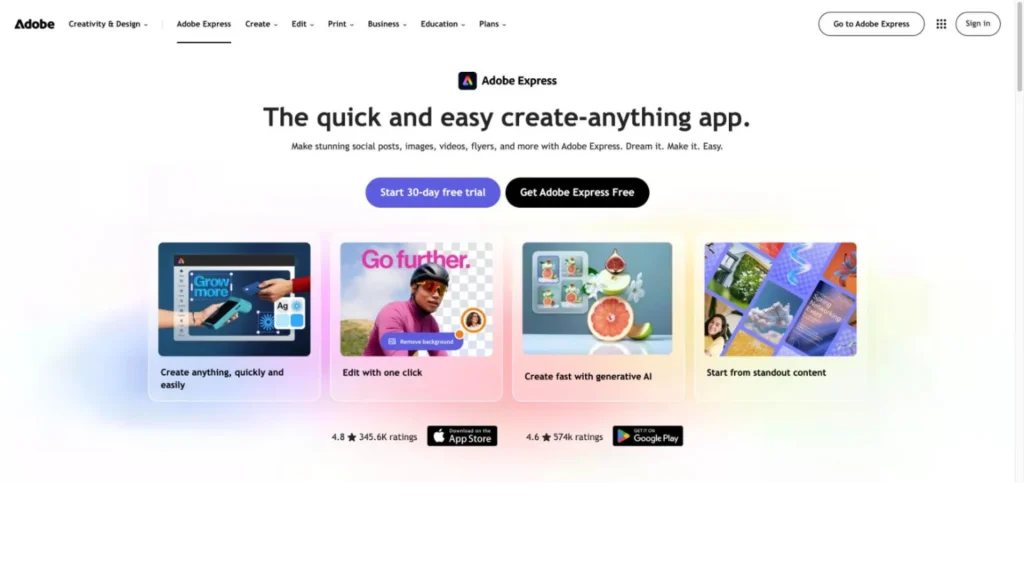
Adobe Express Premium costs $9.99 a month, and its AI Assistant can restyle a whole campaign across several designs from a single request. Adobe introduced the assistant at Adobe MAX on October 28, 2025, as a conversational agent that turns templates into canvases you edit by talking to them. Behind it sit Adobe’s Firefly models and partner models such as Gemini 3.1 and GPT Image 2, which the assistant picks on its own.
It is best for individual creators, small business owners and marketers who want on-brand social posts, flyers and campaign assets without design skills. The assistant is still a desktop beta, rolling out gradually, and it is not yet available on Teams, Enterprise or Education plans even though Adobe says 99% of Fortune 500 companies use Express; team access is the next step to watch. We rate it 8.6/10 on our scale. We have not used it ourselves; this review is based on Adobe’s announcements, help pages and pricing page, plus Capterra reviews.
Express AI Assistant Basics for Solo Creators
- The AI Assistant edits any layer or a whole campaign by conversation, asks follow-up questions and picks between Firefly and partner models on its own.
- It is a desktop beta for individual Free and Premium plans; Teams, Enterprise and Education plans do not have it yet.
- Premium costs $9.99 a month with 250 generative credits, more than 200 million Adobe Stock assets and a 30-day trial; Free includes limited assistant use.
- Adobe says 99% of Fortune 500 companies use Express, and companies such as Eli Lilly and AkzoNobel are piloting its Generate Presentation feature.
- Against Canva AI, Adobe is cheaper to start and stronger on stock assets, while Canva currently offers more workplace connectors and team availability.
From the Adobe MAX Launch to a 16,000-Creator Survey
The facts below come from Adobe’s newsroom, blog, help center and pricing page, plus Capterra.
| Fact | Detail | Source and Date |
|---|---|---|
| Launch | AI Assistant (beta) announced at Adobe MAX in Los Angeles | Adobe newsroom, October 28, 2025 |
| Creator survey | Of more than 16,000 creators surveyed by Adobe, 81% had used generative AI to make content they could not otherwise have made, and more than 70% were excited about agentic AI | Adobe newsroom, October 28, 2025 |
| Enterprise reach | Adobe says 99% of Fortune 500 companies use Adobe Express | Adobe Express blog, April 20, 2026 |
| Enterprise pilots | Generate Presentation in pilot with Eli Lilly, AkzoNobel, Rewe Digital, EDF and Bertelsmann | Adobe Express blog, April 20, 2026 |
| Availability | Beta for individual Free and Premium plans on desktop; not yet on Teams, Enterprise or Education plans | Adobe help center, viewed October 2026 |
| Models | Adobe Firefly plus partner models: Gemini 3.1 with Nano Banana 2, GPT Image 2 and FLUX.1 Kontext, chosen automatically | Adobe help center, viewed October 2026 |
| Partner surfaces | Adobe Express app for ChatGPT and Adobe Express Agent for Microsoft Copilot | Adobe Express blog, April 20, 2026 |
| Premium price | $9.99 a month with 250 generative credits and a 30-day trial | Adobe Express pricing, viewed October 2026 |
| Stock library | More than 200 million Adobe Stock assets on Premium; more than 1 million on Free | Adobe Express pricing, viewed October 2026 |
| Capterra rating | 4.6 out of 5 from 1,244 reviews (Adobe Express overall) | Capterra, viewed October 2026 |
Two facts pull in opposite directions. Adobe Express is already inside nearly every large company, by Adobe’s count, and big brands are piloting its AI features. The AI Assistant itself is currently limited to individual plans, so bringing it to team plans would let those companies switch it on at scale.
Enterprise interest shows in Adobe’s launch materials. Sakura Martin, global head of brand and design at dentsu, said the approach gives employees without design experience more confidence, and Moria Fredrickson, VP of brand and DX at Lumen, said it would let marketers build finished, on-brand layouts without design skills. Govind Balakrishnan, who runs Adobe Express, described an assistant that removes obstacles and speeds up processes. These are statements of intent from launch day, not measured results.
The model list is a practical point for buyers. Because the assistant can route work to Gemini, GPT Image or FLUX as well as Firefly, the output is not limited to Adobe’s own model. Teams with rules about which models may touch commercial work should note that model choice is automatic for now, and a manual option would help them.
Prompting and Hand Editing on the Same Canvas
The AI Assistant lives inside Adobe Express on the desktop web. Users switch between prompting the assistant and editing by hand with the canvas floating menu, so AI and manual work happen on the same design.
Creating, Refining and Restyling Without Manual Steps
- Creates: generates a design from a prompt or finds matching templates.
- Refines: edits a whole design or specific elements, layers and assets, such as fonts, images and backgrounds, while keeping the rest intact.
- Restyles images: transforms an attached image from a prompt.
- Interprets intent: for loose requests such as “make this more tropical,” Adobe says it swaps themes, suggests designs and tools and asks follow-up questions.
- Works across assets: changes a campaign theme across several designs, turns a static image into video and adjusts composition, color and fonts.
- Guides: points the user to the right Express feature or walks through a process.
Models and Assets
Adobe says the assistant orchestrates first- and third-party models and agents along with Adobe’s creative tools and millions of professional assets. The help center names Adobe Firefly plus Gemini 3.1 with Nano Banana 2, GPT Image 2 and FLUX.1 Kontext, and says the system selects the model automatically. Premium adds more than 200 million Adobe Stock assets and 30,000-plus fonts to draw from.
Beyond the Express Editor
Adobe also brings Express into other assistants: an Adobe Express app for ChatGPT and an Adobe Express Agent for Microsoft Copilot. For developers, a Dev MCP Server for Express add-ons lets them build add-on features conversationally. Adobe has announced plans to connect the assistant to brand-approved templates, AEM Assets and Workfront.
Getting the Beta Running on a Free or Premium Account
- Use an individual plan: sign in on desktop with a Free or Premium account; the beta is rolling out gradually.
- Start from a prompt or template: describe the asset or open a template and ask for changes.
- Mix modes: use the floating menu to jump between prompting and manual editing.
- Track credits: Premium includes 250 generative credits a month for AI generations.
Approvals, Copy Checks and Brand Fit Stay Manual
The user still decides what to make, approves each edit, checks copy and brand fit, and publishes or exports the result. Company brand controls, template locking and approvals are Teams and Enterprise features, which do not yet include the assistant.
Free Use and the $9.99 Premium Plan
The AI Assistant is part of Adobe Express rather than a separate product. Plans below are from Adobe’s US pricing page in October 2026.
| Plan | Price | Billing | What’s Included | Limits |
|---|---|---|---|---|
| Free | $0 | None | AI Assistant (beta) limited free use, free daily generations, 1 million-plus Adobe Stock assets, 5GB storage | No credit card; daily generation limits |
| Premium | $9.99 a month | Monthly, no annual commitment | 250 generative credits a month, premium templates, 200 million-plus Adobe Stock assets, brand kits, 30-day trial | Credit cap on AI generations |
| Teams | $7.99 per license per month | Annual, billed monthly; first-year discount | 250 credits per user, brand controls, template locking, admin console | Two-seat minimum; AI Assistant beta not available |
| Enterprise | Quote | Contract | Adobe Experience Manager access, user directory sync, IP indemnification on select plans | AI Assistant beta not available |
Adobe also sells Firefly Pro, a separate plan at $19.99 a month with 4,000 generative credits and a 7-day trial, for people whose main need is image and video generation.
A Solo Creator Versus a Five-Person Marketing Team
These scenarios use Adobe’s published prices; the users are our own illustrations.
- A solo creator on Premium: $9.99 a month, or $119.88 over a year, for the assistant, premium templates and 250 generative credits a month.
- A five-person marketing team: five individual Premium accounts cost $49.95 a month and keep assistant access. Two Teams licenses would cost $15.98 a month before the first-year discount and add brand controls, but would not include the AI Assistant beta today.
- A heavy image generator: Firefly Pro costs about twice as much as Premium for 16 times the generative credits, which may suit people who mostly generate images rather than edit layouts.
Costs to plan for: generative credits on Premium, individual accounts while the beta is on individual plans only, and the time needed to check outputs from automatically chosen models.
Adobe Express AI Assistant Compared With Canva AI, Lovart and Figma Design Agent
Adobe Express and Canva compete most directly: both are mass-market editors with an AI agent built in. Lovart is an AI-first design studio, and Figma’s agent serves product designers.
| Agent | Starting Price | Free Plan | Main Strength | Main Trade-Off | Best For |
|---|---|---|---|---|---|
| Adobe Express AI Assistant | Free (limited); Premium $9.99 a month | Yes | Adobe Stock, templates and Firefly plus partner models | Desktop beta; not on Teams or Enterprise | Individual creators and small businesses |
| Canva AI | Free; Pro $18 a month | Yes | Workplace connectors and scheduled tasks | AI limits stated as multiples; AI Pass $100 per user | Marketing teams with recurring content |
| Lovart | Free; paid reported from about $19 a month | Limited | AI-first studio for brand kits and storyboards | Credit amounts vary between snapshots | Designers producing many brand assets |
| Figma Design Agent | $16 per full seat a month, annual (reported) | No | Edits real product design files | Paid Figma plans only | Product and UI design teams |
For an individual, Adobe Express is the cheaper entry point and brings Adobe’s asset library. For a team that wants an agent to draft recurring content from Slack, Drive or HubSpot, Canva AI is further ahead today. Browse more in our AI agents for design and AI agents for social media guides.
Freelancers, Shop Owners and Seasonal Campaign Marketers
- Solo creators and freelancers: Premium at $9.99 a month gives the assistant, premium templates and a large stock library.
- Small business owners: conversational edits make flyers, menus and social posts without learning design tools.
- Marketers running seasonal campaigns: the assistant can change a campaign theme across several assets in one request.
- Existing Adobe users: Express connects to Adobe’s asset library and, for larger companies, to AEM on Enterprise plans.
- People who already work in ChatGPT or Copilot: Adobe Express is available inside both.
Where Teams Plans, Mobile Users and Model-Specific Workflows Wait for Updates
- Teams and enterprises that need it now: the beta is not yet available on Teams, Enterprise or Education plans.
- Mobile-first creators: the assistant runs on desktop only.
- Teams with strict model rules: the model is chosen automatically from Firefly and partner models.
- Product and UI designers: Figma Design Agent, Google Stitch or v0 are built for app and website interfaces.
- Teams that want scheduled, background content production: Canva AI offers scheduled tasks and workplace connectors.
Gradual Rollout and Upcoming Teams Plan Access
- Beta status: Adobe says the assistant is rolling out gradually and that availability and features may vary by account.
- Plan gap: the cheaper Teams plan adds brand controls but not the assistant, so teams may need individual Premium accounts for now.
- Automatic model choice: partner models such as GPT Image 2 and FLUX.1 Kontext may produce the output, and a manual model picker is not offered yet.
- Credit limits: Premium includes 250 generative credits a month, and the Free plan offers only limited assistant use.
- Indemnification scope: IP indemnification is listed for select Enterprise plans, which do not yet include the assistant.
- Enterprise features still arriving: at launch, Adobe said template locking, batch creation and an approval process for the assistant were in development for enterprise customers.
- Review themes: Capterra reviewers of Adobe Express mention subscription costs for small budgets, free-tier storage limits and watermarks.
Individual Access in April 2026 and Copilot Tie-Ins
- On April 20, 2026, Adobe said the AI Assistant is available to individual plan users, with Teams and Enterprise access later in the year, and listed an Express app for ChatGPT and an Express Agent for Microsoft Copilot.
- On October 28, 2025, Adobe announced the AI Assistant in Adobe Express at Adobe MAX in Los Angeles, as a desktop beta for Premium customers at first.
An Inexpensive Way to Design by Conversation
For individual creators and small businesses, yes, as an inexpensive way to make and adapt designs by conversation. The Adobe Express AI Assistant scores 8.6/10 on our scale: strong on ease of setup and user sentiment for Express, solid on price, with room to grow as it leaves beta and reaches team plans. Its strengths are practical: layer-level edits that leave the rest intact, campaign-wide theme changes and access to Adobe Stock and several image models.
For teams, it is too early. The plans that bring brand controls, template locking and IP indemnification do not include the assistant yet. Try it on the Free plan or the 30-day Premium trial, and revisit once Adobe extends it to Teams and Enterprise as it has said it will.
Is It Free, and Can Teams Use It Yet
Is the Adobe Express AI Assistant Free?
Adobe’s pricing page lists limited free use of the AI Assistant beta on the Free plan. Premium costs $9.99 a month with 250 generative credits and a 30-day trial.
Can Teams Use the Adobe Express AI Assistant?
Not yet. Adobe’s help center says the beta is available on individual Free and Premium plans, not Teams, Enterprise or Education. Adobe said in April 2026 that Teams and Enterprise access would come later in the year.
Which AI Models Does the Assistant Use?
Adobe Firefly and partner models, including Gemini 3.1 with Nano Banana 2, GPT Image 2 and FLUX.1 Kontext. The system chooses the model automatically.
Does the Assistant Work on Mobile?
The help center lists it as desktop only. Adobe Express itself also runs inside ChatGPT and Microsoft Copilot through separate apps.
How Does It Compare With Canva AI?
Adobe is cheaper to start, at $9.99 a month against Canva Pro’s $18, and draws on Adobe Stock. Canva AI goes further on agentic work, with connectors to workplace apps and scheduled tasks, and is available beyond individual plans.
User Reviews
Nobody has rated it here yet. Be the first AI Agents Choice user to rate Adobe Express AI Assistant.