
Thunderbit is an AI web scraper that runs as a Chrome extension. You open a web page, describe the columns you want in plain words, and the AI turns every item on the page into a row. It can follow links into detail pages to enrich each row, run on a schedule and export straight to Google Sheets, Airtable, Notion or Excel. The company reports more than 200,000 users.
It suits sales reps, recruiters and marketers who need a list from a website today. The free tier covers about six pages a month, and Starter costs $15 a month or $108 a year. The main point to watch is credit use and billing terms, which drive most complaints. Thunderbit scores 8.6/10 on our scale.
Thunderbit for Sales and Research Staff
- Chrome extension that structures any page into rows from fields you describe in plain language.
- Free tier for about six pages a month; Starter at $15 a month for 500 credits or $108 a year.
- About one credit per output row, and two credits per row when subpages are scraped.
- Free export to Excel, Google Sheets, Airtable and Notion.
- Capterra rating 4.6 out of 5 from 19 reviews; Trustpilot 2.7 from 32, mostly on billing.
Thunderbit by the Numbers
These figures come from Thunderbit’s pricing pages and blog, and from two review sites.
| Fact | Detail | Source and Date |
|---|---|---|
| Users | More than 200,000 worldwide | Thunderbit pricing page |
| Product Hunt | #1 Product of the Week | Thunderbit pricing page |
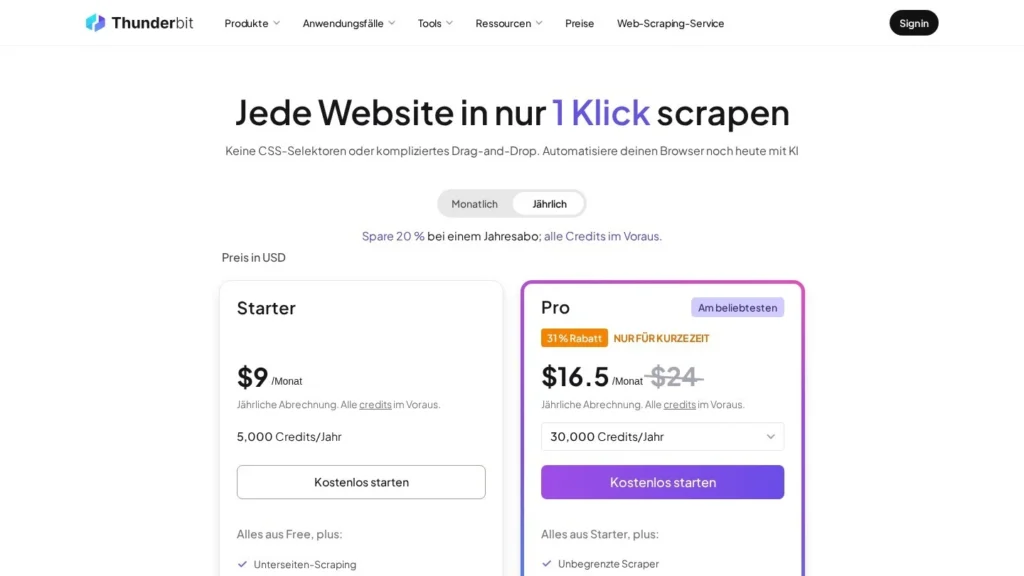
| Annual discount | 20%, with all credits granted upfront | Thunderbit pricing page |
| Credit rule | About 1 credit per output row; 2 per row with subpage enrichment | Thunderbit blog |
| Free tier | About 6 pages a month, up to 30 credits a page | Thunderbit blog |
| Starter | $15 a month for 500 credits, or $108 a year for 5,000 | Thunderbit blog |
| Top Pro tier | $249 a month for 20,000 credits, or $2,304 a year for 240,000 | Thunderbit blog |
| Capterra rating | 4.6 out of 5 from 19 reviews | Capterra |
| Trustpilot rating | 2.7 out of 5 from 32 reviews | Trustpilot |
The credit rule is the most useful number on the list. At about one credit per row, a buyer can size a plan by counting rows. Subpage scraping doubles that, so a list of 1,000 companies enriched from each profile page needs about 2,000 credits.
The two review scores tell different stories. Capterra reviewers rate the product itself well. Trustpilot reviewers mostly write about billing, trials and refunds. Buyers can address that by testing on the free tier and reading renewal terms before paying.
From Open Tab to Exported Rows in Thunderbit
Thunderbit works on the page in front of you. It reads that page with AI and does not need a robot trained in advance.
Choosing the Page and Fields
Open a page with a list, such as a directory, a marketplace category, a job board or search results. Start Thunderbit and describe the columns you need, for example “company name, city, website, phone.” Capterra reviewers say this works without a technical background.
Structuring the Page
The AI reads the page and builds a table, one row per item. OCR and image extraction pull text out of images and documents when the data is not plain text. Reviewers note that some fields can be inferred, so check a sample against the source.
Enriching Rows From Subpages
Subpage scraping visits each linked detail page and adds fields to the same row. A list of 200 agencies from a directory can pick up each agency’s email and service list from its profile page. Each enriched row uses about two credits. Capterra reviewers say the free version does not include subpage scraping.
Scheduling Recurring Scrapes
Saved setups can run on a schedule for recurring checks, such as a weekly competitor price list or a daily look at new job posts. Reviewers mention that header mapping does not always update between runs, and that a site layout change can require reconfiguring fields.
Exporting the Data
Results export to Excel, CSV, Google Sheets, Airtable or Notion. Thunderbit does not charge separately for exports. Developers who want the same extraction in code can use the Web Scraper API.
Web Scraper API for Developers
Thunderbit also sells access through a Web Scraper API, with its own documentation. A developer can send a URL and the fields wanted, and get structured rows back, which suits teams that start with the extension and later want the same job inside a product or an internal tool. Thunderbit’s own comparison with Zyte notes that its credits cover extraction and export, while a raw scraping API returns HTML or JSON that still needs parsing.
A Sample Day for a Recruiter
A recruiter needs 150 product managers from a conference speaker list. She opens the speaker page, asks for name, title, company and profile link, and Thunderbit returns 150 rows in about a minute. She turns on subpage scraping to pull each speaker’s bio from their profile page, using about 300 credits. The rows go straight to a Google Sheet her team shares, and she spends the afternoon on outreach.
Thunderbit Prices by Credit Tier
Thunderbit sells monthly and annual credit plans. Annual plans cost 20% less and grant the full year of credits upfront.
| Plan | Price | Billing | What Is Included | Limits |
|---|---|---|---|---|
| Free | $0 | None | Core scraping and exports | About 6 pages a month; up to 30 credits a page |
| Starter | $15 a month | Monthly, or $108 a year | 500 credits a month (5,000 a year on annual) | Credit-based |
| Pro Tier 1 | $38 a month | Monthly, or $288 a year | 3,000 credits a month (30,000 a year) | Credit-based |
| Pro Tier 2 | $75 a month | Monthly, or $576 a year | 6,000 credits a month (60,000 a year) | Credit-based |
| Pro Tier 3 | $125 a month | Monthly, or $1,152 a year | 10,000 credits a month (120,000 a year) | Credit-based |
| Pro Tier 4 | $249 a month | Monthly, or $2,304 a year | 20,000 credits a month (240,000 a year) | Credit-based |
| Business | Custom | Custom | Custom credits and limits, priority support, account management | Set per contract |
One output row uses about one credit, and subpage enrichment uses two. Exports carry no extra fee. Starter annual works out to $9 a month, and the top annual Pro tier to $192 a month.
How Annual Credits Behave
Annual plans grant every credit for the year on day one. A Starter annual buyer gets 5,000 credits upfront and could use 2,000 in a busy first month. Monthly plans give a fresh allowance each month. Teams with uneven demand, such as a recruiter who scrapes heavily during hiring pushes, may get more from an annual pool, while new users testing the product should start monthly.
Thunderbit Costs for Three Users
A sales rep pulling about 400 rows a month from directories fits Starter. That costs $15 a month, or $108 a year on annual billing, which grants 5,000 credits for the year.
A recruiter pulling 2,000 rows a month and enriching each from a profile page needs about 4,000 credits a month. Pro Tier 2 at $75 a month covers it with 6,000 credits. The annual version costs $576 a year, or $48 a month, and grants 60,000 credits, which covers 48,000 needed across the year. That saves $324 against paying monthly.
A marketing team pulling 15,000 rows a month without subpages needs about 180,000 credits a year. Pro Tier 4 annual at $2,304 a year grants 240,000 credits, which works out to $192 a month. Paying monthly at $249 would cost $2,988 a year, or $684 more.
Thunderbit Compared With Browse AI, Kadoa and Airtop
These tools all extract web data, but they suit different jobs and levels of setup.
| Agent | Starting Price | Free Plan | Main Strength | Main Limit | Best For |
|---|---|---|---|---|---|
| Thunderbit | Free; Starter $15/month | Yes | Scrapes the open page with plain-language fields | Credit use and billing terms need watching | Individuals and sales users |
| Browse AI | Free; $19/month billed annually | Yes | Trained robots with monitoring and SOC 2 Type II | Website caps per plan | Teams monitoring sites on a schedule |
| Kadoa | Quote-based, free evaluation | Trial | Self-healing pipelines with validation | No published prices | Funds and data teams |
| Airtop | Free; paid plans from $29 per month | Yes | Browser agents from plain-English task descriptions | Broader browser automation focus | Teams automating web tasks beyond scraping |
Thunderbit is the fastest of the four for a one-off list from the page you are already viewing. Browse AI suits ongoing monitoring with stated security certification, Kadoa suits institutional pipelines, and Airtop suits broader browser tasks such as logging in and filling forms. More options are on our web scraping agents and lead generation agents pages.
Pricing units differ across the four. Thunderbit and Browse AI charge credits tied to rows, Kadoa bills by active scheduled workflows, and Airtop prices browser agent usage. A person pulling a few lists a month will usually spend least on row credits, while a team running hundreds of fixed sources may find a workflow model easier to forecast.
Thunderbit Users Who Get the Most Out of It
Sales reps and founders building prospect lists from directories, event pages and marketplaces get quick value. Subpage scraping adds emails or profile details without a second tool, and rows go straight to a sheet or Airtable base.
Recruiters and researchers who pull lists from job boards, speaker pages or review sites fit well too. E-commerce staff tracking a few competitor price pages each week can use scheduled scrapes on a Starter or low Pro tier.
Non-technical users are the core audience. Capterra reviewers describe it as usable without a technical background.
Small online stores watching a handful of rival product pages also fit. A weekly scheduled scrape of five price lists, each with 40 items, uses about 800 credits a month, which fits Pro Tier 1.
Marketing teams building content research sets, such as a list of every article on a topic from several blogs, can pull titles, dates and links into Notion and sort them there.
Scraping Jobs That Call for Another Tool
Teams that need security certifications for procurement may prefer Browse AI, which states SOC 2 Type II. Funds and data teams that need validated, self-healing pipelines may prefer Kadoa.
Developers scraping hundreds of thousands of pages for raw HTML may find a request-priced scraping API cheaper, a point Thunderbit’s own comparison with Zyte makes. Thunderbit credits include AI extraction and export, which raw request pricing does not.
Work that goes beyond reading pages, such as logging in to a portal, filling forms and downloading files across many steps, fits a browser agent like Airtop or Skyvern better. Thunderbit is built to turn visible page content into rows, and it does that job quickly.
Credits, Renewals and Field Accuracy in Thunderbit
Measure credits first. Run your real pages on the free tier and note how many credits each uses. Capterra reviewers say AI-heavy runs can be hard to predict, and subpage enrichment doubles the per-row cost.
Read renewal and trial terms. Several Trustpilot reviewers report unexpected charges, annual renewals they did not expect and refund requests that were turned down. Note the renewal date, and cancel before it if you do not plan to continue.
Check fields against the source. Reviewers say some fields can be missed or inferred. Spot-check 10 to 20 rows before using a list for outreach or pricing.
Expect reconfiguration. A site layout change can break a saved setup, and header mapping may not carry over between runs. Recheck scheduled scrapes after a target site redesigns.
Respect site terms. Many websites limit automated collection, and contact data carries privacy rules. Confirm your use fits both before exporting lists for outreach.
Plan for team use. The pricing page lists Business plans with custom credits, custom limits, priority support and account management. A team with several heavy users should compare the cost of several Pro plans against a Business quote before buying.
Our Read on Thunderbit for Quick Data Pulls
Thunderbit scores 8.6/10 on our scale. Ease of setup earns 9.5, the highest of the six, because it runs as an extension and takes plain-language field names. Pricing value earns 9.2 for a free tier and a $15 entry plan with published tiers. Integrations earn 8.8 for free exports to the main spreadsheet and database tools.
Autonomy earns 8.2: Thunderbit structures pages, follows subpages and runs schedules, while a person chooses each page and field set. User sentiment earns 8.0, balancing Capterra praise against Trustpilot billing complaints. Trust and security earn 7.8, as the pricing page lists no certifications.
For a sales rep or recruiter who needs a list today, Thunderbit is a quick way to get it. Start on the free tier, measure credits on your real pages, choose a monthly plan for the first month, and move to annual only once your usage is steady.
Teams with procurement rules should ask Thunderbit for security documentation early, since none is listed on the pricing page. Individual users can judge it in an afternoon on the free tier.
Thunderbit Questions From First-Time Buyers
Is Thunderbit Free?
Yes. The free tier covers about six pages a month, with up to 30 credits per page. Some features, such as subpage scraping, need a paid plan, according to Capterra reviewers.
How Many Rows Does a Thunderbit Credit Buy?
About one output row per credit. Subpage enrichment uses about two credits per row, and exports to Excel, Sheets, Airtable or Notion are free.
Does Thunderbit Work Outside Chrome?
Thunderbit runs as a Chrome extension, lists a Microsoft Edge add-on and offers a Web Scraper API for developers.
Can Thunderbit Scrape on a Schedule?
Yes. Saved setups can run on a schedule for recurring checks, such as weekly price lists or new job posts. Recheck the setup after a target site changes its layout.
How Do I Avoid Unexpected Thunderbit Charges?
Note your plan’s renewal date and billing period, and cancel before renewal if you do not plan to continue. Trustpilot reviewers who reported problems often mention annual renewals and short trials.
User Reviews
Nobody has rated it here yet. Be the first AI Agents Choice user to rate Thunderbit.