
Agent Mode in PowerPoint for Quarterly Reviews and Pitches
Agent Mode became generally available in PowerPoint on April 22, 2026, alongside Word and Excel. It builds and updates decks inside the file: it can create a presentation from Work IQ, meaning the relevant files, meetings and emails, and it refreshes existing decks by updating talking points, swapping charts from a linked Excel workbook and adding slides in the corporate template. Every slide it changes is flagged for human review.
It suits sales, finance and project teams that rebuild the same decks each month or quarter in a fixed company template. Businesses get it through the Microsoft 365 Copilot add-on, reported at $30 per user a month on top of a base license. We score it 8.9/10 on our scale, led by tenant security, with licensing cost the main point to weigh.
Agent Mode in PowerPoint in Five Points
- Generally available in PowerPoint since April 22, 2026.
- Creates decks from Work IQ: files, meetings and emails.
- Keeps corporate fonts, colors and layouts when it edits.
- Flags every modified slide for a person to check.
- Commercial use needs the Copilot add-on, reported at $30 per user a month.
PowerPoint Agent Mode Release Facts
These come from Microsoft’s roadmap and launch blog, a licensing summary, an industry roundup and Capterra.
| Fact | Detail | Source and Date |
|---|---|---|
| First announced | PowerPoint support for Agent Mode listed as coming soon | Microsoft 365 blog |
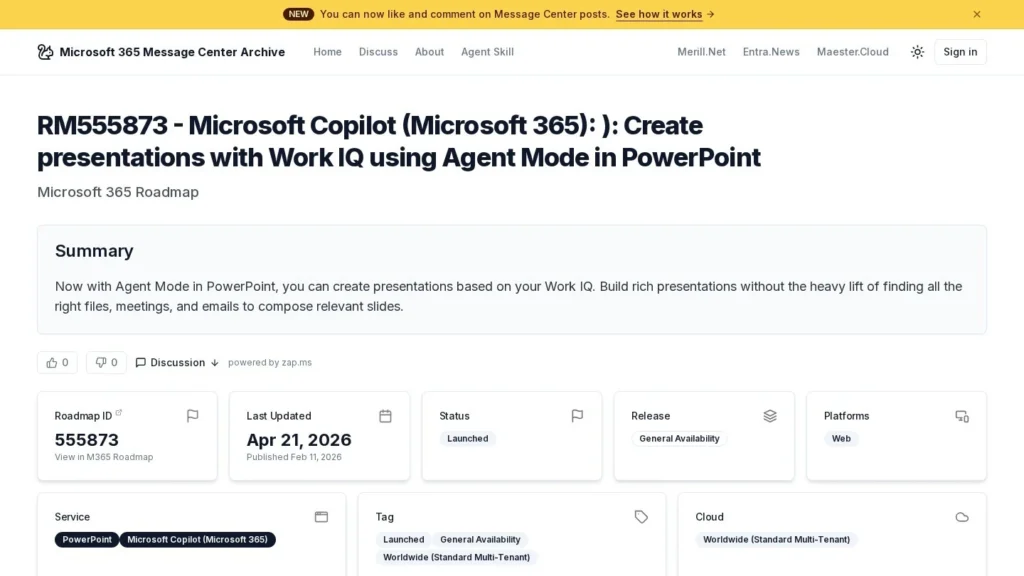
| Work IQ deck creation | Create presentations from files, meetings and emails; status launched, web, worldwide | Microsoft roadmap 555873, published February 11, 2026 |
| General availability | Agent Mode in Word, Excel and PowerPoint | Arahi AI news roundup, April 22, 2026 |
| Template handling | Keeps corporate template fonts, colors and layout | Pasquale Pillitteri summary, April 2026 |
| Review step | Flags modified slides for final human review | Pasquale Pillitteri summary |
| Preview results | Engagement up 11%, retention up 36%, satisfaction up 25%, per Microsoft figures as cited | Pasquale Pillitteri summary |
| Commercial price | Copilot add-on reported at $30 per user a month | Pasquale Pillitteri summary |
| User rating | 4.6 of 5 from 29 reviews (Microsoft 365 Copilot) | Capterra |
The review flag is the fact that matters most for deck work. A wrong number on a chart in a board or client deck is costly, and the agent marks every slide it touched, so a reviewer knows exactly where to look. The template rule matters for brand teams: the agent works inside the company master and does not invent new layouts.
The preview figures are Microsoft’s and show a different shape from Word. PowerPoint engagement rose only 11%, but retention rose 36%, which suggests fewer people tried it at first and more of them kept using it.
Inside a PowerPoint Agent Mode Task
Starting From Work IQ
For a new deck, the agent draws on Work IQ, the files, meetings and emails relevant to the request, so the user does not have to gather them first. Microsoft lists this as a web feature on its roadmap, available worldwide on standard multi-tenant clouds.
Updating an Existing Deck
For a recurring deck, the user asks for an update. In the launch example, the agent reads new figures from a linked Excel file and replaces the charts one by one, keeping the same visual grid. It refreshes customer names on testimonial slides and adds a roadmap slide built from the corporate template. Because the workbook stays linked, next quarter’s update can start from the same request.
Staying Inside the Template
The agent keeps the template’s fonts, colors and layouts. New slides use the existing masters, which keeps a sales team’s decks consistent even when many people edit them over a year.
Checkpoints and Flagged Slides
Like Agent Mode in Word and Excel, it breaks the goal into steps and stops at checkpoints. When it finishes, it flags the modified slides for final human review, so nothing it changed goes unseen.
Licensing for Agent Mode in PowerPoint
| Buyer | What Is Needed | Reported Monthly Cost per User |
|---|---|---|
| Small business | Business Standard plus Copilot add-on | $12.50 plus $30 |
| Small business, more security | Business Premium plus Copilot add-on | $22 plus $30 |
| Enterprise | E3 or E5 plus Copilot add-on | About $36 or $57 plus $30 |
| Individual | Microsoft 365 Premium | Agent Mode included |
| Home users | Microsoft 365 Personal or Family | Agent Mode available |
Prices come from a licensing summary published at launch; confirm current figures with Microsoft or a reseller. The add-on covers Agent Mode in Word and Excel as well, so the PowerPoint agent is one part of the purchase.
Annual Add-On Cost by Team Size
| Team | Seats | Annual Add-On Cost |
|---|---|---|
| Sales pod | 5 | $1,800 |
| Regional sales team | 20 | $7,200 |
| Finance and strategy group | 10 | $3,600 |
For a sales team that rebuilds a quarterly business review for each account, the useful test is hours saved per deck. If the agent removes two hours of chart and slide updates per account each quarter, a rep with ten accounts saves about 80 hours a year, against $360 a year for that rep’s add-on seat.
A Quarterly Business Review Rebuilt With Agent Mode
This walkthrough follows the launch example for an account manager who presents a quarterly review to a large customer.
She opens last quarter’s deck and asks the agent to update it with this quarter’s usage figures from the linked workbook, refresh the customer contacts on the team slide and add a roadmap slide for next quarter. The agent replaces each chart from the workbook while keeping the grid, updates the names and builds the roadmap slide from the company master. It then flags the six slides it changed.
She checks each flagged chart against the workbook, rewrites one talking point and accepts the rest. Her manager reviews only the flagged slides before the meeting, and the unflagged slides, which the agent did not touch, need no second look. The customer sees a deck in the usual company style with current numbers.
Admin Settings Before Rolling Out PowerPoint Agent Mode
Admins can enable or disable Agent Mode per group in the Copilot section of the Microsoft 365 admin center. Sensitivity labels and Purview DLP policies apply, and admins can define which external tenants may receive agent-made files, which matters when sales decks go to customers. Updates arrive through Current Channel and Monthly Enterprise Channel first and Semi-Annual Channel a few weeks later.
Brand teams should check that the corporate PowerPoint template is clean before rollout. Since the agent builds on existing masters, a tidy template with clear layouts for charts, quotes and roadmaps gives it better material to work with.
Sales Enablement Setup for PowerPoint Agent Mode
Sales teams get the most from the agent when the inputs are in order before the first request. Three pieces matter. The first is the master template: one approved PowerPoint master with layouts for title, chart, quote and roadmap slides, since the agent builds from existing masters. The second is the data source: a linked Excel workbook per account or region, kept in a shared location the rep can access, so chart updates pull from one place. The third is a standard request, written once by enablement and shared with reps, naming the workbook, the slides to refresh and any new slide to add.
With those in place, a rep’s quarterly update becomes a repeatable job. Enablement can also review a sample of flagged slides each quarter to see where the agent needs clearer instructions, for example a chart type it swaps poorly or a quote layout it fills inconsistently.
Requests That Work Well
Specific requests match the launch examples best. “Update charts on slides 4 to 7 from the linked Q3 workbook” gives the agent a clear scope. “Refresh the customer names on the testimonial slide from the attached list” names the source. “Add a roadmap slide after slide 9 using the roadmap layout” names the layout. Broad requests such as “make this deck better” leave the agent guessing and produce more flagged slides to check.
Agent Mode in PowerPoint Compared With Gamma, Canva AI and Claude Design
| Agent | Entry Price | Free Option | Main Strength | Main Limit |
|---|---|---|---|---|
| Agent Mode in PowerPoint | Copilot add-on, reported $30 per user/month | No | Updates decks inside corporate templates with tenant controls | Needs a base license plus add-on |
| Gamma Agent | Free; Plus about $9 per seat/month (reported) | Yes | Fast new decks and pages from a prompt | Separate format from company PowerPoint masters |
| Canva AI | Free; Pro $18/month | Yes | Visual design and brand kits across formats | Less tied to Microsoft 365 data |
| Claude Design | Free; Pro $17/month annually | Yes | Prototypes and decks with PPTX export | Research preview with shared usage limits |
Gamma and Canva AI suit new, visual decks and have free plans. Claude Design exports to PPTX and covers prototypes as well. Agent Mode in PowerPoint is the option for decks that must stay in the company master, draw on tenant files and meetings, and carry sensitivity labels. Our design agents page lists more tools, and Agent Mode in Word and Agent Mode in Excel come with the same add-on.
How the PowerPoint Agent Sits Beside Word and Excel
The same add-on brings Agent Mode to three apps, and decks often draw on the other two. A finance team might use Agent Mode in Excel to update the month’s workbook, then the PowerPoint agent to pull the new figures into the results deck through the linked file, and Agent Mode in Word for the written commentary. Each app keeps its own review step: tracked changes in Word and flagged slides in PowerPoint.
Microsoft’s preview figures, as cited at launch, put PowerPoint’s engagement gain at 11%, well below Word at 52% and Excel at 67%, while PowerPoint’s 36% retention gain sat between them. For a buyer, that suggests deck users need more encouragement to try the agent, so a short demo using one of the team’s own decks may matter more here than in Word or Excel.
Teams That Fit PowerPoint Agent Mode
Account managers who prepare quarterly reviews, finance teams who present monthly results from Excel, and project managers who update status decks gain the most, since their decks repeat with new numbers. Large companies with strict templates benefit from an agent that works inside them.
Marketing and communications teams that keep one master deck for the company story can use the agent to produce versions for different audiences while the template stays fixed. Consultants who adapt a standard proposal deck for each client can refresh names, figures and roadmap slides in one pass and send the flagged slides to a partner for sign-off.
Consumers on Microsoft 365 Premium, Personal or Family can use it for school, club or family presentations without a business license.
When Another Deck Tool May Suit Better
Designers who want free-form layouts, motion or social graphics will find design-first tools more flexible. Companies without the Copilot add-on face a per-user cost across staff. Teams that build decks in Google Slides gain nothing here, and small firms without Microsoft 365 subscriptions would need to add those before the agent is an option.
Accuracy and Build Requirements for PowerPoint Agent Mode
Agent Mode needs a current Office build, an eligible license and a connection; it does not work offline. The Work IQ deck creation feature is listed for PowerPoint on the web. Capterra reviewers of Microsoft 365 Copilot report occasional inaccurate or inconsistent answers and a few failures to produce files, so read each flagged chart against its source before presenting.
Admins should also decide which external tenants may receive agent-made files before sales teams start sending updated decks to customers. Where decks carry sensitivity labels, test one labeled file in the pilot group to confirm the agent and the label behave as expected.
Agent Mode in PowerPoint Timeline
| Date | Event |
|---|---|
| Frontier preview | Microsoft lists PowerPoint support as coming soon |
| February 11, 2026 | Roadmap entry for Work IQ deck creation published |
| March 2026 | Work IQ deck creation listed as generally available on the web |
| April 22, 2026 | Agent Mode generally available in PowerPoint, Word and Excel |
Microsoft first described Agent Mode in its vibe working announcement, listed Work IQ deck creation on its roadmap, and general availability was reported on April 22, 2026.
Our Read on Agent Mode in PowerPoint at 8.9 Out of 10
Agent Mode in PowerPoint scores 8.9 out of 10 on our scale. Security rates highest because data stays in the tenant under Purview and DLP. Integrations and setup rate well thanks to Work IQ and delivery through Office updates. Pricing trails because businesses pay the add-on on top of a base license.
For a trial, pick one recurring deck with a linked workbook and run two update cycles with the agent. Track how many flagged slides need edits; if that number falls, widen use to the rest of the team. Keep the request wording that worked and share it with colleagues who build the same type of deck.
Agent Mode in PowerPoint Questions From Deck Owners
Does Agent Mode in PowerPoint Keep My Company Template?
Yes. It keeps the template’s fonts, colors and layout and builds new slides from the corporate template.
Can Agent Mode in PowerPoint Update Charts From Excel?
Yes. In Microsoft’s example it reads new figures from a linked Excel file and replaces charts one by one while keeping the same grid.
What Is Work IQ in PowerPoint?
It lets the agent build a presentation from the files, meetings and emails relevant to your request, so you do not have to search for them first.
How Do I Know What the Agent Changed?
It flags every modified slide for final human review.
Is Agent Mode in PowerPoint Included in Microsoft 365?
For businesses it comes with the Microsoft 365 Copilot add-on, reported at $30 per user a month. Microsoft 365 Premium includes it, and Personal and Family subscribers have it.
User Reviews
Nobody has rated it here yet. Be the first AI Agents Choice user to rate Agent Mode in PowerPoint.