
Smartsheet AI turns an established enterprise work management platform into one where AI builds plans, runs workflows and flags risks, and its Claude connector logged 1.76 million tool calls in its first 30 days. Pro starts at $9 per member a month billed yearly, and every plan lists Smart Assist.
It suits project and portfolio teams in organizations already on Smartsheet, and enterprises that want Claude or Copilot to work directly with project data. Very small teams that want a free plan may find a simpler tool a better fit, and several agent features are still in early access. We rate it 8.6/10 on our scale. We have not used Smartsheet; this review is based on Smartsheet’s pricing page and announcements, Anthropic’s customer story and public reviews.
Smartsheet’s 1.76 Million Claude Tool Calls in 30 Days
- Smart Assist builds workspaces and projects from outlines; Smart Flows build workflows from prompts; a Project Manager Smart Agent flags risks.
- Anthropic’s customer story reports 1.76 million MCP tool calls from 1,400+ organizations in the connector’s first 30 days, with 48 percent going beyond queries.
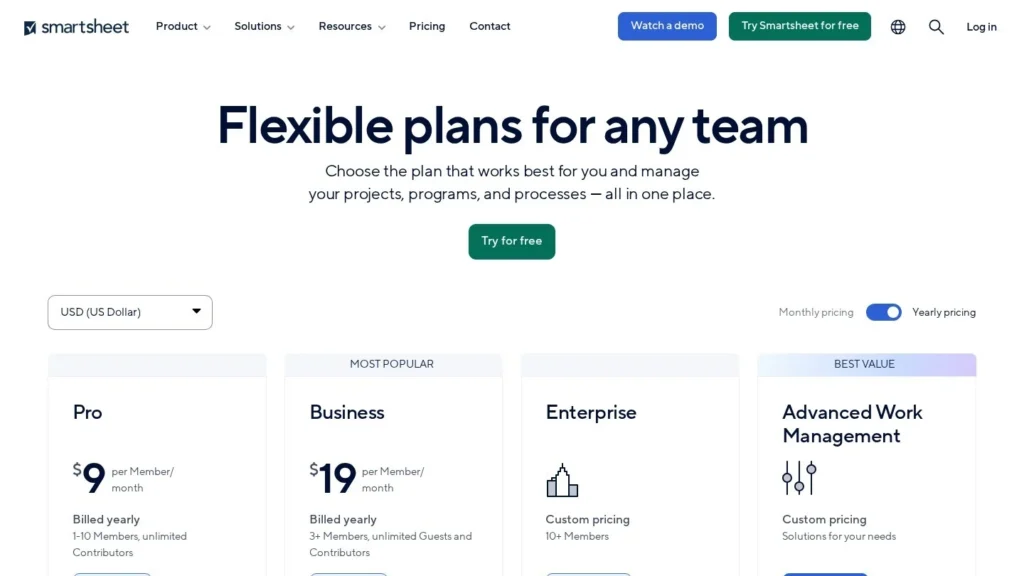
- Pro is $9 and Business $19 per member a month billed yearly, with a 30-day free trial.
- Smartsheet says it serves more than 120,000 organizations, including more than 85 percent of the Fortune 500.
- Smart Flows, Smart Columns and the Project Manager agent were announced for early access, and Smart Hub for 2026.
Smartsheet AI by the Numbers
Smartsheet’s numbers come from its ENGAGE 2025 announcement and an Anthropic customer story that went into unusual detail.
| Fact | Detail | Source and Date |
|---|---|---|
| Connector usage | 1.76 million MCP tool calls in the first 30 days | Anthropic customer story, 2026 |
| Connector adoption | More than 1,400 organizations using the connector | Anthropic customer story, 2026 |
| Action share | 48 percent of connector use went beyond querying: creating sheets, updating rows, flagging risks | Anthropic customer story, 2026 |
| Connector scope | 36+ operations and 27 distinct capabilities | Anthropic customer story, 2026 |
| Model and hosting | Claude Sonnet through Amazon Bedrock | Anthropic customer story, 2026 |
| Cost savings on AI | Prompt caching cut operating costs 60 percent and latency 20 percent | Anthropic customer story, 2026 |
| Fortune 500 reach | 85 percent of the Fortune 500 | Smartsheet release, November 5, 2025 |
| Organizations | More than 123,000 organizations; almost 3 million active projects | Smartsheet release, November 5, 2025 |
| Price | Pro $9, Business $19 per member a month billed yearly | Smartsheet pricing page, viewed November 2026 |
| Review rating | 4.5 out of 5 from 3,568 reviews | Capterra, viewed November 2026 |
The 48 percent figure is the most telling. Nearly half of what users asked Claude to do through the connector changed data: new sheets, updated rows, flagged risks. As Smartsheet’s SVP of AI and data platform, Drew Garner, put it in the story: that is execution, not chat.
The Bedrock detail matters for enterprise buyers. Smartsheet’s chief information and security officer, Ravi Soin, said routing Claude through Amazon Bedrock meant it inherited existing controls such as auditability and data residency, which is often the first question a security team asks.
Plans, Workflows and Risk Flags Built on Sheet Data
Smartsheet calls its approach Intelligent Work Management. All AI features sit on the Smartsheet Knowledge Graph, which links a customer’s sheets, projects and data.
Smart Assist
Smart Assist builds workspaces and projects from an outline, turns on automations and answers real-time questions about projects and deadlines. A project manager could paste a launch outline and get a structured plan with owners and dates to review.
Smart Flows and Smart Columns
Smart Flows build multi-step automated workflows from a natural-language description, such as routing a new request for approval and notifying a team when it is approved. Smart Columns add AI column types that classify, label, translate or summarize data in each row.
The Project Manager Smart Agent
The first Smart Agent is built around project management. It monitors progress, suggests plan improvements and flags and ranks risks. Smart Hub, announced for 2026, is meant to manage these building blocks, create custom agents and show data usage.
Working From Claude and Other Assistants
The Smartsheet MCP Connector for Claude lets users view, create and manage work from a Claude conversation, with more than 36 operations. Business and higher plans also list integrations with Gemini Enterprise, Microsoft Copilot and ChatGPT and connections to other MCP-enabled tools.
A Portfolio Review, Step by Step
A PMO lead preparing a Monday portfolio review asks Claude, through the connector, which projects slipped last week and why. Claude reads the relevant sheets, lists three projects with late milestones and the tasks behind them, and on request flags the riskiest one and updates its status row. In Smartsheet, the Project Manager agent has already suggested moving two dependent tasks. The lead reviews the suggestion, accepts one change and rejects the other, then asks Smart Assist for a dashboard to share in the meeting.
Smartsheet’s own corporate social responsibility team used the connector to evaluate more than 3,200 nonprofit applications in under an hour, according to the Anthropic story.
Scenario Planning and Portfolios
For larger offices, Scenario Planning tests what-if changes without touching live projects, and Portfolios add standard templates, automated project creation and portfolio reporting. Portfolios were slated for general availability in the first quarter of 2026.
Smart Columns in Everyday Sheets
Smart Columns are the least flashy feature and may be the most used. A support intake sheet can add a column that classifies each request by type, another that summarizes long descriptions, and a third that translates entries from regional offices. Because these run row by row inside the sheet, existing reports, dashboards and automations keep working on the new columns without extra setup.
How Smartsheet Uses Claude Internally
The Anthropic story also describes Smartsheet’s own use. More than 500 engineers use Claude Code, and Smartsheet reports that those users ship three times more code and merge 31 percent more pull requests than peers, with org-wide cycle time down 28 percent. Claude-powered helpdesk agents handle 30 percent of IT tickets automatically. These are internal results rather than product features, but they show a vendor applying the same agents it sells.
Where Managers Stay in Control
Agents suggest and flag; people accept plan changes, approve workflows and decide priorities. Admins control which plans can connect external AI tools.
Per-Member Pricing With AI on Every Plan
Smartsheet publishes its per-member prices.
| Plan | Price | Billing | What’s Included | Limits |
|---|---|---|---|---|
| Pro | $9 per member a month ($12 monthly) | Yearly or monthly | Smart Assist, Smart Columns, AI dashboards, form fill, formula generation, data analysis | 1 to 10 members; new customers only |
| Business | $19 per member a month ($24 monthly) | Yearly or monthly | Pro features plus MCP connections and Claude, Gemini, Copilot and ChatGPT integrations, group management, backups | 3 or more members |
| Enterprise | Custom | Contract | Business features plus SAML SSO, directory integrations, SLA | 10 or more members |
| Advanced Work Management | Custom | Contract | Enterprise-scale portfolio and AI tools | By agreement |
A 30-day free trial requires no credit card. Agent features in early access may have their own enrollment, so ask your account team.
Annual Costs at Three Team Sizes
- A five-person team on Pro: 5 members at $9 a month billed yearly is $540 a year.
- A 10-person team on Business: 10 members at $19 is $2,280 a year billed yearly, or $2,880 at the $24 monthly rate.
- A 25-person department on Business: 25 members at $19 is $5,700 a year billed yearly.
One pricing difference from some rivals matters for budgets: the plans list AI features without a separate AI credit charge on the pricing page, while monday.com, for example, lists AI credits as a requirement for its agents. Ask Smartsheet whether any usage limits apply to Smart Assist or the connector on your plan, and whether early access agents will carry their own price when they reach general availability.
The main variable is headcount. Every new member adds to the bill, so organizations that invite many occasional users should review licenses regularly. Reviewers on Capterra say costs rise quickly with add-ons and larger teams.
Smartsheet AI Compared With monday.com AI Agents, Wrike AI Agents, Asana AI Teammates and Rovo
Enterprise work platforms are all adding agents; the differences are how they price AI and how far agents act.
| Agent | Starting Price | Free Plan | Main Strength | Main Weakness | Best For |
|---|---|---|---|---|---|
| Smartsheet AI | $9 per member a month (Pro, yearly) | No | Sheet-based plans with a heavily used Claude connector | Agent features in early access | Enterprise project offices |
| monday.com AI Agents | $9 per seat a month plus AI credits | Limited | Agents that triage and route board items | Credits required | Business teams on monday.com |
| Wrike AI Agents | $25 per user a month (Business, yearly) | No | Agents for intake and classification | Higher entry price | Mid-market project offices |
| Asana AI Teammates | Included with paid Asana plans; extra requests reported | No | Teammates for briefs, triage and bug work | Usage-based extras | Teams on Asana |
| Rovo Agents by Atlassian | Included with paid Jira and Confluence plans | No | Agents across Jira and Confluence | Best inside Atlassian | Software and IT teams |
Smartsheet’s edge is the depth of its enterprise footprint and the Claude connector’s usage. monday.com and Asana suit business teams already on those tools, Wrike suits structured project offices, and Rovo fits Atlassian shops. Compare more in our project management AI agents guide, or see Taskade AI Agents for a low-cost option.
Project Offices Already Running on Smartsheet
- PMOs and portfolio managers: Scenario Planning, Portfolios and the Project Manager agent target their daily work.
- Enterprises standardizing on Claude or Copilot: Business plans connect those assistants directly to project data.
- Security-conscious organizations: Bedrock routing, MFA and SAML SSO on Enterprise fit formal reviews.
- Teams living in spreadsheets: Smart Columns and formula generation help users who think in rows and columns.
Choosing Pro or Business for AI
The split between Pro and Business matters more for AI than for project features. Pro includes Smart Assist, Smart Columns and the AI dashboard builder, which covers most day-to-day help inside Smartsheet. Business is the step for teams that want Claude, Copilot, Gemini or ChatGPT to work with their sheets, since MCP connections and those integrations are listed only from Business up. Teams with ten or fewer members can start on Pro and upgrade once they want outside assistants connected.
Small Teams Wanting a Free or Simpler Tool
- Very small teams on tight budgets: There is no free plan; a tool such as Taskade offers one.
- Teams needing agent features today: Some agents are in early access, so check availability before buying for them.
- Users with very large sheets: Reviewers report slowdowns on large sheets; test your biggest files.
Early Access Features and License Growth
- Early access: Smart Flows, Smart Columns and the Project Manager agent were announced for early access programs. Confirm what is live.
- Plan gating: MCP and third-party AI integrations require Business or higher.
- License growth: Per-member billing rises with every invited user. Audit licenses each quarter.
- Performance: Large sheets can lag, according to reviewers.
- AI write access: The connector can create and update data. Set permissions so assistants change only what they should.
- Formula limits: Reviewers find advanced formulas and cross-sheet references restrictive. Formula generation helps, but complex models may still need care.
- Pro availability: Pro is listed as available to new customers only, so existing accounts should confirm which plans they can move to.
Intelligent Work Management and the March 2026 Claude Connector
On November 5, 2025, at its ENGAGE conference, Smartsheet debuted Intelligent Work Management, including Smart Assist, Smart Flows, Smart Columns, Smart Agents and a planned Smart Hub, along with Scenario Planning, Portfolios, Security Score and MFA. CEO Rajeev Singh called it the operating model for the modern enterprise.
In March 2026 Smartsheet launched its MCP Connector for Claude. Anthropic’s customer story reports 1.76 million tool calls in 30 days, 1,400+ organizations, and inside Smartsheet, 49 percent of employees using Claude Enterprise within two and a half weeks.
A Strong Pick for Enterprise Teams on Smartsheet
Smartsheet AI scores 8.6/10 on our scale. Published per-member pricing, a free trial, AI on every plan, broad assistant integrations and strong security controls make it a solid choice for enterprise project offices. Smartsheet could raise its score by moving its agent features from early access to general availability.
The 1.76 million connector calls in a month suggest many customers want to reach their project data from the AI assistant they already use, rather than learn a new interface. Smartsheet is well placed for that pattern, since its sheets hold structured data that assistants can read and update reliably.
Organizations already on Smartsheet should start with the trial’s AI features and, on Business, connect Claude or Copilot to a test workspace. Teams that are not yet on Smartsheet can compare monday.com AI Agents and Asana AI Teammates.
Project Managers’ Questions About Smartsheet AI
How Much Does Smartsheet Cost With AI?
Pro is $9 per member a month billed yearly and Business is $19, with monthly billing at $12 and $24. Core AI features such as Smart Assist are listed on all plans. Enterprise is quoted.
Does Smartsheet Have a Free Trial?
Yes. Smartsheet offers 30 days free with no credit card required. It does not offer a free plan.
Can Claude Update My Smartsheet Projects?
Yes, through the Smartsheet MCP Connector for Claude, which can view, create and manage work. Connections to external AI tools are listed on Business and higher plans.
What Does the Project Manager Smart Agent Do?
It monitors project progress, suggests plan improvements and flags and prioritizes risks. Smartsheet announced it for its early access program.
Is Smartsheet AI Secure for Enterprise Data?
Smartsheet routes Claude through Amazon Bedrock so it inherits controls such as auditability and data residency, offers MFA and a Security Score, and includes SAML SSO on Enterprise plans.
User Reviews
Nobody has rated it here yet. Be the first AI Agents Choice user to rate Smartsheet AI (Smart Assist and Smart Agents).