
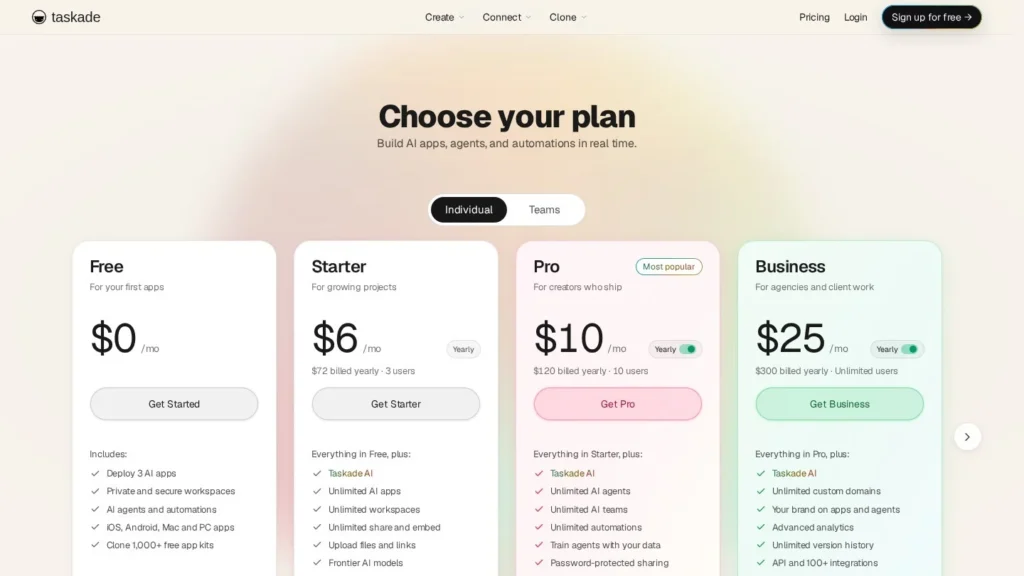
Taskade AI Agents run inside a project workspace where agents with tools and memory, multi-agent teams and background automations share the same tasks and notes, and the Pro plan covers 10 people for $10 a month billed annually. Taskade says it has more than 1 million users and has deployed over 500,000 AI agents.
It suits small teams, agencies and solo operators who want projects and agents in one cheap workspace without per-seat pricing. Large enterprises that need detailed portfolio scheduling or offline work may find a dedicated work management platform a better fit. We rate it 8.8/10 on our scale. We have not used Taskade; this review is based on Taskade’s pricing pages, changelog, company blog and public reviews.
Taskade Covers 10 Users With Unlimited Agents for $10 a Month
- Pro costs $10 a month billed annually for up to 10 users, unlimited agents, 50,000 AI credits and 1,000 automation runs a month.
- A free plan includes 2 users and 1 agent; Business at $25 a month adds unlimited users, SAML SSO and API access.
- Agents have tools and persistent memory, can work as multi-agent teams and trigger automations across 100+ integrations.
- Taskade Genesis, launched in October 2025, builds apps with data, agents and automations from one prompt.
- Taskade reports more than 1 million users, 500,000+ agents deployed and 150,000+ apps hosted.
Taskade by the Numbers
Taskade is a Y Combinator company that has been building since 2017, and most of its numbers come from its own site and changelog.
| Fact | Detail | Source and Date |
|---|---|---|
| Users | More than 1 million | Taskade company blog, updated April 6, 2026 |
| Agents deployed | More than 500,000 AI agents | Taskade company blog, updated April 6, 2026 |
| Apps hosted | More than 150,000 | Taskade company blog, updated April 6, 2026 |
| Automations | More than 1 million running | Taskade company blog, updated April 6, 2026 |
| Seed funding | $5 million led by Grishin Robotics and Y Combinator | Taskade company blog, October 24, 2019 |
| Genesis launch | Prompt-to-app builder launched October 2025 | Taskade changelog, 2025 |
| Multi-agent | Agent orchestration added August 2025 | Taskade changelog, 2025 |
| Pro plan | $10 a month billed annually, 10 users, unlimited agents, 50,000 credits | Taskade pricing page, viewed November 2026 |
| Max plan | 400,000 credits and 320,000 AI requests a day | Taskade pricing page, viewed November 2026 |
| Review rating | 4.6 out of 5 from 68 reviews | Capterra, viewed November 2026 |
The 500,000 agents figure shows how Taskade is used. Agents are not a premium add-on here; even the free plan includes one, and Pro makes them unlimited. That pushes teams to create many small, single-purpose agents rather than one general assistant.
The pricing structure is the other fact buyers should note. Most project tools with AI agents charge per seat. Taskade charges per plan, so a 10-person team on Pro pays the same $120 a year as a team of three.
Projects, Agents and Automations Working Together
Taskade calls its model Workspace DNA: projects for memory, agents for reasoning and automations for action.
Projects as Shared Memory
Projects hold tasks, notes and data in views such as lists and boards. Agents read and write them, so a project doubles as the agent’s working memory. Version history runs from 7 days on Free to 5 years on Max.
Custom Agents
Taskade describes an agent as an AI with tools and knowledge. Since AI Agents v2 in 2024, agents have custom tools and persistent memory. A team can create a research agent, a content agent and a project coordinator, each with its own instructions and access to the relevant projects. Pro and higher plans can use their own OpenAI, Anthropic or Google keys.
Multi-Agent Teams
Since August 2025, agents can work together as a team on one task, with an orchestrator handing parts of the work to specialist agents.
Automations in the Background
Automations run workflows triggered by events, connected to more than 100 integrations including Gmail, Slack, GitHub, Discord, WhatsApp, Google Sheets and Stripe, plus webhooks, HTTP requests and hosted MCP. Run limits range from 10 a month on Free to 10,000 on Business and above.
Genesis Apps From a Prompt
Genesis builds an app and its workspace from one prompt, including the interface, logic, data and automations, without code. Apps can be live dashboards, client portals or internal tools, published with custom domains on Pro and up. Taskade says thousands of apps were built in the months after launch.
A Weekly Client Report, Step by Step
A five-person agency keeps each client in its own Taskade project. On Friday afternoon, an automation triggers a reporting agent. It reads the week’s completed tasks and notes, asks a research agent to pull campaign figures from a connected Google Sheet, drafts a summary and posts it to the client’s channel in Slack for an account manager to approve. Overdue tasks get flagged and reassigned on the board. The agency could also ask Genesis for a client portal that shows project status, then share its link with each client.
Bringing Your Own Model Keys
Pro and higher plans can connect their own OpenAI, Anthropic or Google keys, and Business adds more AI providers. For a team that already pays for a model provider, this can stretch the monthly credit pool, and it gives some control over which model handles sensitive work. Max adds a ceiling of 320,000 AI requests a day for teams running heavy automation.
Templates and the Community Gallery
Taskade added a community gallery in November 2025, and its changelog lists ten community App Kits. A team starting out can copy an existing app or agent setup, such as a client portal or a content pipeline, and adjust it rather than building from a blank prompt. Reviewers on Capterra also call out the range of templates as a reason they picked Taskade.
What Taskade Users Still Decide
Teams decide what agents may touch, review drafts before they reach clients and keep an eye on credits. Agents act on workspace data, so clear project structure makes their work better.
Flat Plans With Monthly AI Credits
Taskade’s annual prices are published. Monthly billing costs more, and Taskade says annual saves 50 percent on Pro and above.
| Plan | Price | Billing | What’s Included | Limits |
|---|---|---|---|---|
| Free | $0 | Monthly | 2 users, 1 agent, 10 automation runs, 250 MB, 3 live apps | No monthly AI credits; earn credits through referrals |
| Starter | $6 a month ($72 a year) | Annual | 3 users, 10,000 credits, 3 agents, 350 runs, 5 GB, 100+ integrations with MCP | 3 users |
| Pro | $10 a month ($120 a year) | Annual | 10 users, 50,000 credits, unlimited agents, 1,000 runs, 100 GB, custom domains, BYOK | 10 users |
| Business | $25 a month ($300 a year) | Annual | Unlimited users, 150,000 credits, 10,000 runs, 1 TB, SAML SSO, API, priority support | Credit pool shared |
| Max | $100 a month ($1,200 a year) | Annual | 400,000 credits, 320,000 AI requests a day, 5-year history | Credit pool shared |
| Enterprise | Custom | Contract | 1.1 million credits, SCIM, premium SLA, onboarding | By agreement |
Paid plans can buy credit packs that do not expire and turn on auto top-up. Taskade’s plan matrix lists Starter as a legacy plan, so new buyers may see Pro as the entry paid tier.
Costs for a Solo Consultant, an Agency and a Growing Company
- A solo consultant: The free plan covers one agent and light automation. Moving to Pro costs $120 a year for unlimited agents.
- A 10-person agency: Pro covers the whole team for $120 a year. The same team on a tool charging $28 per user per month would pay $3,360 a year.
- A 40-person company: Business at $300 a year covers unlimited users, though a shared pool of 150,000 credits may need top-ups if many people use AI heavily.
The variable cost is credits. A team that runs many agents or long automations can exhaust its monthly pool, and some reviewers say credits feel tight. Track usage in the first month and decide between buying packs and moving up a plan.
Taskade AI Agents Compared With ClickUp Super Agents, Notion Agent, monday.com AI Agents and Smartsheet AI
Project tools now all add agents; the differences are price model and depth.
| Agent | Starting Price | Free Plan | Main Strength | Main Weakness | Best For |
|---|---|---|---|---|---|
| Taskade AI Agents | Free; Pro $10 a month annual for 10 users | Yes | Flat pricing, unlimited agents, Genesis apps | Credits can run short; no offline | Small teams and agencies |
| ClickUp Super Agents | $28 per user a month (reported) | No | Agents across a deep project and docs suite | Per-user cost adds up | Teams already on ClickUp |
| Notion Agent | $20 per member a month (Business, annual) | Limited | Agents across docs, wikis and databases | Per-member pricing | Docs-heavy teams on Notion |
| monday.com AI Agents | $9 per seat a month plus AI credits | Limited | Agents on monday boards for triage and routing | Credits required | Business teams on monday.com |
| Smartsheet AI | $9 per member a month (Pro, annual) | No | Enterprise work management with a Claude connector | Agents still in early access | Enterprise project offices |
The price gap is largest for mid-sized teams. A 10-person team pays $120 a year on Taskade Pro, while per-seat tools multiply their monthly rate by every user, so the same team on a $20 per member plan would pay $2,400 a year. Per-seat platforms often bring deeper reporting, permissions and enterprise support in exchange.
Taskade is the low-cost, all-in-one choice. ClickUp, Notion and monday.com make sense for teams already on those platforms, and Smartsheet suits enterprise project offices. See more in our project management AI agents guide.
Small Teams and Agencies Wanting Agents Without Per-Seat Bills
- Agencies and consultancies: Flat plans cover the whole team, and Genesis portals give clients a live view.
- Startups building internal tools: Genesis builds dashboards and portals without code.
- Teams that want many small agents: Unlimited agents from Pro encourage single-purpose agents for each job.
- Linux and mixed-device teams: Taskade runs on web, desktop including Linux, and mobile.
Picking Between Starter, Pro and Business
For most teams the decision comes down to users and agents. Starter fits three people who need a few agents. Pro fits up to ten people who want unlimited agents and custom domains for Genesis apps. Business is the step for any team above ten people, or any team that needs SAML SSO, an admin dashboard or API access. Teams that hit credit limits on Business can buy packs before jumping to Max, since packs do not expire.
Enterprises Needing Deep Scheduling or Offline Work
- Project offices with Gantt-heavy plans: Some reviewers miss Gantt charts; a dedicated scheduling tool may suit them better.
- Teams that work offline: Taskade does not work offline.
- Heavy AI users on small plans: Credit limits may push them to larger plans or packs.
- Organizations needing user provisioning: SCIM comes only with Enterprise.
Credit Budgets and Security Requirements
- AI credits: Monthly credits do not roll over on plans, though packs do not expire. Watch usage early.
- AI prominence: Some reviewers want an easier way to turn AI features off for people who do not use them.
- Billing after trials: One reviewer reported a charge after a trial ended. Check renewal dates.
- Security: SAML SSO starts at Business and SCIM at Enterprise. Ask for security documentation if you need certifications.
- Agent permissions: Decide which projects each agent can read and write before connecting outside tools.
- Feature depth versus Notion: Some reviewers find custom layouts less flexible than Notion. Try your most complex project in the free plan first.
- Export and files: A few reviewers want better file attachments and document export. Test the exports you rely on.
Genesis and Multi-Agent Teams Arrive in 2025
Taskade’s 2025 changelog records the steps: agent orchestration for multi-agent teams in August, the public launch of Taskade Genesis in October, a community gallery, custom domains, Stripe and 100+ integrations in November, and app analytics and encrypted fields in December. CEO John Xie signed off the year promising more triggers and actions in 2026.
A Low-Cost Agent Workspace for Small Teams
Taskade AI Agents score 8.8/10 on our scale. A free plan, flat pricing that covers whole teams, unlimited agents from $10 a month and a broad integration list make it one of the easiest ways for a small team to put agents to work. Taskade could serve larger buyers better by adding Gantt scheduling and publishing security certifications.
Its strongest case is the agency or small business that wants to try agents without a large commitment. Starting on the free plan with one agent, then moving to Pro for $120 a year, keeps the risk small while the team learns what agents can do for its projects.
Small teams can start free and move to Pro once they hit the one-agent limit. Teams already committed to another platform can compare ClickUp Super Agents or Notion Agent.
Teams’ Questions About Taskade Agents
Is Taskade Free?
Yes. The free plan includes 2 users, 1 AI agent, 10 automation runs a month and 250 MB of storage. It has no monthly AI credits, but users can earn credits through referrals, up to 3,500. It is an ongoing plan rather than a time-limited trial.
How Much Does Taskade Pro Cost?
Pro is $10 a month billed annually, or $120 a year, for up to 10 users with unlimited agents, 50,000 AI credits and 1,000 automation runs a month.
Can Taskade Agents Work Together?
Yes. Since August 2025, Taskade supports multi-agent teams, where several agents work on one task together.
What Is Taskade Genesis?
Genesis builds a working app from one prompt, including its interface, data, agents and automations. Apps can be dashboards, portals or client tools, published with custom domains on Pro and up.
Which AI Models Does Taskade Use?
Paid plans include frontier models and Taskade’s own model tiers. Pro and higher can bring their own OpenAI, Anthropic or Google keys, and Business adds more providers.
User Reviews
Nobody has rated it here yet. Be the first AI Agents Choice user to rate Taskade AI Agents.