ChatGPT Wallet is the OpenAI feature that lets a ChatGPT agent pay for things with your own credit card. So yes, it can shop for you, but only with your sign-off on every purchase and only for US ChatGPT Pro users for now. OpenAI launched ChatGPT Wallet on November 13, 2026, inside its always-on agents called dots. Your dot finds the item, fills in the checkout and then asks you to approve the payment with Face ID or a fingerprint.
The name causes some mix-ups. ChatGPT also has a separate wallet balance that holds gift card credit, and that balance can only pay for ChatGPT plans. Then there is Instant Checkout, the older Buy button for Etsy items inside a chat. OpenAI scaled it back in March 2026, eight months before the wallet arrived.
The sections that follow cover who can use ChatGPT Wallet, how to set it up and what it can’t do yet. They also show how your card stays safe, what happened to Instant Checkout and how the wallet compares with Google’s checkout in AI Mode. The last part explains what the change means for online stores.
How ChatGPT Wallet Works With dots
ChatGPT Wallet works as the payment step for dots, the always-on agents OpenAI added to ChatGPT on September 29, 2026. Each dot runs on its own cloud computer with a browser and the apps you connect. You can reach it in ChatGPT, Slack or Teams, and it can work on several tasks at once.
The wallet lives only inside chats with your dot. It does not work in regular Chat, in Work or in standalone Codex threads. So you need to set up a dot before you can add a card. Dots are also separate from the older ChatGPT agent mode, which still comes with Plus and Pro plans.
A purchase runs in four steps:
- You ask your dot to buy something, and it finds the item and fills in the store’s checkout.
- You check the store, the items, the total, the card and any shipping or repeat-payment terms.
- You tap Approve and confirm with Face ID or Touch ID.
- The card network issues a one-time token, and the dot uses it to finish checkout and report the result.
An approval does not prove the store placed the order. If the result looks unclear, look for the store’s own confirmation email before you pay another way.

Who Can Use ChatGPT Wallet Right Now
ChatGPT Wallet is open only to ChatGPT Pro subscribers in the US who are 18 or older and hold an eligible US-issued credit card. It is rolling out in stages, so it may not show up on every Pro account yet.
| Requirement | Works | Does not work |
|---|---|---|
| Plan | ChatGPT Pro | Other plans for now |
| Where you live | The US, with a US billing address | Accounts outside the US |
| Age | 18 or older | Under 18 |
| Card brand | US-issued American Express, Chase, Mastercard and Visa credit cards | Debit cards |
| Card type | Physical credit cards | Virtual cards at launch |
| Chase cards | Primary cardholder | Authorized users |
| Where you chat | Conversations with your dot | Chat, Work and standalone Codex threads |
Your first dot comes with Pro at no extra cost. For approvals you need a phone or computer that can run a fingerprint or face check. If your current device can’t, ChatGPT gives you a link or QR code to approve on another device signed in to the same account.
How to Add a Card and Approve a Purchase
You add a card to ChatGPT Wallet by asking your dot to add one. In the mobile app, you can also go to Settings, then Wallet, then Add Card. The steps take a few minutes:
- Ask your dot to add a card, or open Settings, Wallet, Add Card.
- Type the card number, expiry date and security code into the secure form. For American Express, use the four-digit code on the front.
- Read the Wallet terms and privacy notice, then tap Add card.
- Finish any check your bank asks for.
- Wait for the Card added message before you start a purchase.
Chase cards need one extra step. You install the Chase app, sign in with your fingerprint or face, and approve the link inside the app. On a computer, you scan a QR code with your phone instead.
Never type a card number into the chat itself. The secure form keeps it out of the conversation. To stop a purchase, decline it before you approve. Once you approve, any cancellation goes through the store.
To remove a card, ask your dot to remove it by its last four digits, confirm the right card, then ask to see your saved cards. Removing a card does not cancel past orders or close the card with your bank.
What ChatGPT Wallet Can’t Do Yet
ChatGPT Wallet can’t buy anything without your approval, can’t use debit cards and can’t finish checkout at every store. These are the limits that matter most in daily use:
- No hands-off buying. Every purchase needs a fingerprint or face check. Spending caps that let a dot buy on its own are a plan for later.
- Not every store works. Some checkouts fail, and sites that block agents won’t let the dot through at all.
- Narrow card support. Debit cards, virtual cards and Chase authorized-user cards are out.
- US Pro users only. Other plans and other countries have to wait.
- Returns stay with the store. The store handles returns, refunds and cancels under its own policy.
- Repeat charges stay with the store too. For a subscription, the store may keep the payment token and charge it again under the terms you approved.
Stores may also ask for your name, phone number, email and billing or delivery address. The dot passes those along so the order can ship.
Read also: What Can an AI Agent Fix in Your Store’s SEO?
How ChatGPT Wallet Keeps Your Card Details Safe
ChatGPT Wallet keeps your card details safe by paying with a token from the card network. Neither the dot nor the store sees your real card number. The token stands in for the card at checkout. As a result, the number the store sees may differ from the one on your card.
Each approval also creates a record of exactly what you agreed to buy. If the store charges something else, that record backs your case. The right contact depends on the problem:
| Problem | Who to contact |
|---|---|
| Return, refund or cancel after approval | The store |
| Declined, pending or unknown charge | Your card issuer |
| Bank check fails when adding a card | Your card issuer |
| Purchase differs from what you approved | OpenAI Support |
| Wallet error or signs of someone else using it | OpenAI Support |
Dots add their own safety rules on top. Custom Rules let you allow, require approval for or block set actions. Certain sensitive jobs, such as a password change, always stay with you. Dots can still make mistakes, so check important results. Our guide to AI agent guardrails covers how limits like these work in other agents.
ChatGPT Wallet vs the ChatGPT Wallet Balance
ChatGPT Wallet and the ChatGPT wallet balance are two different things. The first pays stores through your dot. The second is a US dollar balance for ChatGPT plans, filled by OpenAI gift cards and account credits.
The balance pays for Go, Plus, Pro and Business plans and renewals on the web. It can’t pay for API credits or for plans billed through the Apple App Store or Google Play. You can’t withdraw it to a bank or card, and it only works on US accounts billed in dollars. You can check it under Settings, then Billing.
What Happened to Instant Checkout
Instant Checkout, the Buy button that let you pay for Etsy items inside a chat, was scaled back in March 2026 after about six months. OpenAI launched it on September 29 of last year for US users on the Free, Plus and Pro plans. Shoppers could buy single items from US Etsy sellers, and over a million Shopify merchants, including Glossier, SKIMS, Spanx and Vuori, were due to follow.
The button was free for shoppers. Stores paid a small fee on each completed sale. Payment ran on a Stripe Shared Payment Token, which was locked to one store and one cart total.
On March 24, 2026, OpenAI changed course. The first version of Instant Checkout lacked the flexibility OpenAI wanted. So stores went back to their own checkout pages, and OpenAI shifted its effort to helping people find products. Stores could still offer checkout through their own apps inside ChatGPT for a time.
Shoppers had not taken to buying in a chat anyway. A Forrester survey from March 2026 asked regular answer engine users in the US, UK and Canada what they use them for. Finishing a purchase inside the engine was the least used task. Asking general questions and researching products came first and second.
The Agentic Commerce Protocol After Instant Checkout
The Agentic Commerce Protocol, or ACP, is still an open standard from OpenAI and Stripe, now pointed at linking shoppers to stores from search to sale. It is open source under the Apache 2.0 license. OpenAI was the first AI platform to use it, and Stripe was the first payment firm to support it.
ACP sends each order to the store’s own back end. The store then accepts or turns down the order, charges the card, works out sales tax and handles shipping and returns. PayPal agreed to adopt ACP in October of last year. Ways for AI platforms to find stores that support ACP are still being built.
ChatGPT Wallet Compared With Instant Checkout and Google’s AI Mode Checkout
ChatGPT Wallet differs from both Instant Checkout and Google’s checkout because your dot pays on the store’s own checkout page with a one-time token. Instant Checkout kept the sale inside ChatGPT. Google’s checkout built on its Universal Commerce Protocol puts a Buy button on product listings in AI Mode and Gemini.
| Detail | ChatGPT Wallet | Instant Checkout | Google AI Mode checkout |
|---|---|---|---|
| Who can buy | US Pro users aged 18 or older | US Free, Plus and Pro users | Shoppers of eligible products in the US, Canada and Australia |
| Where the sale happens | The store’s own checkout, run by your dot | Inside the ChatGPT chat | On Google, in AI Mode and Gemini |
| How you pay | Amex, Chase, Mastercard or Visa credit card, sent as a token | Card on file or other card and express pay | Google Pay with details saved in Google Wallet |
| Stores | Any store the dot can check out on | US Etsy sellers, with Shopify stores planned | Select stores that join the program |
| Status in November 2026 | Rolling out | Scaled back in March 2026 | Open to select stores |
Other shopping agents take their own routes. Perplexity Comet is a browser with a built-in agent, and Alexa for Shopping works inside Amazon. Our list of AI shopping agents compares more of them.
How Many People Shop Through ChatGPT
Few people buy through ChatGPT yet, though many use it to look for products. Forrester ran its Consumer Pulse Survey in December of last year. By then, 35% of US Gen Z online adults had used ChatGPT to search for products in the past month. The share was 32% for Millennials and 23% for Gen X, and older groups were in single digits.
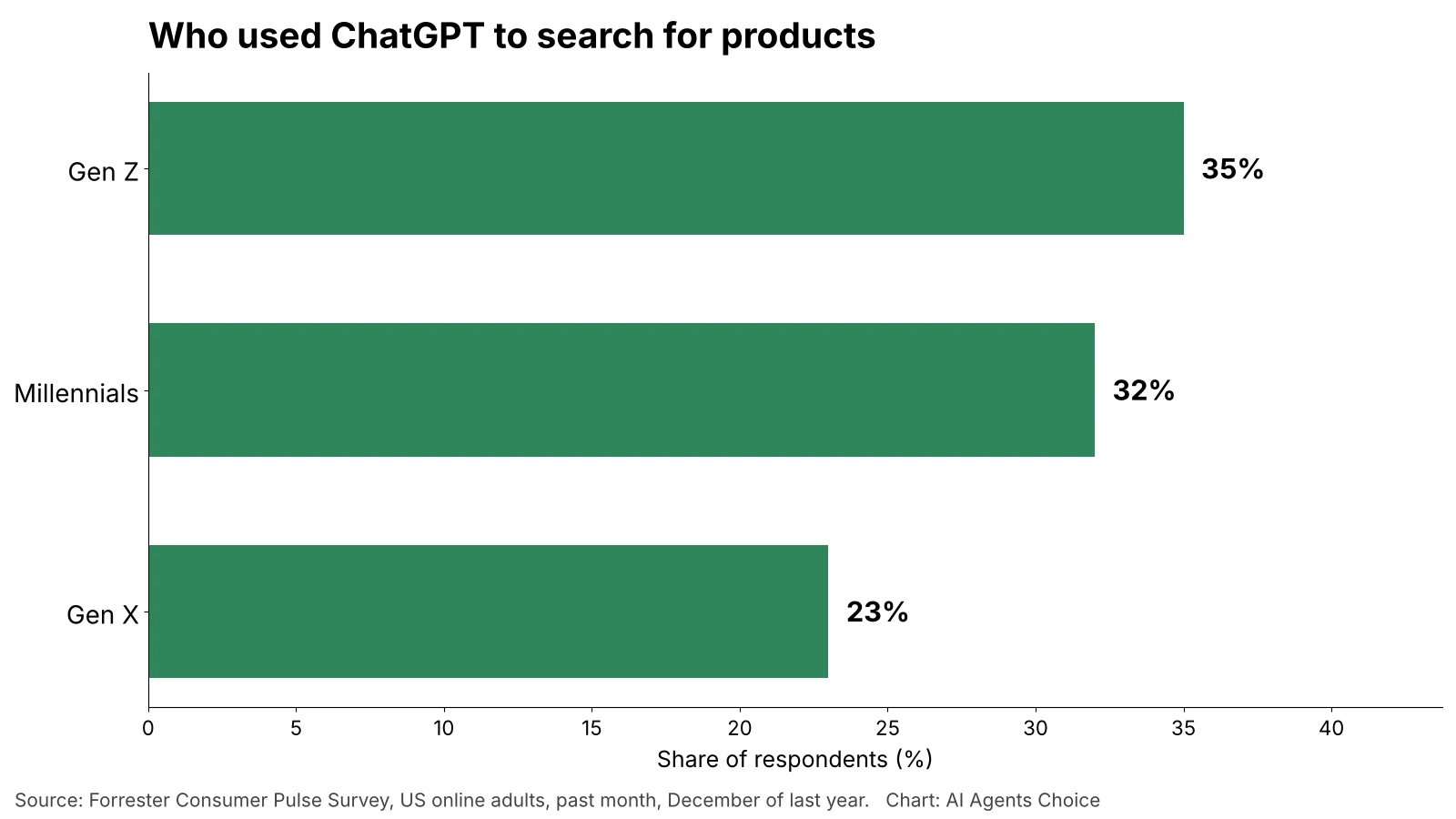
So the gap is between looking and paying. Shoppers use ChatGPT to compare and research, then most still pay on the store’s site. ChatGPT Wallet tries to close that gap by letting the dot do the paying, with you still in charge of the final tap.
What ChatGPT Wallet Means for Online Stores
For online stores, ChatGPT Wallet means a dot may land on your own checkout page with a tokenized card and try to finish the sale. If your site blocks agents, that sale fails. Chaya Nayak, who leads product for payments at OpenAI, told CNBC the first goal is to build a base with stores and card networks.
Getting found comes first. Product results in ChatGPT are not ads. Stores selling the same item are ranked on stock, price, quality and if they make or mainly sell it. Shopify stores reach ChatGPT through Shopify Catalog with no extra work. Other stores can apply for a direct product feed.
These steps help a store get ready for dot shoppers:
- Check your bot rules. Make sure your fraud and bot tools do not block real agent sessions that carry a valid card token.
- Keep product data fresh. Price, stock and shipping cost must match what ChatGPT shows, or the dot hits a surprise at checkout.
- Send plain confirmation emails. Shoppers are told to look for the store’s own confirmation when a dot’s result is unclear.
- Write plain repeat-billing terms. Subscription terms show up on the approval screen, so short terms are easier to approve.
For the search side of the same shift, see our guide to AI agents for ecommerce SEO.
ChatGPT Wallet Questions
Does ChatGPT Wallet Cost Anything to Use?
ChatGPT Wallet has no transaction fees for now, but it needs a ChatGPT Pro plan. OpenAI has not added a charge per purchase, and the first dot comes with Pro at no extra cost.
Will ChatGPT Wallet Ever Buy Without Asking Me?
ChatGPT Wallet may one day buy without asking each time, within limits you set. OpenAI plans to let users hand purchases to their agent with a spending cap, set purchase types or a time window. For now, every purchase needs your fingerprint or face check.
Do I Keep My Card Rewards With ChatGPT Wallet?
Yes, you keep your card rewards with ChatGPT Wallet. Purchases also keep your card’s protections for eligible disputes, since the charge runs on your own card through its network.
Who Built ChatGPT Wallet With OpenAI?
OpenAI built ChatGPT Wallet with American Express, Chase, Mastercard and Visa. Forter, Riskified, Sardine and Signifyd handle fraud checks. Adyen, Checkout.com and Stripe process the payments.
Read also: Best Regie.ai Alternatives for AI Prospecting and Outbound