

Long-running AI agent tasks fail less often when you keep the active context small, store state outside the model, and checkpoint every step so a crash costs one step instead of the whole run. The need is real: frontier models succeed on almost 100% of tasks that take humans under 4 minutes but under 10% of tasks that take over about 4 hours, based on METR’s March 2025 study. Length itself is the problem, so the fix is mostly engineering around the model.
Three layers do the work. Context management (compaction, clearing old tool results) keeps each model call lean. Durable state (checkpoints, sessions, progress files) lets the agent pick up where it stopped. Human checkpoints pause the run for approval without losing anything. The doubling time of the 50% task horizon is about 7 months, so the tasks you hand agents will keep getting longer.
Below, each layer comes with the actual settings in the Claude API, LangGraph, the OpenAI Agents SDK and Temporal, then covers token cost and approval gates. If you are new to the topic, start with our primer on context engineering for AI agents.
Why Long Agent Tasks Break: Context Rot and Hard Token Limits
Every model call sees a finite window. Recent Claude models such as Opus 4.6 and later, Sonnet 4.6 and later, and Haiku 5.5 have a 1M token context window with up to 128k output tokens, while older ones like Haiku 4.5 sit at 200K. If the input alone exceeds the window, the API returns a 400 error with “prompt is too long”. On Claude 4.5 and newer, a response that runs into the limit stops with model_context_window_exceeded.
A big window does not mean the model uses it well. A July 2025 test of 18 LLMs from Anthropic, OpenAI, Google and Alibaba concluded that models do not use their context uniformly, and reliability drops as input grows, even on simple tasks. A single distractor lowered accuracy, and four made it worse. On LongMemEval, every model family scored higher on focused prompts than on full-length ones.
For a long agent run, that means two separate risks. The hard limit ends the run with an error. The soft limit, context rot, lets the run continue while the agent quietly gets worse at following its plan. Design for both: trim context well before the limit, and keep the plan somewhere the agent can reread.
- Track input tokens for every call and alert well below the window size.
- Treat old tool output (search results, file dumps, logs) as the first thing to drop.
- Keep the task plan and status in a file or store, not only in the conversation.
Compaction and Context Editing Keep the Active Window Small
Compaction replaces older turns with a summary. On the Claude API, compaction runs on the server, so you do not write summarization code. You can trigger it on demand, at a token threshold, or roll your own summarizer. On-demand compaction uses the beta header compact-2026-09-04, and both server modes are in beta.
Threshold compaction uses the edit type compact_20260112. The default trigger is 150,000 input tokens, and the minimum is 50,000. Set pause_after_compaction to true and the API stops with stop_reason: "compaction", so you can reinsert recent turns or save the summary before continuing. Custom instructions replace the default summary prompt entirely, so include everything the agent must keep.

Context editing is a lighter tool. The clear_tool_uses_20250919 strategy removes old tool results once the prompt passes a trigger. Its defaults are a 100,000 token trigger and keeping the 3 most recent tool uses. Use exclude_tools for tools whose results must stay, and clear_at_least so each clear is big enough to justify breaking the prompt cache.
| Technique | What It Removes | Default Trigger | Best For |
|---|---|---|---|
| Threshold compaction | Older turns, replaced by a summary | 150,000 input tokens | Long chats and agent loops |
| On-demand compaction | Older turns, when you ask | You decide | Harnesses with their own checkpoints |
| Tool result clearing | Old tool results (and inputs if set) | 100,000 input tokens | Tool-heavy research or coding agents |
| Thinking block clearing | Thinking from earlier turns | Keeps 1 turn when enabled | Long reasoning runs |
The gains are measurable. In Anthropic’s internal agentic search evaluation from September 2025, context editing alone improved performance by 29%, and the memory tool plus context editing by 39%. In a 100-turn web search test, context editing cut token consumption by 84%. Start with tool result clearing, since it is cheap and predictable, then add compaction for runs that still grow past your threshold.
Memory Files and Progress Logs Give the Agent State It Can Reread
Summaries lose detail. Files do not. The Claude memory tool lets the model read and write files under /memories on storage you control, with six commands: view, create, str_replace, insert, delete and rename. The tool runs client-side, so your code executes every operation.
Your handler must validate paths. A value like /memories/../../secrets.env can escape the folder unless you decode it, reject .. segments, resolve it, and confirm it stays under the root. Cap file sizes, cap how much view returns, and expire files nobody has opened in a long time.
The memory docs pair it with compaction for long-running agents: compaction keeps active context small, and memory keeps facts that must survive summarization. Anthropic’s harness for long-running coding agents turns this into a pattern you can copy. An initializer agent runs first and creates an init.sh script, a claude-progress.txt log and an initial git commit. Every later session reads those files, works on one feature, commits, and updates the log.
The feature list is the key detail. In the claude.ai clone example it held over 200 features in JSON, each starting as "passes": false. Agents could only flip that flag after testing, never edit or delete the tests. JSON was chosen because models are less likely to rewrite it improperly than Markdown.
- Keep one progress file the agent reads at the start of every session and writes at the end.
- Use git commits as restore points, with descriptive messages the next session can scan.
- Store the task list as structured data with a pass or fail field, not as prose.
- Run a basic smoke test at session start so the agent sees breakage before adding more work.
For a wider view of memory options, see our guide on AI agent state across sessions.
Read also: AI Agent State Machines: Managing Complex Workflows
Checkpointing With LangGraph Persistence and a Postgres Saver
LangGraph saves a snapshot of graph state through a checkpointer, keyed by a thread_id you pass in the config. Those checkpoints power conversation continuity, human-in-the-loop workflows, time travel and fault tolerance. A separate store holds long-term key-value data across threads.
Pick the checkpointer for the environment. InMemorySaver keeps checkpoints in RAM, so a restart wipes them. SqliteSaver writes a local file and suits development. PostgresSaver and AsyncPostgresSaver are the production options, and you call checkpointer.setup() once to create tables and indexes.

| Checkpointer | Survives Restart | Use It For |
|---|---|---|
| InMemorySaver | No | Tests and notebooks |
| SqliteSaver | Yes, single machine | Local development |
| PostgresSaver / AsyncPostgresSaver | Yes | Production agents |
Three operational details matter on long runs. Keep Postgres thread_id values under 255 characters. Checkpoints pile up over long conversations, so prune them with a scheduled job. Each subgraph has its own checkpoint namespace, so use the store for data that must cross graph boundaries.
OpenAI Agents SDK Sessions Hold Conversation History Between Runs
The OpenAI Agents SDK handles history through sessions. Before each run, the runner loads session history and prepends it to the new input, and after the run it stores new items such as user input, responses and tool calls. You no longer call .to_input_list() between turns.
| Session Type | Storage | Fit |
|---|---|---|
| SQLiteSession | In-memory or file | Prototypes and single-process apps |
| RedisSession | Redis | Shared memory across workers |
| SQLAlchemySession | Any SQLAlchemy database | Production apps |
| OpenAIConversationsSession | OpenAI Conversations API | Server-side history |
| OpenAIResponsesCompactionSession | Wraps another session | Automatic history compaction |
| EncryptedSession | Wraps another session | Encryption and TTL |
For long tasks, two settings help. SessionSettings(limit=N) retrieves only the N most recent items, and the compaction session summarizes stored history through the Responses API. Compaction runs after turns by default and can hold a stream open for a few seconds, so call run_compaction() yourself if latency matters.
Mind the security gaps. EncryptedSession does not verify the completeness or order of history, and SQLiteSession does not authenticate stored rows. Lock down the database file and check that each caller may access the session ID it requests.
Durable Execution With Temporal Resumes After Crashes
Checkpoints save state. Durable execution also replays the work. With Temporal, a workflow resumes automatically after a crash, a network timeout or a multi-day wait for human approval. Completed steps are not redone, and failed steps retry in isolation.
Temporal and OpenAI launched an integration with the OpenAI Agents SDK in July 2025, in public preview for the Python SDK. Work resumes from the point of failure instead of rerunning LLM calls, which saves tokens. Temporal’s AI docs also cover 12 agent frameworks, including LangGraph, Google ADK, Pydantic AI, the Claude Agent SDK and Mastra.
Whatever runtime you use, apply the same rules to resume safely:
- Make tool calls idempotent, or record a key so a retried payment, email or ticket is not sent twice.
- Persist the result of every model call and tool call before moving on.
- Use the Saga pattern for multi-step changes, with a compensating action for each step.
- Send heartbeats from long activities so the runtime can tell slow from dead.
- Deploy new agent versions without killing running ones. Anthropic uses rainbow deployments that gradually shift traffic for this.
Resume beats restart. Anthropic’s research team built systems that resume from where the agent was when errors occurred, instead of starting a long research run over. Model each step explicitly so you always know where to restart.
Token Cost Grows Fast on Long Runs
Long tasks are expensive by nature. Agents typically use about 4× more tokens than chat interactions, and multi-agent systems about 15×, taking a single chat as 1×. On the BrowseComp evaluation, token usage by itself explained 80% of the variance in performance, so spending more often works, but it adds up.
Compaction has its own bill. It needs an extra sampling step, and the top-level usage.input_tokens and output_tokens exclude the compaction iteration. In the documented example, the top line reads 24,000 tokens, but the true total is 180,000 + 3,500 + 23,000 + 1,000, or 207,500 tokens. Sum every entry in usage.iterations to get real cost. Reapplying an existing compaction block costs nothing extra.
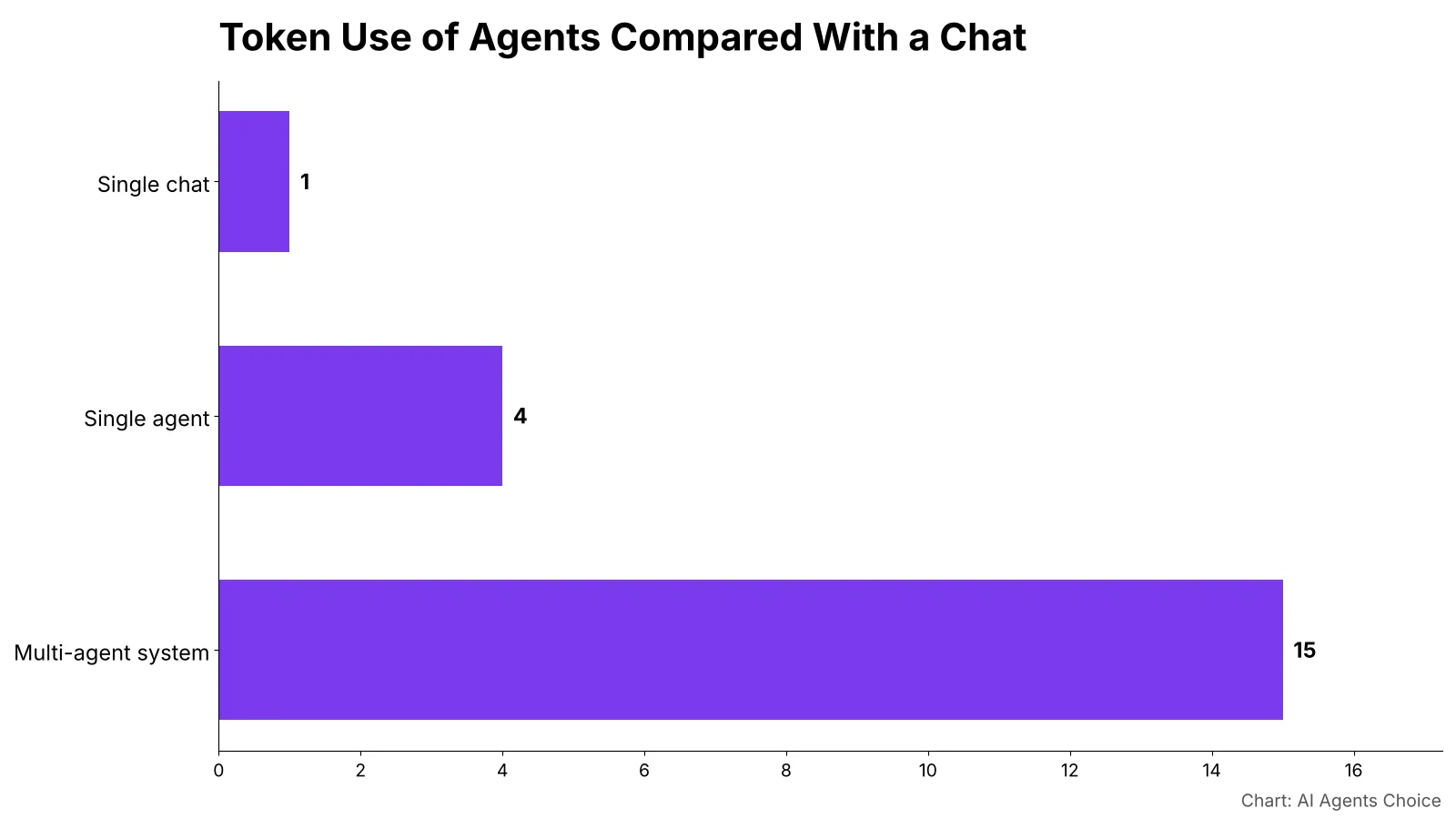
Practical ways to keep the bill in check:
- Log the full
usage.iterationsarray, not just the top-level numbers. - Set
clear_at_leastso tool clearing does not break the prompt cache for small savings. - Resume from checkpoints instead of rerunning completed model calls.
- Cap a run with a token budget and stop for review when it is hit.
For deeper tactics, read our breakdown of AI agent token consumption.
Human Checkpoints That Survive Restarts
Long tasks often need a person to approve a step. In LangGraph you call interrupt() inside a node, the checkpointer saves state, and you resume later with Command(resume=...) on the same thread_id. Because state is persisted, the approval can come hours later from a different process.
One detail trips people up. On resume, the node reruns from its start, so code before interrupt() executes again. Put non-idempotent actions after the interrupt, keep the order of multiple interrupts fixed, and never wrap interrupt() in a bare try/except.
In Temporal, the Approval pattern uses Signals to wake a waiting workflow. On the Claude API, pause_after_compaction gives a natural review point too. Good places to stop for a human:
- Before any irreversible action such as payments, deletions or outbound email.
- When the token budget or time budget for the run is reached.
- After compaction, to confirm the summary kept the plan intact.
- When the agent wants to mark a major task as done.
Our guide on human-in-the-loop orchestration covers approval UX and routing in more depth.
Read also: How AI Agents Maintain State Across Sessions: Checkpoints, Sessions and Memory Stores
Questions Builders Ask About Long-Running Agent Tasks
How Long Can an AI Agent Run Before It Fails?
It depends on the task, not the clock. Models handle short tasks almost perfectly but succeed on under 10% of tasks that take humans over about 4 hours. Breaking work into small verified steps with saved state is what extends the useful run time.
Should I Use Compaction or a Memory Tool?
Use both. Compaction keeps the active window small, and a memory tool or progress file keeps the facts and plan that a summary might drop. Start with tool result clearing, then add compaction for runs that still grow.
Is an In-Memory Checkpointer Enough for Production?
No. InMemorySaver loses everything on restart. Use PostgresSaver or another durable backend, and prune old checkpoints on a schedule.
Do I Need Temporal if I Already Use LangGraph?
Not always. LangGraph checkpoints cover state and resume. Temporal adds retries, timers, heartbeats and crash recovery across the whole workflow, which matters when runs span days or call many external systems. Temporal also integrates with LangGraph directly.
How Do I Stop a Resumed Agent From Repeating Actions?
Make tool calls idempotent, persist each result before the next step, and place side effects after any interrupt. The AI agent deployment checklist includes these checks.
Related Articles
 GuidesAI Agent State Machines: Managing Complex Workflows
 GuidesHow AI Agents Maintain Context Across Multiple Tasks
 GuidesAutoGPT Alternatives for Running AI Agents Locally
 GuidesWhat Is Context Engineering for AI Agents? Techniques, Origins and Token Math
 GuidesHow AI Agents Maintain State Across Sessions: Checkpoints, Sessions and Memory Stores
 GuidesSmall Business AI Agents Tasks Statistics
