

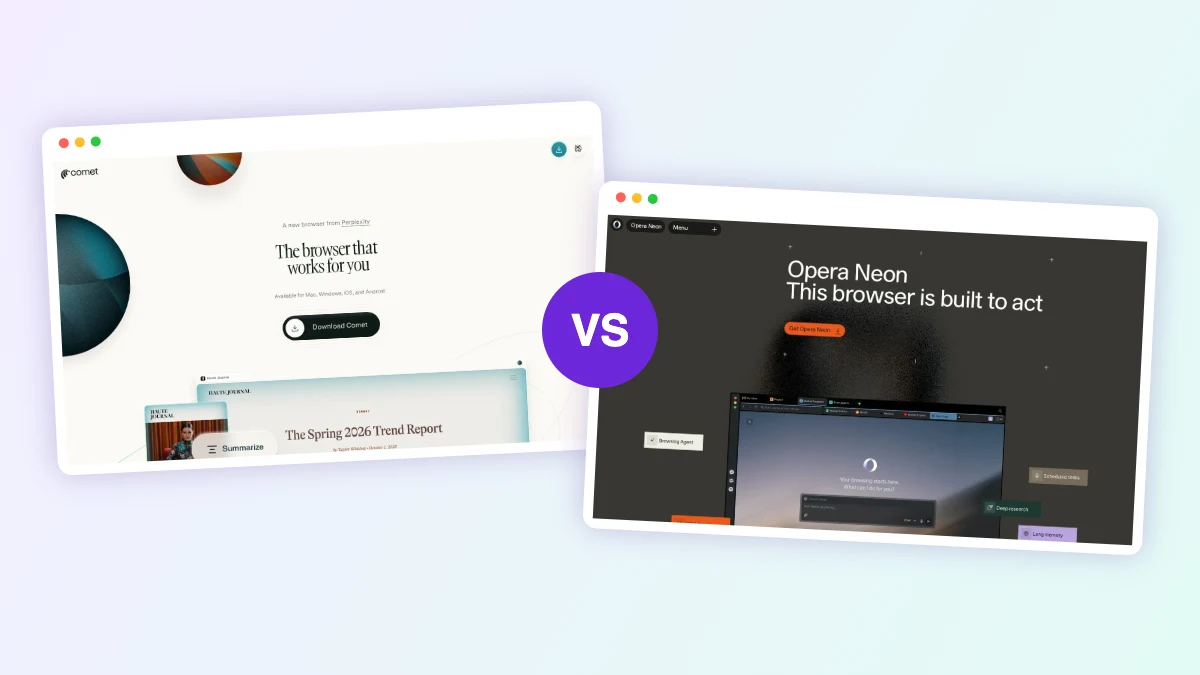
Perplexity Comet and Opera Neon are both AI browsers that can read pages, research topics and click through web tasks for you, but they are priced and built for different people. Comet gives away its browser and agent on Windows, macOS, Android and iPhone, and charges only when you want more capacity through Perplexity Pro at $20 a month or Max at $200. Neon runs on Windows and macOS, keeps its own agents behind a Neon Standard plan at $19.90 a month, and offers something Comet does not: a free way for outside agents such as Claude, ChatGPT and n8n to control the browser. For most people who want a free AI browser, Comet is the easier pick, while power users and developers who want several agents and models in one place will get more from Neon.
This comparison is based on each company’s published plans, product updates and independent reporting. We did not test either browser hands-on.
Comet or Neon for Everyday Browsing
- Price to start: Comet’s browser and assistant are free, while Neon’s free plan covers browsing, basic chat and connecting your own agents, with Neon’s built-in agents on the $19.90 Standard plan.
- Platforms: Comet runs on Windows, macOS, Android and iOS, and Neon runs on Windows and macOS only.
- Agent style: Comet carries out tasks in your browser while you watch and adds background assistants on Max, whereas Neon splits work across agents such as Neon Do, Make and a deep research agent.
- Open to other agents: Neon’s MCP Connector and command-line tool let Claude, ChatGPT, n8n and others drive the browser, which is its clearest advantage.
- Business use: Comet has an Enterprise edition with MDM deployment and admin control over agent actions, while Neon is sold as individual subscriptions and is still labeled experimental by Opera.
Comet and Neon by Price, Platform and Agent Features
The table pulls together the main facts from each company’s published plans. Both browsers change quickly, so check the current terms before you subscribe.
| Perplexity Comet | Opera Neon | |
|---|---|---|
| Maker | Perplexity | Opera, a Nasdaq-listed browser company founded in 1995 |
| Platforms | Windows, macOS, Android, iOS | Windows, macOS |
| Free plan | Browser, sidecar assistant and agent tasks while you watch | Browser, ad blocker, free VPN, basic AI chat, MCP Connector and CLI |
| Paid plans | Pro $20 a month or $200 a year; Max $200 a month or $2,000 a year | Neon Standard $19.90 a month |
| Built-in agents | Comet assistant, Perplexity Computer, background assistants on Max | Neon Do, Make, Chat and Opera Deep Research Agent |
| Background work | Background assistants and scheduled jobs on Max, using Computer credits | Scheduled tasks on Standard |
| Models | Models from OpenAI, Anthropic and others on paid plans, with earlier access on Max | Models from OpenAI, Anthropic and Google on Standard |
| Agent access | Comet’s own assistant and Perplexity Computer | MCP Connector for Claude, ChatGPT, Lovable, n8n and OpenClaw, plus a local CLI |
| Business edition | Comet Enterprise with MDM and admin action controls; from $40 per seat a month | Free and Standard plans for individuals |
| Status | Generally available | Labeled experimental by Opera |
| Best fit | Anyone who wants a free AI browser across desktop and phone | AI power users and developers who want many agents in one browser |
Two lines in that table carry most of the weight. Comet’s free plan and four-platform reach make it the default for ordinary users, while Neon’s support for outside agents makes it the more interesting tool for people who already build or run AI agents of their own.
How Perplexity Comet Works

Comet is a full Chromium browser with Perplexity’s assistant in a sidecar panel next to every page and Perplexity’s answer engine in place of the usual search box. You can ask the assistant about the page in front of you or have it summarize a long article. You can also highlight text to fact-check, define, summarize or translate it in a small floating panel.
The agent side is where Comet earns the “agentic” label. You can ask the assistant to compare products across several sites, fill in a form or work through a multi-step task. It then opens pages and clicks through the steps in your own browser while you watch. You can take over at any point, and permission prompts appear before the agent acts. Since July 2026, Perplexity’s Computer agent has been available inside the Comet assistant, so longer research and multi-step work can run without leaving the current page.
What Paid Plans Add
The free tier mostly works in front of you, inside your logged-in browser. Max subscribers get background assistants that work through several tasks at once, report progress on a dashboard and send a notice when they finish. These jobs can also run on a schedule, such as a daily summary of email and calendar. Max also includes a Max Assistant mode that uses reasoning models for harder tasks, the highest weekly limit on browser agent queries, and 10,000 Computer credits a month. Pro sits in between, with higher limits and a one-time bonus of about 4,000 Computer credits rather than a monthly allowance.
For companies, Comet Enterprise launched in March 2026. It lets IT teams deploy the browser silently through MDM tools on macOS and Windows and restrict which actions the agent may take, with security controls developed alongside CrowdStrike.
Comet’s Risks
Security researchers have repeatedly shown that hidden instructions on web pages can steer AI browsers, and Comet has been a frequent target. LayerX showed an attack it called CometJacking, in which a crafted link made the agent pull data from connected Gmail and Calendar accounts. Perplexity first marked those reports “Not Applicable.” Comet also drew a lawsuit from Amazon over its shopping agent. A federal appeals court overturned the injunction against Comet in August 2026, but the case itself continues.
How Opera Neon Works

Neon looks like a normal desktop browser, but Opera has built AI into it at three levels: workspaces for organizing AI work, agents that act on the web, and connections that let outside agents take control. Tasks are workspaces that group tabs and chats around one project, such as researching a purchase across several sources. Cards are reusable prompts, and you can write your own or pick from a community collection.
Neon’s Built-In Agents
Neon Do works inside a Task to browse the web, check sources, gather information and complete forms for you. Make builds things, and Opera’s Standard plan lists image and video generation and code with deploy options among its features. The Opera Deep Research Agent, added in October 2025, splits a question into parts, runs separate researchers in parallel on Opera’s servers and combines the results. In February 2026 Opera added an Intelligent Mode that picks the right agent for each request automatically, so you do not need to remember what each one does.
Neon Standard also brings models from OpenAI, Anthropic and Google, along with skill cards, scheduled tasks, long memory and Google connectors. One subscription therefore covers several model providers, which matters for people who would otherwise pay for more than one chatbot.
Letting Outside Agents Drive
Neon’s most distinctive feature is that it opens the browser to other people’s agents. Since March 2026, an MCP Connector has let AI clients including Claude, ChatGPT, Lovable, n8n and OpenClaw act inside Neon, with Neon working as an MCP server. In August 2026 Opera made that free, along with an Opera Browser CLI that runs locally without sign-in. The CLI compresses page content so agents spend fewer tokens reading pages, and launch coverage reported savings of up to 66%. MCP connections require an Opera account, while plain browsing does not.
For a developer, this means an agent can work in a real desktop browser with your own logins instead of a remote cloud browser. That is useful for testing, but it also means any connected agent acts with your sessions, so connect only tools you trust.
Neon’s Risks
Opera still describes Neon as experimental, which means features, plans and prices can shift from month to month. Neon is also exposed to the same class of risk as Comet, because any agent that reads web pages and acts in logged-in sessions can be steered by malicious content. Opera sells Neon as individual subscriptions, so businesses that need central billing or admin controls will find Comet Enterprise a better fit.
Read also: Lovable vs v0: Which AI App Builder Should You Use?
Pricing Compared
Comet’s pricing is part of Perplexity’s wider subscription range, while Neon has a single paid tier. The table below lists the plans most buyers will consider.
| Plan | Price | What it adds |
|---|---|---|
| Comet free | $0 | Browser, sidecar assistant, inline tools and agent tasks while you watch |
| Perplexity Pro | $20 a month or $200 a year | Higher limits and a one-time bonus of about 4,000 Computer credits |
| Perplexity Max | $200 a month or $2,000 a year | 10,000 Computer credits a month, background assistants, Max Assistant mode |
| Perplexity Enterprise Pro | $40 per seat a month | Comet Enterprise controls and 500 Computer credits per seat |
| Neon free | $0 | Browser, ad blocker, VPN, basic chat, MCP Connector and CLI |
| Neon Standard | $19.90 a month | Neon agents, deep research, image and video, code, scheduled tasks, full model choice |
At the entry paid level the two are close. Neon Standard costs $238.80 a year, while Perplexity Pro costs $240 a year on monthly billing or $200 on annual billing. The real gap appears higher up, since Perplexity Max costs $2,400 a year on monthly billing or $2,000 on annual billing, and Neon has no equivalent tier.
What Each Costs in Practice
These examples apply list prices to assumed usage, so treat them as a guide rather than a quote.
A student or casual researcher: Comet costs nothing for page questions, summaries and supervised tasks, and Neon’s free plan only includes basic chat, so Comet is the better free option.
A consultant who wants deep research and many models: Neon Standard at $19.90 a month bundles OpenAI, Anthropic and Google models with a deep research agent. Perplexity Pro at $20 a month gives higher limits and a one-time credit bonus. At this level, the choice comes down to which interface you prefer.
A developer testing an agent: Neon’s free plan covers it. You can point Claude, ChatGPT or an n8n workflow at the browser through MCP or the CLI at no cost from Opera, though your model provider may still charge you.
A ten-person research team: Perplexity Enterprise Pro costs $400 a month for ten seats, with Comet Enterprise controls and 5,000 Computer credits a month. Ten separate Neon Standard plans would cost $199 a month, but each person would subscribe alone.
Which One Should You Pick
The right choice depends on which devices you use, how much you want the browser to do on its own, and whether you plan to bring your own agents.
You want a free AI browser on your laptop and phone: choose Comet, because it is free on Windows, macOS, Android and iPhone and its assistant works without a subscription. Neon does not run on phones.
You want to hand off long jobs and check back later: Comet with Perplexity Max is the stronger option. Its background assistants run several tasks at once and report back when done. The $200 monthly price only makes sense if those jobs save real time.
You switch between ChatGPT, Claude and Gemini models: Neon Standard bundles models from OpenAI, Anthropic and Google for $19.90 a month, which may replace more than one separate subscription.
You build agents or run automations in n8n: choose Neon, because its free MCP Connector and CLI let your agents work in a real desktop browser. For high-volume work in the cloud, a framework such as Browser Use or a hosted service such as Airtop may fit better, and our page on browser automation agents compares more options.
Your IT team wants to roll out an AI browser: Comet Enterprise is the only one of the two with MDM deployment and admin control over agent actions.
You mainly want finished reports, slides or apps rather than browsing help: a general agent such as Manus or ChatGPT Work may suit you better, and our Manus vs Genspark comparison covers that category.
How to Use Either Browser Safely
Both browsers let an AI agent act inside your logged-in sessions, so a few habits lower the risk. Keep banking, health and HR accounts in a separate browser or profile where the agent is never used. Connect as few accounts as possible to the assistant, and read each permission prompt before you approve it, especially for purchases and form submissions.
On Neon, connect only outside agents you trust, since they act with your cookies once linked. On Comet, check what the agent did after any task that touched email or calendar data. These steps will not remove the risk of hidden instructions on web pages, but they limit how much damage a hijacked agent could do.
Which AI Browser We Would Pick
Comet is the better browser for most people. It is free on four platforms, its assistant handles everyday research and shopping comparisons well, and Perplexity’s paid plans add real capacity when you need it, along with an Enterprise edition for companies. Its main drawbacks are its security record and the open legal fight with Amazon, so it is best kept away from sensitive accounts.
Neon is the more ambitious product. It packs several agents and models from three providers into one desktop browser at a flat monthly price. Its free MCP and CLI access also makes it one of the few mainstream browsers that outside agents can drive directly. Opera’s experimental label and the lack of business controls hold it back, so it suits individual power users and developers more than companies. For more tools like these, see our pages on AI research agents, free AI agents and general-purpose agents, or browse our list of AI agent examples.
AI Browser Questions Readers Ask
Is Perplexity Comet Free?
Yes, Comet and its assistant have been free for everyone since October 2025. Perplexity Pro at $20 a month and Max at $200 a month add higher limits and Computer credits, and Max adds background assistants.
How Much Does Opera Neon Cost?
Neon’s free plan covers browsing, basic AI chat and connecting your own agents. Neon Standard, which adds Neon’s own agents, deep research and full model choice, costs $19.90 a month on a month-to-month basis.
Is Comet or Neon Better for Research?
Both handle research well in different ways. Comet puts Perplexity’s cited answers beside every page and adds the Computer agent for longer jobs, while Neon’s deep research agent runs several researchers in parallel. For dedicated research reports, Perplexity Deep Research is another option.
Can Claude or ChatGPT Control Opera Neon?
Yes. Neon’s MCP Connector lets AI clients including Claude, ChatGPT, Lovable, n8n and OpenClaw act inside the browser, and this has been free since August 2026. MCP needs an Opera account, while the local CLI does not.
Are AI Browsers Safe to Use?
They are as safe as normal browsers for everyday reading, but their agents add risk. Researchers have shown that hidden instructions on web pages can steer AI agents, so keep sensitive accounts in a separate browser and review what the agent does before you approve it.
Related AI Agents



Read also: Fin vs Gorgias AI Agent: Which Support Agent Fits Your Store
Explore Agent Categories
Related Articles
 ComparisonsLovable vs v0: Which AI App Builder Should You Use?
 GuidesBrowser Use vs Playwright: AI Agent or Scripted Automation
 GuidesDuplicates, Typos and Broken Dates: Which AI Agent Should Clean Your Data?
 GuidesThe Research Before the Draft: Which AI Agent Should Find Your Next Topic?
 NewsZapier Agents Is Now AI by Zapier: What Changed and What Users Should Do
 GuidesAI Agents vs AI Assistants: Technical Differences and Use Cases
