


Protecting sensitive data in AI agent workflows means keeping personal details, payment data and secrets away from every step that does not need them. The answer is five controls used together: sort the data, redact it before the model sees it, keep secrets in the tool layer, scope each tool, and cut how long logs keep it. No single filter covers the whole job. An agent reads files, calls tools, saves memory and writes logs, and each step makes a new copy of the data.
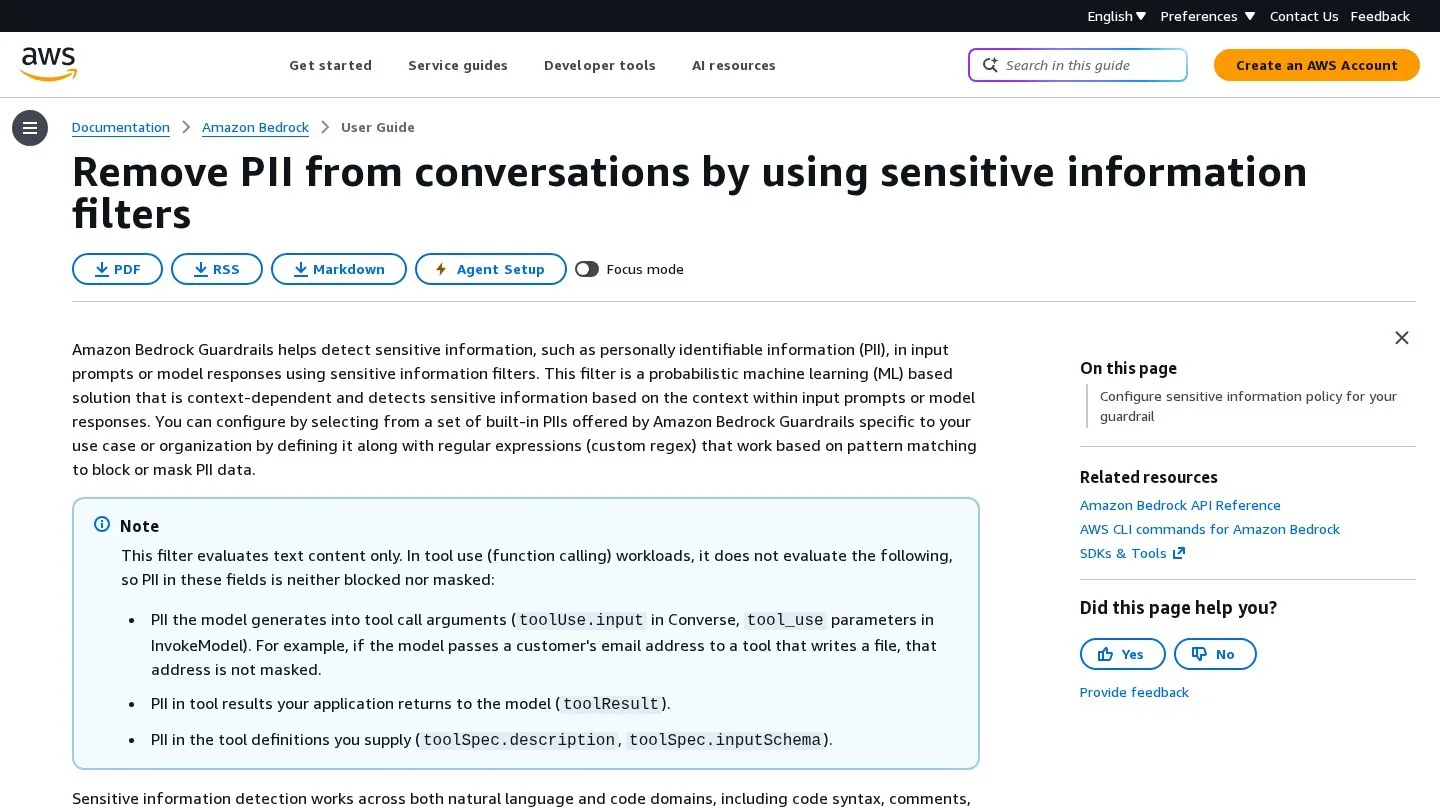
Chat filters also miss more than most teams expect. For example, Amazon Bedrock Guardrails does not block or mask PII inside tool inputs or tool results. Its model invocation logs also keep the original request, even when the guardrail masked it. On the OpenAI API, abuse monitoring logs stay for up to 30 days by default.
So the steps here follow one agent workflow from the first prompt to the last log line. Each step comes with working Python, a settings change or a table you can copy. Last comes a test with fake canary records, so you can prove the controls hold before real customer data goes in. For the ways data escapes in the first place, see our guide to AI agent data leakage.
Map Where Sensitive Data Moves in an AI Agent Workflow
Sensitive data in an AI agent workflow moves through six places: the prompt, retrieved files, tool inputs, tool results, memory and logs. Most teams guard the first one and forget the other five. Yet a single support ticket can pass through all six in one run.
Each place keeps its own copy, too. So the first job is a data map. It shows where data comes in, where it stays and what stops it. Memory deserves extra care here, because a fact saved today can return in a chat months later. The guide on AI agent state across sessions covers how that storage works.
| Stage | Example of sensitive data | Where a copy can stay | First control |
|---|---|---|---|
| User prompt | A customer pastes a card number into chat | Provider logs, your chat history | Redact before the API call |
| Retrieved files | Search pulls an HR file with salaries | Model context, traces | Filter results by the user’s rights |
| Tool input | The agent sends a full customer record to a CRM | Tool server logs | Allow IDs only in arguments |
| Tool result | A database row comes back with a home address | Model context, traces | Mask the result before the model reads it |
| Memory | The agent saves the last four digits of an SSN | Memory store, vector database | Block PII in memory writes |
| Logs and traces | The full prompt with all of the above | Observability tool, cloud logs | Mask at log time and set short retention |
Sort Agent Data Into Three Sensitivity Tiers
Three tiers cover most agent data: never send, send masked and send as is. The OWASP Top 10 for LLM Applications ranks the leak of private data as LLM02. Its list of data at risk has PII, bank and card details, health records and business secrets. It also has login details and legal files. So all of those types go in the top two tiers.
- Never send: Passwords, API tokens, cloud access credentials and full card numbers with CVV stay out of the model. The tool code reads them at run time, and the model only sees the result of the action.
- Send masked: Names, emails, phone numbers, home addresses, tax IDs and health numbers go in as placeholders. The model rarely needs the real value to plan a refund, draft a reply or sort a ticket.
- Send as is: Product data, public help articles, order status and prices go to the model untouched. Masking them only makes answers worse and adds cost.
Write the tiers as code, in one shared policy file. Then the prompt filter, the tool wrapper and the log masker all read the same rules. As a result, a new data type gets added once and every layer picks it up.
Redact PII Before the Prompt Reaches the Model
Redact PII in your own code before the API call, so the model provider never receives the raw value. The open-source Presidio anonymizer does this in a few lines. It is free under the MIT license, and version 2.2.366 came out on October 27, 2026. The analyzer finds names, emails and card numbers, and the anonymizer swaps each one using the rule you set.
from presidio_analyzer import AnalyzerEngine
from presidio_anonymizer import AnonymizerEngine
from presidio_anonymizer.entities import OperatorConfig

analyzer = AnalyzerEngine()
anonymizer = AnonymizerEngine()

# One policy shared by prompts, tool results and logs
POLICY = {
    "PERSON": OperatorConfig("replace", {"new_value": "<NAME>"}),
    "EMAIL_ADDRESS": OperatorConfig("replace", {"new_value": "<EMAIL>"}),
    "CREDIT_CARD": OperatorConfig("replace", {"new_value": "<CARD>"}),
    "PHONE_NUMBER": OperatorConfig("mask", {"masking_char": "*", "chars_to_mask": 6, "from_end": True}),
    "US_SSN": OperatorConfig("redact", {}),
}

def clean(text: str) -> str:
    findings = analyzer.analyze(text=text, language="en")
    return anonymizer.anonymize(
        text=text, analyzer_results=findings, operators=POLICY
    ).text

print(clean("Refund Jane Ortiz, card 4111 1111 1111 1111, email jane@example.com"))
# Refund <NAME>, card <CARD>, email <EMAIL>
Detection runs on patterns and context, so it can miss a value. That is why the same clean() step runs again on tool results and logs later in this guide. Also, add custom rules for your own IDs, such as policy numbers or patient record codes, because no built-in list knows them.
Pick Reversible or One-Way Redaction
Use one-way redaction by default. Use encryption you can undo only when a tool must send the real value later. Presidio has these built-in ways to change a value. It also has a fake-value option that runs through Azure Health Data Services.
| Presidio operator | What the model sees | Value can come back | Good use in an agent |
|---|---|---|---|
| replace | A label such as <EMAIL> | No | Most prompts and logs |
| redact | Nothing, the text is removed | No | SSNs and other data the task never needs |
| mask | Part of the value, such as ******0134 | No | Phone numbers a human agent may confirm |
| hash | A SHA-256 or SHA-512 hash | No | Matching the same person across records |
| encrypt | AES ciphertext | Yes, with the decrypt operator | Emails a send_email tool needs later |
| custom | Output of your own function | Your choice | Numbered labels such as <PERSON_2> |
The reversible pattern works like a coat check. The model plans with <EMAIL_1>, and your code keeps the real address in a lookup table. Then the send_email tool swaps the label back at the last moment. So the real address never enters the prompt, the model reply or the trace.
Keep Secrets in the Tool Layer
Secrets such as API tokens and database passwords belong in the tool server, never in the prompt, the system message or agent memory. Any text in the model context can come back out. It can show up in an answer, a log line or a tool call that an attacker steers through prompt injection.
OWASP makes the same point about system prompts. Its LLM02 advice tells teams to conceal the system preamble, so a prompt is no place for a secret. Instead, the model asks for an action by name, and the tool code adds the credential. The AI agent middleware layer is the usual home for that code.
import os
import requests

def send_invoice(customer_id: int) -> dict:
    # Token comes from a secret manager at deploy time, never from the model
    token = os.environ["BILLING_API_TOKEN"]
    r = requests.post(
        f"https://billing.internal/api/customers/{customer_id}/invoice",
        headers={"Authorization": f"Bearer {token}"},
        timeout=10,
    )
    # Return only what the model needs to finish the task
    return {"status": r.status_code}
Notice the last line. The tool returns a status code, not the full invoice with the customer’s address and bank details. That one habit removes a large share of the data a model would otherwise see. Rotate any token that ever appeared in a prompt, because you cannot recall it from provider logs.
Read also: Agentic AI Statistics: Adoption, ROI, Jobs and Pricing Data
Filter Tool Inputs and Tool Results Too
Tool inputs and tool results need their own filter, because many guardrail products check only chat text. Amazon Bedrock Guardrails is a good example. Its sensitive information filter detects 31 built-in PII types and custom regex patterns. It can block a request, mask values as labels such as {NAME}, or only report what it found.
Even so, PII inside toolUse.input, toolResult and toolSpec is neither blocked nor masked. The filter is also a machine learning model that works best with enough context, so short phrases can slip past it. So wrap every tool in your own check.
import json

ALLOWED_DOMAINS = {"yourcompany.com", "billing.internal"}

def guarded(tool):
    def wrapper(**kwargs):
        # Inputs: block outbound calls to unknown domains
        url = kwargs.get("url", "")
        if url and url.split("/")[2] not in ALLOWED_DOMAINS:
            raise PermissionError(f"Blocked domain in {tool.__name__}")
        result = tool(**kwargs)
        # Results: mask PII before the model reads them
        return clean(json.dumps(result))
    return wrapper
The domain check matters most for web and email tools. A hidden instruction on a web page can tell the agent to paste customer data into a link. OWASP lists that kind of targeted prompt injection as a main way sensitive data gets out. Tools from the prompt injection detection category can add a second check on incoming text.
Give Each Tool the Smallest Data Scope
Each tool should reach only the rows, fields and actions that the current user may see. A model cannot leak data that its tools never return. So access rules do more for privacy than any prompt instruction.
- Use the user’s own token: Call business apps with an OAuth token issued to the person who started the task. One shared service account lets the agent read every record in the system.
- Give read-only roles by default: Most agent tasks only read data. Grant write access per tool, and keep delete rights out of agent roles.
- Hide columns with views: Point the agent at a database view without SSN, salary or bank fields. The model then cannot ask for them, even by mistake.
- Filter search by user rights: Store an access list as metadata on each chunk in your vector database. Then apply that filter in every retrieval query, before results reach the model.
The steps to connect AI agents to databases cover read-only roles in more depth. And agents with too much access are common, as the AI agent permission management statistics show.
Cut Retention in Logs, Traces and Provider Storage
Logs and traces often hold more sensitive data than the agent itself, so set a retention limit on every store that keeps prompts. On the OpenAI API, data is not used for training by default. Still, abuse monitoring logs stay for up to 30 days. Also, the Responses API stores state for 30 days when the store setting is left out or set to true.
from openai import OpenAI

client = OpenAI()
response = client.responses.create(
    model=MODEL,
    input=clean(user_message),
    store=False,  # do not keep response state on OpenAI servers
)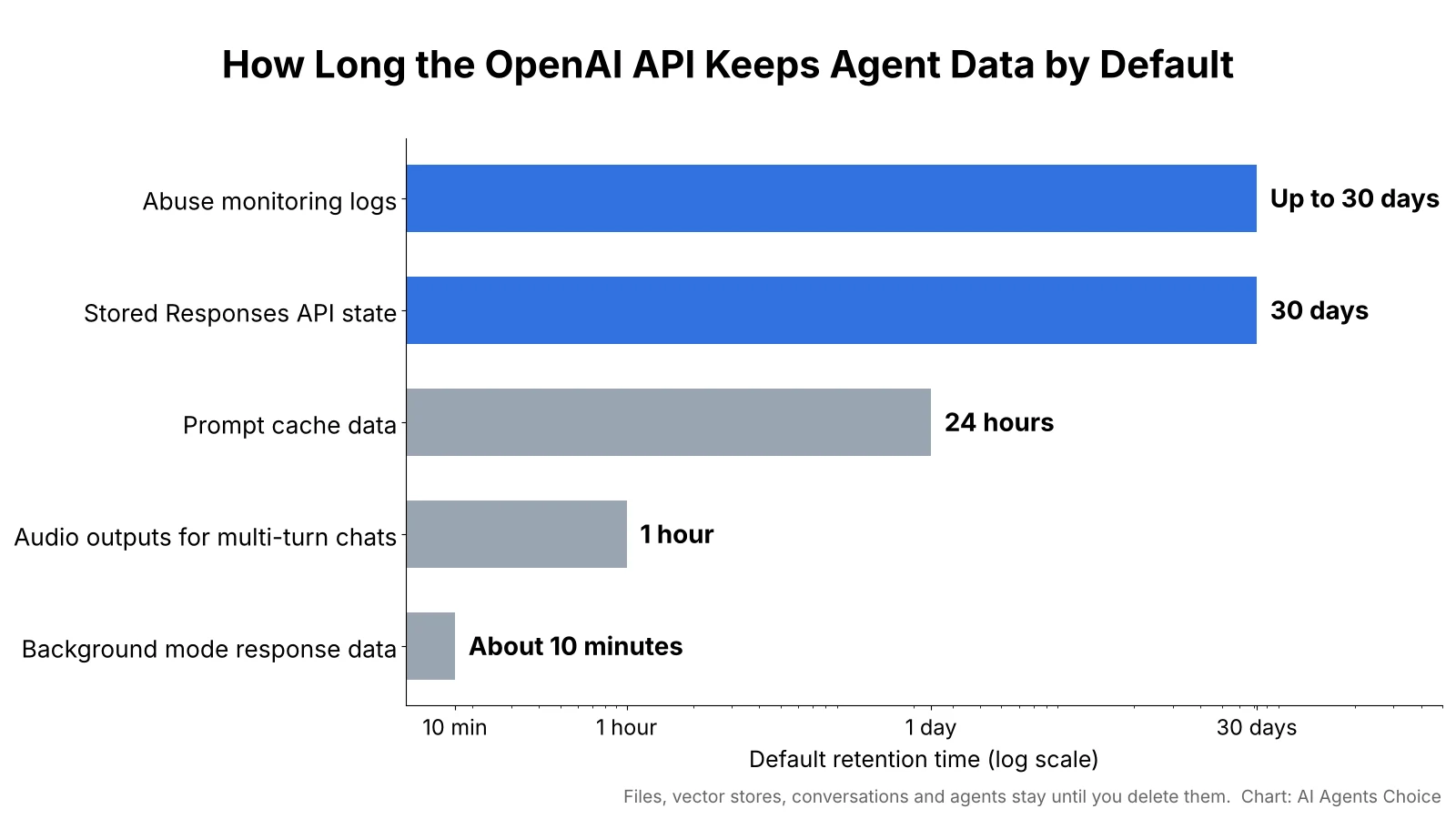
Some objects never expire on their own. Saved chats, files, vector stores and agents stay until you delete them. Files can carry an expires_after setting, so use it for uploads an agent needs once. Zero Data Retention also forces store to false and keeps your content out of abuse logs. But it needs OpenAI to approve it first.

AWS has its own gap. Bedrock model invocation logs in CloudWatch keep the original request, whatever the guardrail did. The guardrail trace also holds the original PII value in its match field. So turn on CloudWatch Logs data protection, and run clean() on any trace you send to an observability tool.
Require Approval Before Data Leaves the Workflow
A person should approve any step that sends sensitive data outside the company. That covers an email to a new address, a file upload to an unknown domain or an export of many records. The check costs a few seconds, but it stops the one bad send that redaction missed.
Set rules for when the check fires, so people do not approve every small step. Good rules fire on a new email address, an outside domain, a file, or more than 10 records in one call. Show the reviewer the real destination and a redacted preview of the content. The guide to human-in-the-loop orchestration covers how to pause and resume an agent around that approval.
Test Data Protection With Canary Records
Canary records are fake customers with unique values that you plant in test data, then search for in every place they should not appear. If a canary value shows up in a log, a trace or memory, a control failed. The test turns privacy from a promise into a pass or fail result.
- Plant 20 fake people. Give each one a unique email such as canary-7q4x@example.com, a test card number and a made-up address.
- Run normal tasks. Send 50 ordinary requests that touch those records, such as refunds and address changes.
- Run attack prompts. Send 20 prompts that ask the agent to reveal, export or email the records, including hidden instructions inside web pages and files.
- Search every store. Grep your app logs, traces, memory store, vector database and tool server logs for each canary string.
- Pass only at zero. Any hit outside the tool that owns the record is a failure. Rerun the test after every change to the model, prompt or tools.
The three OWASP attack scenarios make good test cases too. One user sees another user’s data, an attacker gets past input filters, or a model repeats data it trained on. For rules that block risky actions in the first place, see AI agent guardrails.
Questions About Sensitive Data in AI Agent Workflows
Does Redaction Make an AI Agent Less Accurate?
Redaction rarely makes an agent less accurate when the task does not need the real value. Typed labels such as <NAME> keep the meaning of the sentence. Numbered labels such as <PERSON_1> and <PERSON_2> also keep two people apart. Accuracy drops mainly when the task depends on the value itself, such as checking the format of an IBAN.
Is It Safe to Fine-Tune a Model on Customer Data?
Fine-tuning on raw customer data is risky, because a model can repeat what it learned in training. OWASP lists data leaks through training data as one of its example attacks. So scrub or mask the data before training, and keep the redaction policy the same as for prompts.
Does a Self-Hosted Model Remove the Need for Redaction?
A self-hosted model does not remove the need for redaction. It keeps prompts off a provider’s servers, but your own logs, traces, memory and tools still keep copies. Every step in this guide still applies, except the provider retention settings.
Which Framework Should Shape an Agent Data Policy?
OWASP LLM02 is the most useful framework for the day-to-day controls. It covers data cleanup, access rules and redaction. It also covers safe setup. For rules and oversight, use NIST AI 600-1. This NIST profile for generative AI names data privacy as one of the risks to manage.
Related AI Agents





Read also: Autonomous AI Agents vs Workflow Automation: Cost, Risk and When to Use Each
Explore Agent Categories
Related Articles
 GuidesAgentic Commerce Statistics: Latest Data
 GuidesAI Agent Data Leakage: Causes and Prevention
 GuidesDuplicates, Typos and Broken Dates: Which AI Agent Should Clean Your Data?
 GuidesAgentic AI Statistics: Adoption, ROI, Jobs and Pricing Data
 GuidesWebhooks vs Polling for AI Agent Workflows
 GuidesHow AI Agents Automate Enterprise Workflows
