


Save State Outside the Model Before Anything Else
AI agents keep state across sessions by saving it outside the model. Then they load it back when the next session opens. The model itself keeps nothing once a call ends. So the agent’s code writes the chat history, task progress and learned facts to a database or to files. It tags each record with an ID. Next time, it reads those records and puts the useful parts back into the prompt.
We researched how eight tools do this today. We read the memory docs for LangGraph, the OpenAI Agents SDK, Claude’s memory tool, Claude Code, Letta, Zep, Mem0 and ChatGPT. Then we compiled their code samples and storage options into one guide. In fact, every one of them follows the same basic loop. Load, run, save, repeat.
The tools differ in what they save and who decides. Some save every message. Others extract a few facts and throw the rest away. A few let the model edit its own memory with tool calls. If you are still deciding what an agent is, our guide to AI agents vs AI chatbots covers that first.

Sort the State Your Agent Carries Into Three Buckets
Agent state falls into three groups. Each one needs a different store and a different lifetime. So name them before you write any code.
Keep the Conversation Thread for the Current Task
The thread is the list of messages and tool calls in one conversation. It is short-term memory. LangGraph calls it a thread, and the OpenAI Agents SDK calls it a session. Either way, the agent reloads it on every turn. As a result, the model sees what was said a minute ago.
Store Long-Term Facts About the User
Long-term memory holds facts that should outlive one chat. For example, a user’s name, time zone or preferred report format. These facts sit in a separate store. Then any later thread can read them. LangGraph’s docs describe this as memory shared across threads.
Checkpoint Task Progress So Work Can Resume
The third bucket is progress on a long job. For instance, a coding agent may be halfway through a refactor when the process stops. A checkpoint records the exact step, so the run can pick up where it left off. LangGraph uses checkpoints for this, and also for human review and “time travel” to earlier steps.
Give Every Session and Every User a Stable ID
Memory only works if the agent can find its records again. So every tool we studied asks for an ID. The thread ID points to one conversation. The user ID points to one person across many conversations.
| Tool | Short-term key | Long-term key |
|---|---|---|
| LangGraph | thread_id in the run config | Namespace tuple in the store, such as (user_id, “memories”) |
| OpenAI Agents SDK | Session ID passed to the session class | Your own store, or a custom session |
| Claude memory tool | Your app’s conversation history | Files under the /memories directory |
| Letta | Conversations on one agent | Memory blocks attached to the agent |
| Zep | Threads that belong to a user | The user’s context graph |
| Mem0 | Not its focus | user_id passed to add and search |
Pick IDs from your own system, such as a database user key. Never use something the model writes. Also, keep the IDs short. LangGraph’s docs say a thread_id used with PostgresSaver should stay under 255 characters.
Persist Graph State With LangGraph Checkpointers
LangGraph saves state through a checkpointer. You attach one when you compile the graph. Then you pass a thread_id with each call. After that, the checkpointer reads and writes that thread’s state for you. This is the official example from the LangGraph persistence docs.
from langgraph.checkpoint.memory import InMemorySaver
from langgraph.store.memory import InMemoryStore

checkpointer = InMemorySaver()
store = InMemoryStore()

graph = builder.compile(checkpointer=checkpointer, store=store)

result = graph.invoke(
    {"messages": [{"role": "user", "content": "Hi, my name is Bob."}]},
    {"configurable": {"thread_id": "thread-1"}},
)
The in-memory saver keeps data in RAM, so a restart wipes it. That is fine for tests. For production, the docs point to PostgresSaver and its async version, AsyncPostgresSaver. SqliteSaver writes to a local file and works for development.

Share Facts Across Threads With a LangGraph Store
The checkpointer only covers one thread. So LangGraph adds a store for facts that every thread can read. Items live under a namespace, which is a tuple such as (user_id, "memories"). You write with store.put and read with store.search.
The store can also search by meaning. You turn this on by giving it an embedding index. This is the shape of the config in the LangGraph stores docs.
store = InMemoryStore(
    index={
        "embed": init_embeddings("openai:text-embedding-3-small"),
        "dims": 1536,
        "fields": ["food_preference", "$"]
    }
)
With the index set, store.search takes a plain-language query and a limit. Also, you can store an item with index=False. Then it stays readable by key but never shows up in search. For production, the docs list PostgresStore, MongoDBStore, RedisStore and UpstashStore.
Read also: How AI Agents Maintain Context Across Multiple Tasks
Reload Chat History With OpenAI Agents SDK Sessions
The OpenAI Agents SDK handles short-term memory through sessions. You create a session with an ID and pass it to the runner. The runner loads the history before each run and saves new items after it. So you no longer copy the message list by hand between turns. This is the quick-start pattern, trimmed to the lines that matter.
from agents import Agent, Runner, SQLiteSession

agent = Agent(name="Assistant", instructions="Reply very concisely.")
session = SQLiteSession("conversation_123")

result = await Runner.run(agent, "What city is the Golden Gate Bridge in?", session=session)
result = await Runner.run(agent, "What state is it in?", session=session)
The SDK ships several session types. SQLiteSession uses an in-memory database by default, or a file if you give it a path. SQLAlchemySession works with any database SQLAlchemy supports, such as PostgreSQL or MySQL. OpenAIConversationsSession stores history in OpenAI’s Conversations API. Finally, EncryptedSession wraps another session, encrypts items and skips old ones after a time limit. That limit defaults to 10 minutes.
You can also edit a session directly. For example, pop_item() removes the last item, which helps when a user corrects a message. Then clear_session() wipes the whole thread. For other backends, such as Redis, you subclass SessionABC.

Let Claude Write and Edit Its Own Memory Files
Claude’s memory tool takes a different route. The model decides what to save. It asks to create, read or edit files in a /memories directory. Your app then runs each request against storage you control and sends back the result. So the files can live on disk, in object storage or in a database.
The tool has six commands, and we listed them from the official docs. Also, the name field must be memory.
| Command | What it does |
|---|---|
| view | Shows a folder listing or a file with line numbers |
| create | Makes a new file |
| str_replace | Swaps one piece of text for another |
| insert | Adds text after a given line |
| delete | Removes a file or folder |
| rename | Moves or renames a file or folder |
Because your code runs every command, path checks are your job. The docs say to require that every path begins with /memories. They also say to resolve each path and confirm it stays inside that folder. Next, reject “../” patterns, including URL-encoded forms. Besides that, cap file sizes and delete files that nobody has opened for a long time.
The docs also pair memory with two context features. Context editing clears old tool results. Compaction summarizes the whole conversation on the server when it nears the limit. So memory keeps what must survive, and compaction keeps the live window small. Our explainer on context engineering for AI agents covers both features in depth.

Copy the Claude Code Pattern of Instructions Plus Notes
Claude Code shows how this works in a real product. Each session begins with a fresh context window. Then two files carry knowledge forward. CLAUDE.md files hold instructions a person writes. Auto memory holds notes Claude writes itself.
Auto memory lives in a folder per project. A MEMORY.md file acts as the index, with one line per memory. Each session loads the first 200 lines or 25KB of it. Also, Claude skips anything it can work out from the code itself. In fact, the docs say it only saves what would help in a later conversation. That is a useful rule for any agent you build.

Hand Memory to a Dedicated Memory Service
Some teams would rather not build memory themselves. Three products focus on it. Each one stores data in a different shape, so the choice changes what your agent can recall.
Pin Core Facts in Letta Memory Blocks
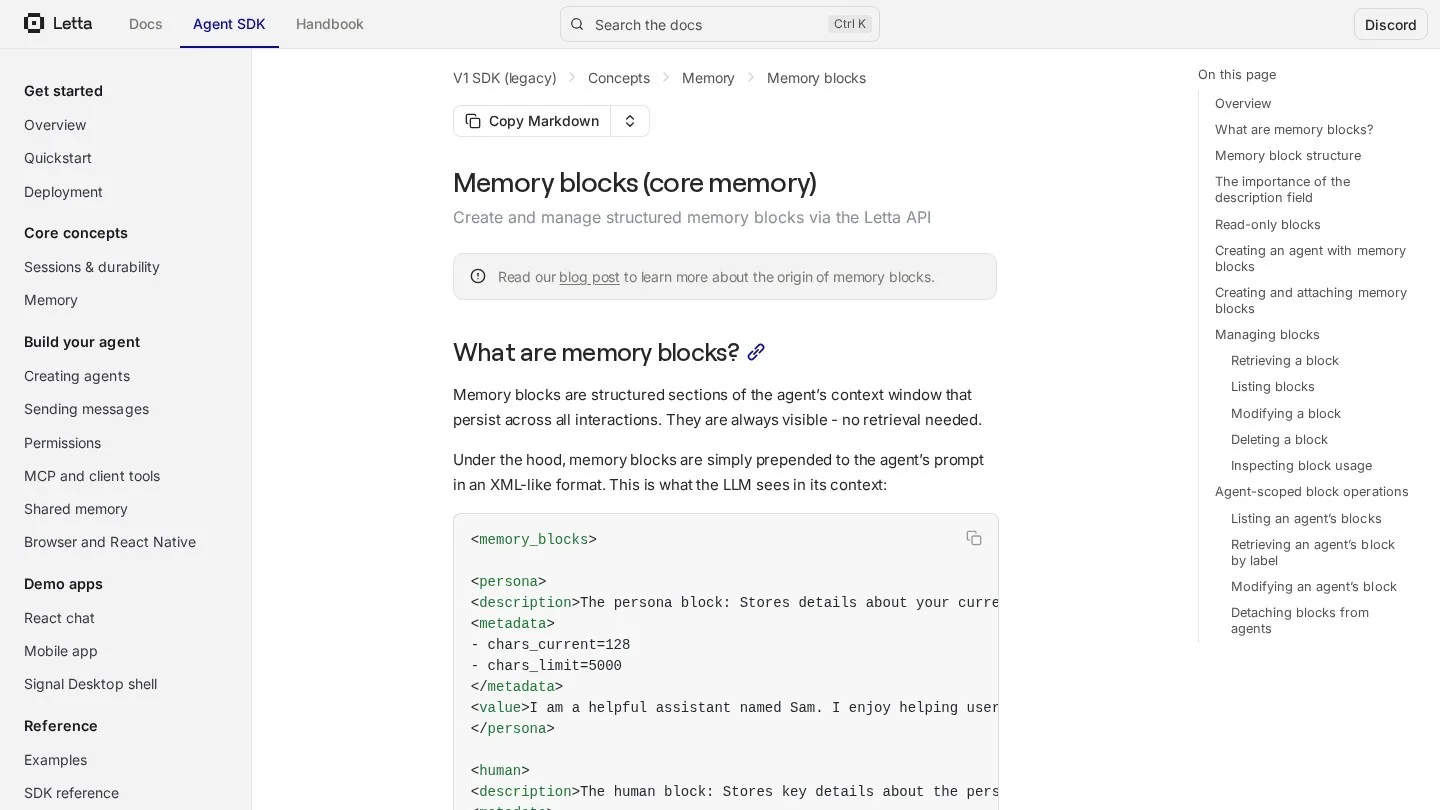
Letta grew out of the MemGPT research project. So it treats the context window like working memory. It stores memory as blocks that stay pinned to the system prompt. Each block has a label, a description, a value and a character limit. The default blocks are human, for facts about the user, and persona, for the agent’s own role.
The agent edits these blocks with built-in memory tools. You can also mark a block read-only, so the agent cannot change it. Blocks can be shared across several agents. However, a write replaces the whole value, and the last write wins. Letta also keeps every message in its database. So older messages stay searchable after they leave the context window.
Track Changing Facts in a Zep Context Graph
Zep builds a graph of facts for each user. You add chat messages with thread.add_messages. Then Zep pulls facts and links out of them. When new data makes an old fact wrong, Zep stores the time the old fact became invalid on that graph edge. As a result, the agent can tell what was true last month from what is true now.
To read memory, you call thread.get_context. It returns a context block, which is one string of the most relevant facts, entities and summaries. You can also search edges, nodes and episodes directly.

Extract Short Facts With Mem0
Mem0 focuses on pulling facts out of conversations. You pass messages and a user ID. Then Mem0 uses an LLM to extract facts and update older ones. This is the quick-start code from its open-source docs.
from mem0 import Memory

m = Memory()

messages = [
    {"role": "user", "content": "Hi, I'm Alex. I love basketball and gaming."},
    {"role": "assistant", "content": "Hey Alex! I'll remember your interests."}
]
m.add(messages, user_id="alex")

results = m.search("What do you know about me?", filters={"user_id": "alex"})
The defaults matter for cost and privacy. By default, Memory() uses an OpenAI model for fact extraction and an OpenAI embedding model. It writes vectors to a local Qdrant folder and history to a SQLite file. So check those settings before you ship.
Study How ChatGPT Remembers Users
ChatGPT is the memory system most people have already used. OpenAI first tested memory in February 2024. Then it opened the feature to Free, Plus, Team and Enterprise users in September 2024. Later updates split memory into two parts. Saved memories are details a user asks ChatGPT to keep. Chat history covers insights it gathers from past conversations.
The user controls are worth copying. People can ask what ChatGPT remembers and change it in the chat. They can delete single memories or clear all of them in settings. Also, Temporary Chat neither uses nor updates memory. One detail surprises users, though. Deleting a chat does not delete memories made from it. So tell your own users exactly how deletion works.
Decide What the Agent Loads When a Session Opens
Saving state is half the job. Next, the agent must load the right slice of it at the top of each session. Load too little and it forgets the user. Load too much and it wastes tokens on old chatter.
We suggest a fixed load order, based on how the tools we studied behave. First, load the system prompt and any rules file, the way Claude Code loads CLAUDE.md. Second, load a short block of user facts, like a Letta human block or a Zep context block. Then load the recent turns of the current thread. Finally, let the agent fetch anything older with a search tool, so it only pulls what the task needs.
Also, put a token budget on each layer. For example, give user facts a fixed cap and trim the thread from the oldest end. As a result, a long-time user never pushes the current task out of the window. Our AI agent examples page shows real agents that follow this split.
Choose a Memory Pattern That Matches the Job
We compiled the eight tools into four patterns. In fact, the right one depends on who should decide what gets saved.
| Pattern | Who decides what to save | Tools that use it | Good for |
|---|---|---|---|
| Full history replay | Your code saves every message | OpenAI Agents SDK sessions, LangGraph checkpointers | Support chats and short tasks |
| Fact extraction | A model pulls facts after each turn | Mem0, Zep, ChatGPT saved memories | Assistants that serve the same user for months |
| Self-edited memory | The agent writes files or blocks with tools | Claude memory tool, Letta blocks, Claude Code auto memory | Long coding or research agents |
| Human-written instructions | A person edits a file | Claude Code CLAUDE.md | Team rules the agent must always follow |
Most production agents mix two patterns. For example, a support agent may replay the current thread and also pull a few user facts from a store. A coding agent may load a rules file and also keep its own notes. That is why we suggest picking one short-term store and one long-term store, then testing them together. Our roundup of AI agent frameworks shows which frameworks ship each piece. You can also browse every framework we list on the agent frameworks category page.
Keep Stored Memory Small and Safe
Memory grows quietly. Every saved fact costs tokens when it loads. So set hard caps. Letta blocks carry a character limit, and Claude Code loads only the top of MEMORY.md. Copy those limits in your own design.
Next, treat memory as user data. Strip secrets and personal data in your own code before anything is saved. The Claude memory tool docs say this directly, even though Claude usually refuses to store sensitive data. Also, give each user a way to view and delete their memories, as ChatGPT does.
Then expire what goes stale. EncryptedSession in the OpenAI Agents SDK skips items past a time limit. The Claude memory tool docs suggest removing files nobody has opened in a long time. Finally, keep users apart. Scope every read by user ID, so one person’s facts never reach another person’s prompt. For more on the cost side, see our guide to controlling AI agent costs.
Test That the Agent Remembers What It Should
Memory bugs are hard to spot in a demo. So run four tests before launch.
- Restart test: Start a task, stop the process, then resume with the same thread ID. The agent should continue from the last checkpoint.
- Two-user test: Tell the agent a fact as user A. Then ask about it as user B. The answer should reveal nothing.
- Change test: Give the agent a fact, then correct it a day later. It should use the new fact, as Zep’s invalidated edges are built to do.
- Size test: Feed the agent hundreds of small facts. Then check that memory stays under your cap and the prompt stays within budget.
Run these tests again after every model or prompt change. In fact, a new model may save more or less than the old one. Our tutorial on building an AI agent from scratch shows where these checks fit in a build.
Answer the Memory Questions Builders Ask Most
Does a Bigger Context Window Remove the Need for Memory?
No. A context window only lasts for one call. So anything you want next week still has to be saved somewhere and loaded back. Also, Anthropic’s docs note that answers get worse as a conversation grows, which is why compaction exists.
Where Should a Small Team Store Agent Sessions?
Use the database you already run. For example, LangGraph offers PostgresSaver, and the OpenAI Agents SDK offers SQLAlchemySession for PostgreSQL or MySQL. Then you back up memory with the rest of your data.
Can Two Agents Share One Memory?
Yes. Letta lets you attach one memory block to several agents. Also, a LangGraph store can serve any thread that knows the namespace. However, plan for conflicts, because Letta’s shared blocks follow a last-write-wins rule. For agent hand-offs, see our explainer on agent-to-agent communication.
How Do I Make an Agent Forget Something?
Delete the record at the source. In the OpenAI Agents SDK, pop_item() or clear_session() removes history. With the Claude memory tool, your code runs the delete command on the file. Then check any extracted facts too, because a summary may still hold the detail.
Read also: What Can an AI Agent Fix in Your Store’s SEO?
Related AI Agents


Explore Agent Categories
Related Articles
 GuidesHow AI Agents Maintain Context Across Multiple Tasks
 GuidesAI Agent State Machines: Managing Complex Workflows
 GuidesVector Databases for AI Agent Memory
 GuidesVector Memory vs Knowledge Graph Memory for AI Agents
 GuidesTextYess Alternatives for WhatsApp Sales on Shopify Stores
 GuidesWhat Can an AI Agent Fix in Your Store’s SEO?
