


Single-agent vs multi-agent systems is a choice of design. One model can work through a task in one loop, or a team of agents can split the work. A single agent wins on most tasks, because it is cheaper, faster to debug and keeps all the context in one place. Multi-agent systems win when a job breaks into parts that can run side by side, such as wide research.
The gap can be large in both directions. Anthropic’s research system uses a lead agent with parallel subagents. In June of last year, it beat a single Claude Opus 4 agent by 90.2% on an internal research eval. Yet in Google Research tests from January 2026, every multi-agent setup scored 39% to 70% worse than one agent on a step-by-step planning task. Cost moves too, since multi-agent runs used about 15 times the tokens of a chat.
So the real question is the shape of the task. Parallel, read-heavy work rewards a team. Sequential work where each step depends on the last one rewards a single agent with good tools.
Next come how each design is built, what published tests found and where teams break. A decision table and a test plan for your own workload close it out.
Inside a Single-Agent System
A single-agent system is one model, one set of instructions and one tool loop. The model reads the task, calls tools, reads the results and repeats until it is done. Every step lands in the same context window, so the agent always knows what it already tried.
OpenAI’s practical guide to building agents puts this first. Its advice is to get the most out of one agent before adding more. Prompt templates are its main tool for that, with one base prompt that takes variables such as the policy or the customer tier. That way, one agent covers many use cases without a second agent in the mix.
Picture a support agent for an online shop. It reads the message, looks up the order, checks the return policy and issues a refund. Each step needs the result of the one before, and all of it fits in one context window. A second agent here would only add a handoff, more tokens and one more place for the refund amount to get lost.
A single agent also has limits. Long tasks fill the context window, and a long tool list confuses tool choice. OpenAI points to two signs that a split may help, which are complex logic with many branches and tool overload. Even so, some teams run more than 15 well-defined tools in one agent. Tools that overlap cause more trouble than the raw count.
Inside a Multi-Agent System
A multi-agent system splits one job across several agents, each with its own prompt, tools and context. Most designs fall into two families. In the manager pattern, one agent calls specialist agents as if they were tools and keeps control of the conversation. In the handoff pattern, agents pass the task to each other, and the agent that receives it takes over.
Frameworks now ship these patterns as built-in blocks. The table maps them across three of the main SDKs.
| Pattern | How control moves | OpenAI Agents SDK | Google ADK | Microsoft Agent Framework |
|---|---|---|---|---|
| Manager | A lead agent calls specialists and gathers their output | Agent.as_tool() | AgentTool | Magentic |
| Handoff | One agent passes the whole task to another | Handoffs | sub_agents with transfer | Handoff |
| Pipeline | Agents run in a fixed order | Chaining in code | SequentialAgent | Sequential |
| Fan-out | Agents run at once, then one merges | asyncio.gather in code | ParallelAgent | Concurrent |
| Loop and critic | One agent drafts, another checks, repeat | Evaluator loop in code | LoopAgent | n/a |
The OpenAI Agents SDK draws a useful line between the first two. Use agents as tools when a specialist should help with a bounded subtask without taking over. Use handoffs when picking the specialist is part of the workflow and that agent should own the rest of the turn. Google’s ADK patterns guide, from December of last year, adds a habit worth copying. Build a plain sequential chain, debug it, and only then add loops or parallel branches.
Profiles of the main frameworks sit on our pages for the OpenAI Agents SDK, Google ADK and Microsoft Agent Framework. For the messages agents send each other, see our post on multi-agent communication protocols.

Single-Agent vs Multi-Agent Performance in Published Tests
Published tests show multi-agent systems winning big on parallel research and losing badly on sequential planning. The direction depends on the task far more than on the model.
Anthropic Research System
Anthropic’s multi-agent research system used Claude Opus 4 as the lead agent and Claude Sonnet 4 subagents. It beat a single Claude Opus 4 agent by 90.2% on an internal research eval. The lead agent split each question into parts, and subagents searched in parallel. That parallel search cut research time by up to 90% on complex queries.

Google Research Scaling Study
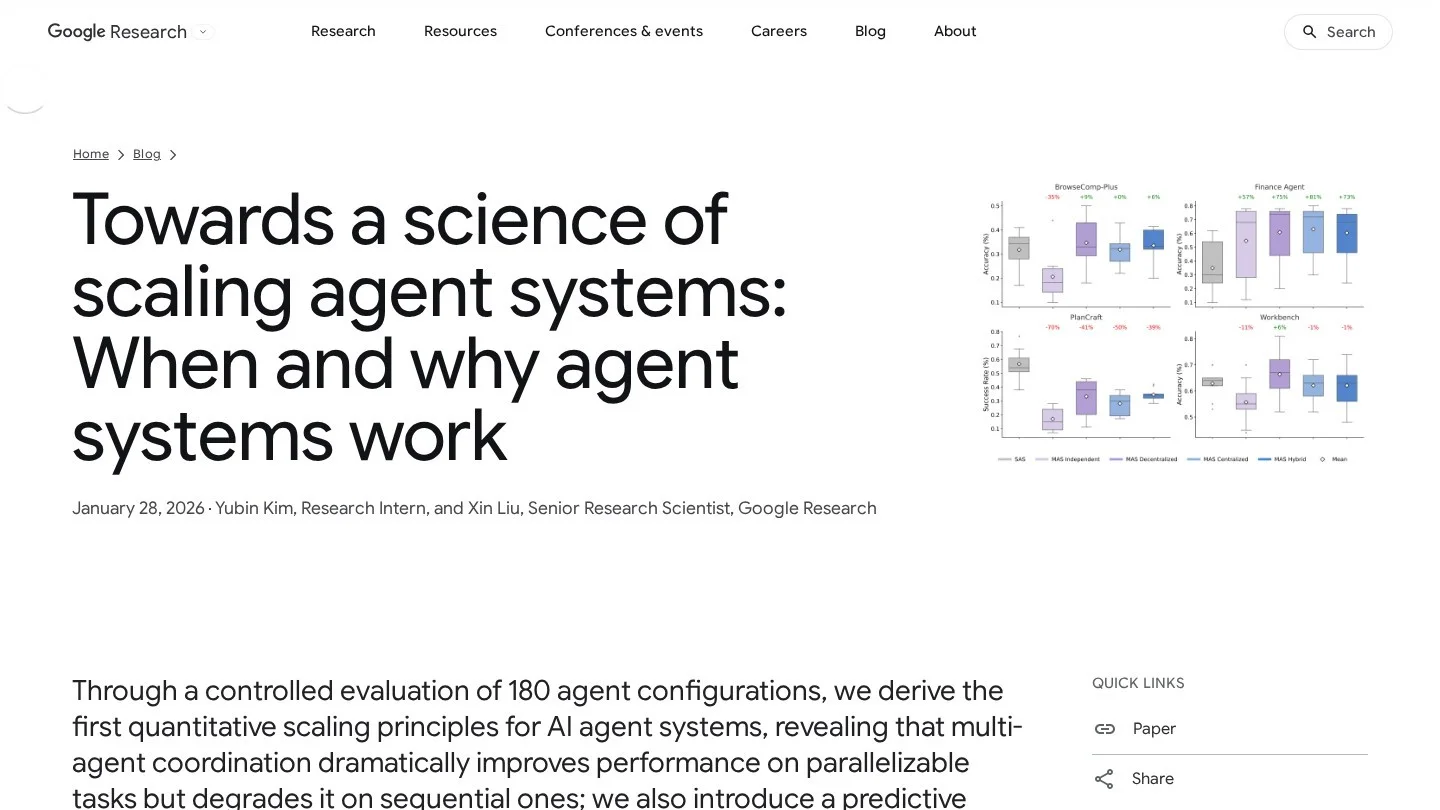
Google Research tested 180 agent setups across four benchmarks and five designs, from one agent to fully decentralized teams. On Finance-Agent, a task that splits well, a centralized team improved results by 80.9% over one agent. On PlanCraft, where each step depends on the one before, every multi-agent variant did 39% to 70% worse. A model trained on these results picked the best design for 87% of new task setups.

Failure Study Across Seven Frameworks
A Berkeley-led study, Why Do Multi-Agent LLM Systems Fail?, labeled more than 1,600 traces from 7 popular multi-agent frameworks. It found 14 failure modes in three groups, which are system design issues, misalignment between agents and weak task checks. The authors also found that multi-agent gains on popular benchmarks are often small.
Read also: Hierarchical Multi-Agent Systems Explained
Token Cost and Speed of Each Architecture
A multi-agent system costs about four times as much as a single agent in tokens. Anthropic measured this in June of last year. A single agent used about 4 times the tokens of a chat reply, and a multi-agent system used about 15 times. Say a chat answer costs 10 cents. At the same price per token, one agent would cost about 40 cents and a team about $1.50.

Those extra tokens buy something on the right task. On the BrowseComp test, token use alone explained 80% of the gap in scores, and token use plus tool calls plus model choice explained 95%. So a team of agents scores higher partly because it spends more, with each subagent reading in its own fresh context. Our breakdown of AI agent token consumption shows where those tokens go.
Speed works the other way from cost. Parallel subagents finish wide searches sooner, as the 90% time cut shows. However, a pipeline of agents in a row adds a model call at every handoff. So a sequential team is often slower than one agent doing the same steps.
| Factor | Single agent | Multi-agent system |
|---|---|---|
| Token use | About 4x a chat reply | About 15x a chat reply |
| Context | One shared window | A fresh window per agent |
| Speed on wide research | Searches one after another | Searches run in parallel |
| Speed on step-by-step work | No handoff delay | A model call at each handoff |
| Debugging | One trace to read | Many traces to line up |
| Error spread | Errors stay in one loop | Errors can pass between agents |
Where Teams of Agents Break
Teams of agents break when they need the same context or write to the same thing at once. Anthropic names shared context as the main poor fit, and coding as weaker than research because it has fewer parts that can run in parallel.
Errors also spread. In the Google study, independent agents with no coordinator amplified errors 17.2 times, while a central coordinator held that to 4.4 times. Coordination costs rise too as tasks need more tools, which Google calls the tool-coordination trade-off. So if you build a team, give it a manager that checks work before it moves on.
Cognition, the company behind the Devin coding agent, has tested both sides. In June of last year it argued against building multi-agent systems at all. By April 2026, it had found a narrower set of patterns that work. They share one rule. Many agents can add thinking, but writes stay single-threaded. Read-only subagents for web or code search work well, and they behave much like tool calls. A review agent with a clean context also works. Devin Review catches an average of 2 bugs per pull request, and about 58% of them are severe. Unstructured swarms, in Cognition’s view, are mostly a distraction.

Choosing One Agent or a Team for Your Task
Choose a single agent unless the task splits into parts that can run in parallel and do not share state. Then move to a manager with subagents, and keep any step that writes data in one place.
| If your task looks like this | Pick | Why |
|---|---|---|
| Support chat that looks up orders and issues refunds | Single agent | Each step depends on the last, and context must stay whole |
| Research across 20 companies or sources | Manager with parallel subagents | Searches run at once, and each subagent reads in fresh context |
| Code change across one repo | Single agent, plus a review agent | Edits must stay in one thread, while a clean reviewer catches bugs |
| Intake that routes billing, sales and tech questions | Handoff to specialists | Each specialist owns its own tools and rules |
| Report built from fixed steps in order | Pipeline in code | Code sets the order, so no model call is spent on routing |
| Step-by-step planning, like a build order | Single agent | Multi-agent teams scored 39% to 70% worse on this task type |
Budget is the last check. If the task is worth a few cents, the 15x token bill of a team will rarely pay off. If it is worth hours of an analyst’s time, the extra spend is small next to the time saved. For a side-by-side look at two popular team frameworks, see CrewAI vs LangGraph. For the parts inside any agent, read our AI agent architecture guide.
Testing Both Designs on Your Own Workload
Testing both designs on your own tasks beats any benchmark, because published gains swing from +90% to -70% by task type. Build the single agent first and treat it as the baseline. Then build the smallest team that could help, usually one manager and two or three subagents.
Run both on the same set of 50 to 100 real tasks, and record these numbers for each run:
- Task score: grade each answer against a known result or a short rubric. Use the same grader for both designs.
- Tokens and cost: log input and output tokens per run, then multiply by your model prices.
- Time to finish: parallel teams should be faster on wide tasks. If they are not, the split is wrong.
- Failure type: tag each failure as a design issue, a mix-up between agents or a missed check. Those are the three groups from the Berkeley-led study.
Keep the team only if it lifts the score enough to cover the extra tokens. Also read ten full traces from each design before you decide. A team that wins on score can still hide agents that repeat work or ignore each other, and those issues get worse as traffic grows.
Questions Teams Ask Before Splitting an Agent
Is a Multi-Agent System More Accurate Than One Agent?
A multi-agent system is more accurate only on tasks that split into parallel parts. Google’s tests found an 80.9% gain on such a task and a 39% to 70% loss on a sequential one. On many popular benchmarks, the Berkeley-led study found the gains small.
How Many Agents Should a Team Have?
A team should have as few agents as the parallel parts of the task need. Each extra agent adds tokens, a context to manage and a new place for errors. Anthropic’s lead agent sets the number of subagents per question, scaling up for broad research and down for simple facts.
Can I Build One Agent Now and Split It Later?
You can build one agent now and split it later, and most frameworks make that easy. In the OpenAI Agents SDK, a specialist agent can become a tool of the main agent with one call to as_tool. Keep tools and prompts in separate modules from day one, so moving them to a new agent is a small change.
Do Agents in a Team Need the Same Model?
Agents in a team do not need the same model. Anthropic paired a Claude Opus 4 lead with Claude Sonnet 4 subagents. Cognition also uses a smaller main model that calls a larger one for help on hard steps. That works best when both models are capable.
Which Frameworks Run Both Designs?
The OpenAI Agents SDK, Google ADK and Microsoft Agent Framework all run both designs. Each one lets you ship a single agent with tools today and add a manager, handoffs or parallel branches later without a rewrite. Microsoft Agent Framework also supports human approval steps inside its orchestrations, so a person can review a tool call before it runs. More tools built for agent teams sit in our multi-agent category.
Related AI Agents




Read also: AI Agent Middleware: Architecture and Use Cases
Explore Agent Categories
Related Articles
 GuidesHierarchical Multi-Agent Systems Explained
 GuidesMulti-Agent Communication Protocols: MCP, A2A, AG-UI, ANP and FIPA-ACL
 GuidesThe Future of Personal AI Operating Systems
 GuidesSupervisor vs Swarm Architecture for AI Agents
 GuidesHow AI Agents Work: Architecture, Components and Execution Flow
 GuidesAI Agent Architecture Patterns for Production Applications
