

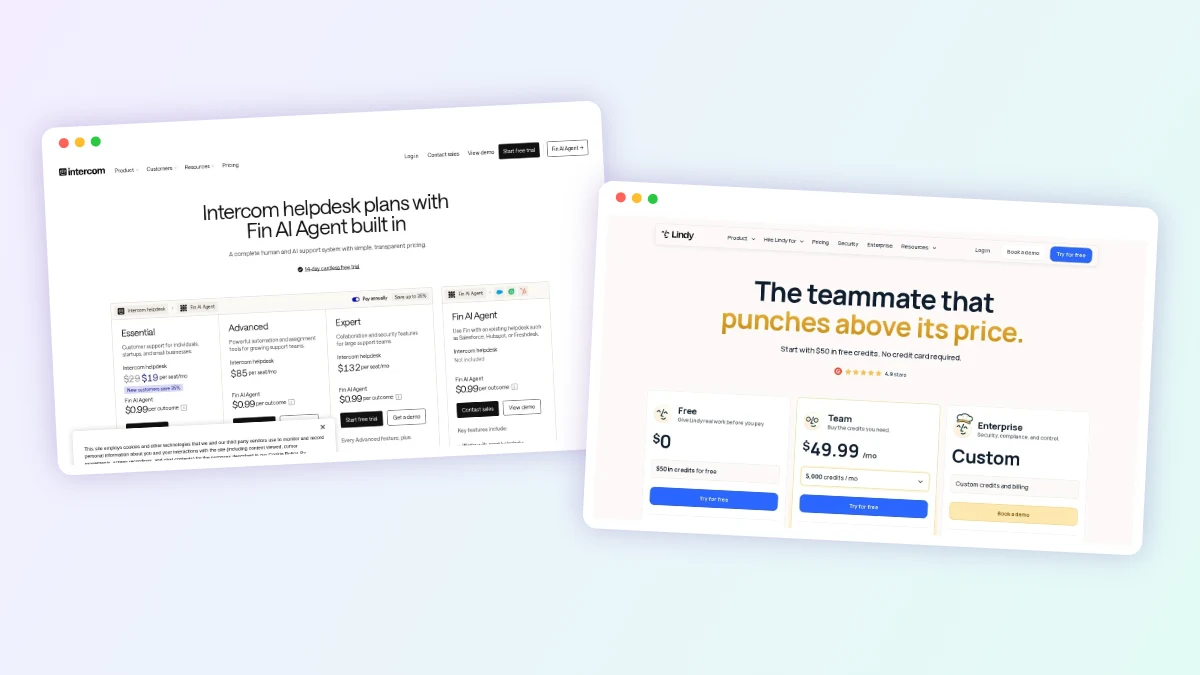
AI tools use nine main pricing models: per seat, usage or credits, per outcome, tiered plans, hybrid seat plus credits, free tiers, bring your own API key, enterprise contracts and open-source self-hosting. The pricing model matters as much as the sticker price, because two tools with the same headline price can cost very different amounts once your team starts using them every day.
Every task an AI agent runs consumes paid compute, so vendors tie price to consumption far more often than traditional software companies did. GitHub moved every Copilot plan to usage-based AI Credits on June 1, 2026. Intercom charges for Fin by the outcome. This guide explains each model with real examples from tools in our directory, then walks through a cost estimate you can copy.
How AI Tools Charge Customers Today
- Per-seat pricing is easy to budget but charges for people, not work, so light users cost as much as heavy ones.
- Usage and credit pricing tracks real use, yet each vendor defines a credit differently, which makes side-by-side comparison hard.
- Per-outcome pricing, such as Intercom Fin at $0.99 per outcome, ties cost to results but grows fast as volume rises.
- Hybrid seat plus credit plans are now common: Lindy and GitHub Copilot both bundle usage into a seat price and charge for more.
- Watch for credits that expire, overage settings, seat rules and price changes before you sign an annual plan.
Why AI Tools Price Differently From Regular Software
Traditional software costs almost nothing extra to serve one more user, so vendors could sell flat seats with unlimited usage and still protect their margins. AI products work differently. Each answer, call minute or code change runs a language model, and the vendor pays the infrastructure cost every time, which means a heavy user can cost the vendor many times more than an occasional one.
That cost structure explains why prices change so frequently in this market. Lindy raised its entry Team plan from $29.99 to $49.99 per user in October 2026. Relevance AI closed its free plan to new signups in September 2026. CrewAI removed its $25 Professional plan earlier in the year. Buyers should treat any published AI price as a temporary snapshot and confirm it again before every renewal.
1. Per-Seat Pricing
Per-seat pricing charges a fixed monthly fee for each person who uses the tool, and it remains the oldest and most familiar subscription model in business software. Reclaim AI, which schedules tasks and meetings on your calendar, charges $10 per seat a month on its Starter plan when billed annually, or $12 billed monthly. Its Business plan costs $15 annually or $18 monthly, and it does not use AI credits at all.
The main advantage is predictability, since you know the bill before the month starts and finance teams can budget for it easily. The disadvantage is that seats charge for headcount rather than value. A person who opens the tool twice a month costs exactly the same as a daily user, and every new hire automatically increases the bill.
Per-seat pricing suits tools that people use every day in a similar way, such as calendar, writing or email assistants, but it fits poorly when a few power users generate most of the activity.
2. Usage-Based and Credit Pricing
Usage-based pricing charges for what you consume, measured in minutes, messages, tasks or tokens, and voice agents provide the clearest illustration. Retell AI bills per second with no platform fee. Its published rates include $0.055 per minute for voice infrastructure, a language model fee that depends on the model (for example $0.04 per minute for GPT 5.1), $0.015 per minute for standard voices and $0.015 per minute for telephony.
Credit pricing is a variation in which you purchase a pool of credits and each action deducts a certain amount. Lovable, the AI app builder, sells its Pro plan at $25 a month for 100 credits. Unused monthly credits roll over while you stay subscribed, and top-up credits last 12 months. Fyxer AI publishes what each action costs: one credit per meeting minute, 20 per chat message and 0.2 per email sorted.
For buyers, the benefit is fairness, because you pay more only when you actually use more. The risk is that a credit means something different at every vendor, and a busy month can cost far more than a quiet one. Before you commit, ask the vendor how many credits your typical task consumes and request usage reports from the trial period.
3. Per-Outcome and Per-Resolution Pricing
Per-outcome pricing charges only when the AI completes a defined result, such as a support conversation that ends without human involvement. Intercom Fin is the best-known example. Intercom’s pricing page lists Fin from $0.99 per outcome, and Fin can run on other helpdesks without seat fees. When Fin runs on another helpdesk, there is a 50-outcome monthly minimum, and unused outcomes expire.
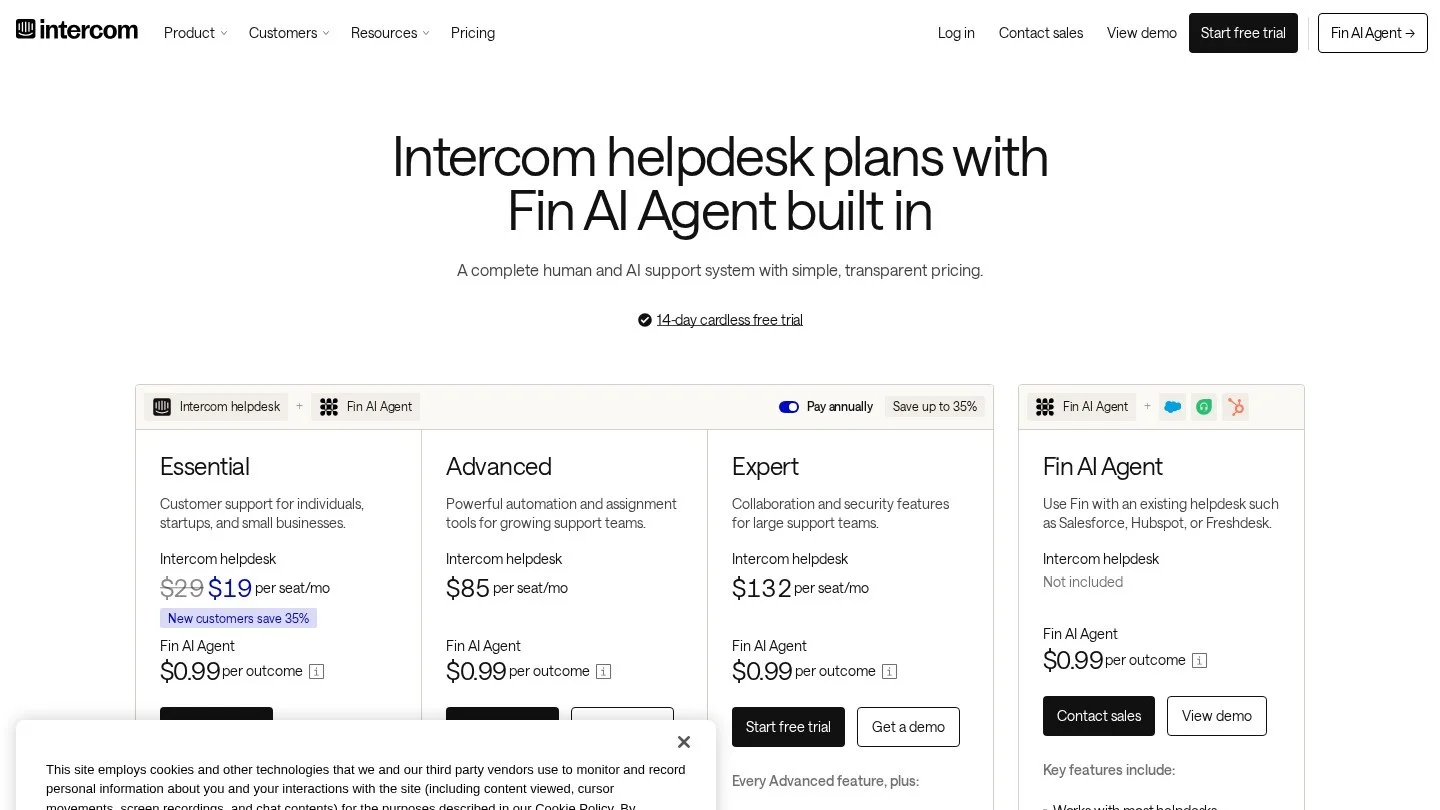
This model aligns the vendor’s revenue with your results, which explains why buyers find it attractive. It also shifts the negotiation to definitions: you need to know exactly what counts as an outcome, how the vendor detects it automatically and whether a customer who returns an hour later counts as a second outcome.
Per-outcome costs also rise with success: if the AI resolves more conversations, your bill grows, even though each automated resolution may still cost less than a human reply. We compare two outcome-priced support agents in our Fin vs Gorgias AI Agent breakdown.
4. Tiered Plans
Tiered plans bundle a specific amount of usage and a set of features into each price level, and customers move up a tier as their volume grows. Zipchat AI, a shopping assistant for online stores, shows the pattern clearly. Its Starter plan costs $80 a month, or $64 a month billed yearly, for 750 AI replies. Pro costs $300 a month, or $240 billed yearly, for 3,000 replies, and extra replies cost $49 per 250.
Tiers are easy to understand and keep bills steady within each band. The downside is the jump between tiers, since a store that needs 900 replies a month must either purchase additional reply packs or move to a plan designed for 3,000. Map your expected monthly volume against each tier before you choose.
Many vendors also reserve features such as integrations, analytics or single sign-on for higher plans, so confirm which tier includes the capabilities you need, not just the usage allowance.
Read also: AI Agent Tool Calling: How Models Execute External Functions
5. Hybrid Seat Plus Credits
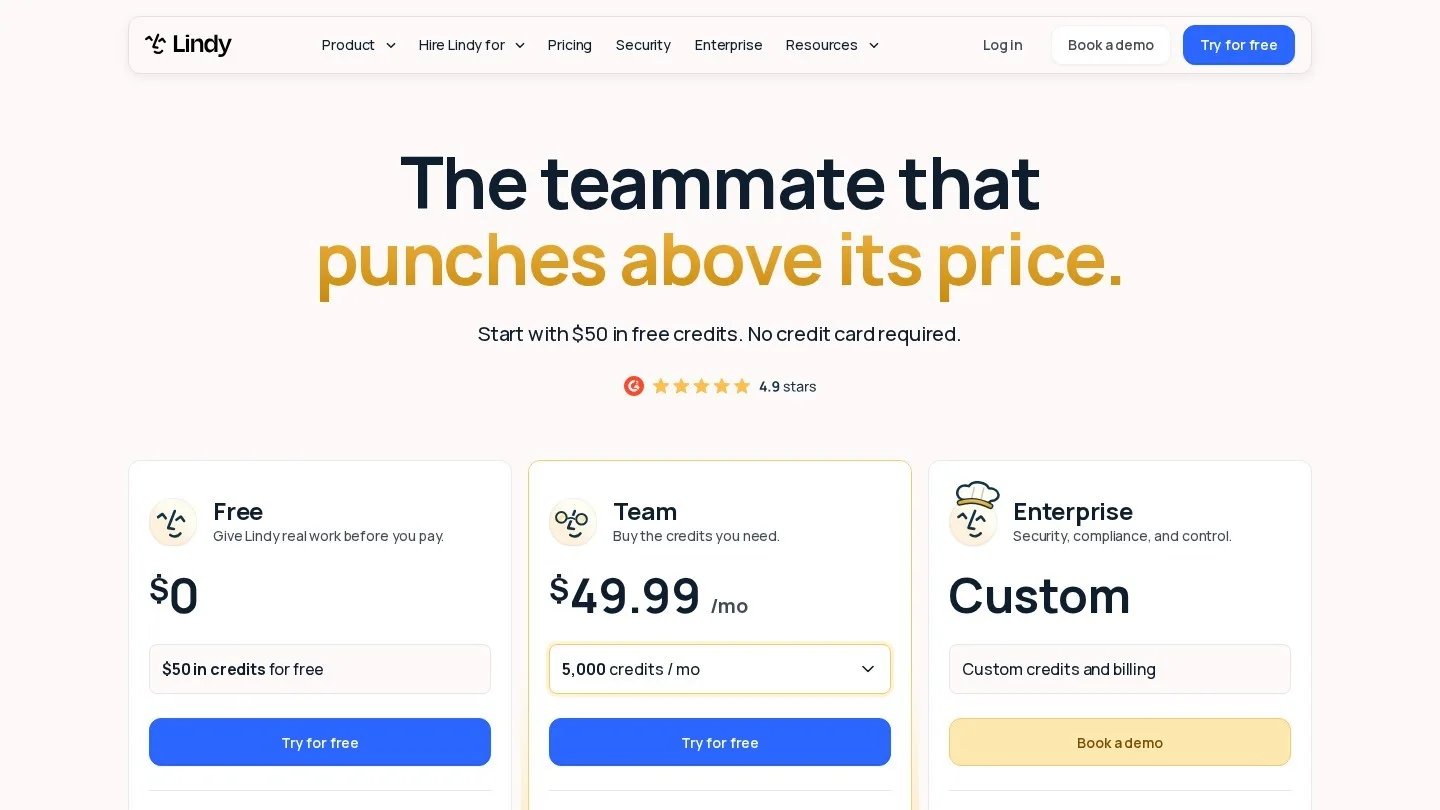
Hybrid pricing combines a seat fee with a usage allowance, and it is quickly becoming the standard approach for AI agents. Lindy charges $49.99 per active user per month on its Team plan, with 5,000 credits per user pooled across the workspace. Extra credits cost $10 per 1,000.
GitHub Copilot follows the same idea. Since June 1, 2026, each plan includes AI Credits equal to its price, so Copilot Business at $19 per user a month includes $19 of credits. Credits are used up by input, output and cached tokens at each model’s API rate. Code completions do not use credits. Teams can pool credits and set budgets, then choose to allow extra usage or cap spending.
Hybrid plans provide a stable base with room to scale, but they are also the hardest to forecast, because you must estimate both headcount and usage at the same time. Read the seat definitions carefully. At Lindy, anyone who uses the agent, including through a Slack mention, takes a paid seat.
6. Free Tiers and Freemium
Most AI tools offer some free entry point, whether a permanent free plan with usage limits or a short trial of the paid features. Lovable’s free plan includes five daily build credits, up to 30 a month. Fyxer’s free plan includes 400 credits a month but leaves out inbox sorting and drafts. Reclaim’s Lite plan is free for one user and one calendar.
Free tiers are the cheapest way to test whether a tool fits your workflow. Use them to measure how many credits or tasks a realistic week of work requires, since that number determines your eventual paid cost. Avoid building an important business process around a free tier, because vendors change them frequently, as Relevance AI did in September 2026.
7. Bring Your Own API Key
Some tools let you connect your own account with a model provider such as OpenAI or Anthropic, so you pay the tool for its software and pay the model provider directly for tokens. Relevance AI allows your own API keys on any plan. When you use its built-in model access instead, it passes Vendor Credits through at cost with no markup.
Open-source agents frequently work this way by default. goose, the open-source agent from Block, is free under the Apache 2.0 license and charges nothing itself. Your only cost is the model, which can be a paid API, an existing subscription, a free model tier or a local model.
Bringing your own key gives you complete visibility into model costs and lets you apply rates your company has already negotiated. The trade-off is two separate bills to manage and no single vendor responsible for the total. You also need someone to configure spending limits in the model provider’s console.
8. Enterprise Contracts
Enterprise contracts are custom deals, usually billed annually, with features large companies need: single sign-on, audit logs, security reviews, data controls and support terms. Devin, the autonomous coding agent, prices its Enterprise plan by quote and bills it in Agent Compute Units. Lindy’s Enterprise plan adds HIPAA support with a signed business associate agreement, SSO and audit logs.
Contracts let large buyers negotiate volume discounts, fixed rates and service levels, but they also hide prices, which makes comparison difficult for everyone else. CrewAI’s Enterprise plan, for example, includes overage at rates it does not publish. Ask for overage rates, renewal caps and exit terms in writing before you sign.
9. Open-Source and Self-Hosted
Open-source tools let you run the software on your own infrastructure without paying license fees. n8n offers a free, self-hosted Community Edition with no execution cap set by the vendor. Its cloud plans start at €20 a month billed annually for 2,500 executions. OpenHands, the open-source coding agent, is free under the MIT license, and its paid Teams plan costs $500 a month for up to 10 users.
Self-hosting gives you the most control over data and cost per task, although it is not free in practice. You pay for servers, model API usage and the engineering time needed to install, update and secure the software. It suits organizations with engineers available and strict data residency or privacy requirements.
AI Pricing Models Compared
Prices below are as of November 2026, based on each vendor’s published pricing. Use them as reference points, not quotes.
| Pricing Model | How You Pay | Example | Published Price | Best For | Watch Out For |
|---|---|---|---|---|---|
| Per seat | Fixed fee per user | Reclaim AI | $10 per seat a month (Starter, annual) | Daily tools used evenly | Paying for light users |
| Usage-based | Per minute, message or token | Retell AI | $0.055 per minute infrastructure, plus model, voice and phone fees | Voice and API-heavy work | Bills that swing with volume |
| Credits | Prepaid pool of credits | Lovable | $25 a month for 100 credits (Pro) | Project or build work | Unclear credit cost per task |
| Per outcome | Fee per result | Intercom Fin | From $0.99 per outcome | Support automation | Outcome definitions, rising bills |
| Tiered plans | Bundles by volume | Zipchat AI | $64 a month billed yearly for 750 replies | Steady, predictable volume | Jumps between tiers |
| Seat plus credits | Seat fee with usage pool | Lindy | $49.99 per user a month with 5,000 credits | Team agents | Seat rules and top-ups |
| Free tier | No charge with limits | Fyxer AI | Free with 400 credits a month | Testing fit | Limits and plan changes |
| Bring your own key | Software fee plus model bill | Relevance AI | Own API keys on any plan | Teams with model contracts | Two bills to track |
| Enterprise contract | Custom annual deal | Devin | Custom, billed in Agent Compute Units | Large companies | Hidden overage rates |
| Open source | Free license, you host | n8n | Community Edition free to self-host | Teams with engineers | Hosting and staff costs |
How to Estimate Your Monthly AI Tool Cost
A reliable estimate starts with your own volume rather than the vendor’s price list. Count the units the vendor charges for, apply the published rate and then add any fixed fees. The example below uses a small company that wants four AI tools. The volumes are our assumptions for illustration, and the prices are each vendor’s published rates.
- Support with Intercom Fin: 1,500 conversations a month, and we assume Fin resolves half. That is 750 outcomes at $0.99 each, or $742.50.
- Team agent with Lindy: six users at $49.99 each is $299.94, with a 30,000-credit pool. If the team uses 36,000 credits, it needs six top-ups of 1,000 credits at $10 each. The total is $359.94.
- Phone agent with Retell AI: 1,200 minutes at $0.125 per minute (infrastructure, GPT 5.1, a standard voice and telephony) is $150, plus $2 for a phone number. The total is $152.
- Coding with GitHub Copilot Business: four seats at $19 is $76, which includes $76 of AI Credits. If token use reaches $120 and the admin allows extra usage, the overage is $44 and the total is $120.
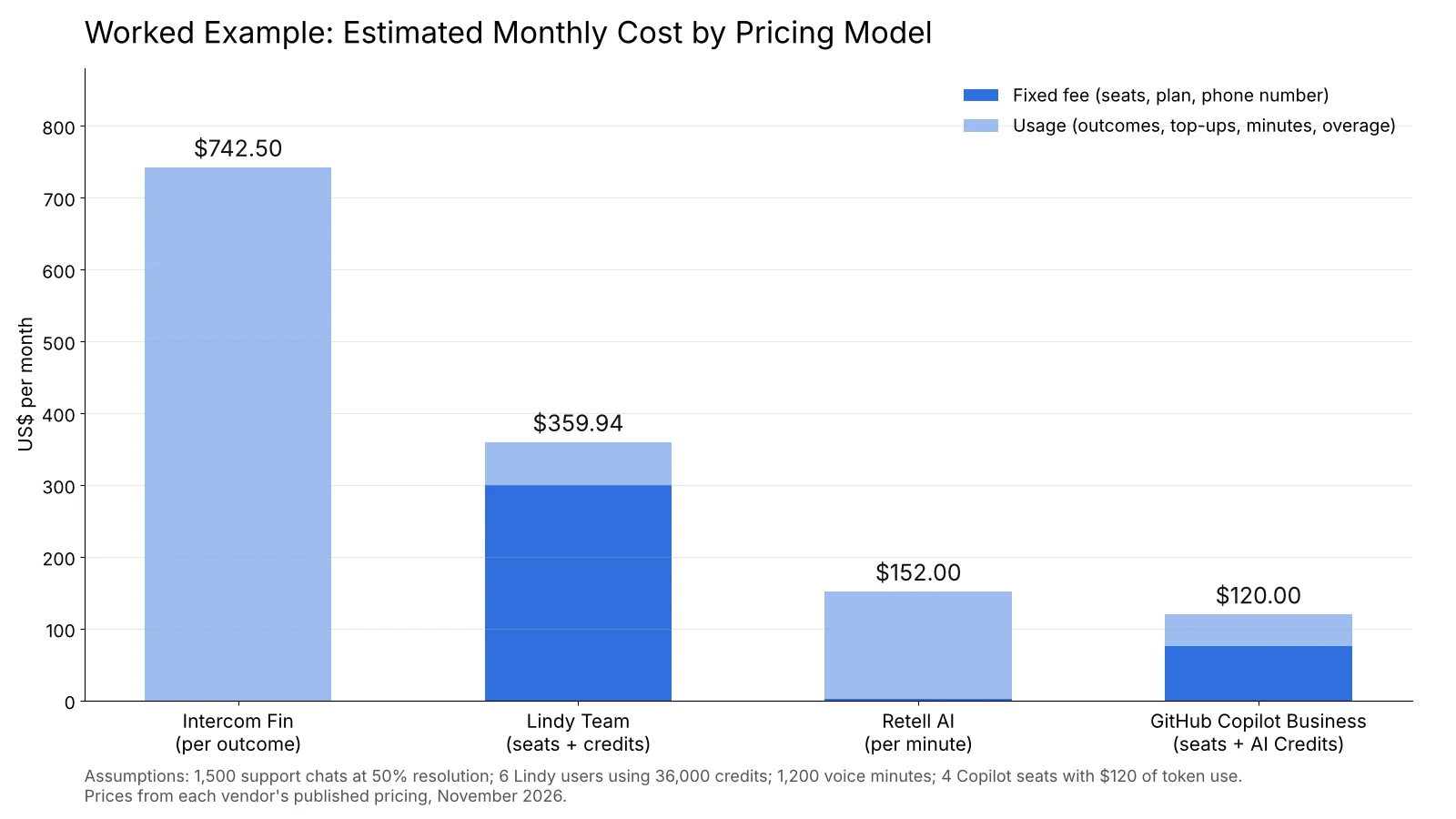
The four tools add up to $1,374.44 a month, or $16,493.28 a year, and most of that bill depends on usage. Fin has no fixed fee at all, so its cost moves directly with the resolution rate. At a 30% resolution rate the Fin line drops to $445.50, and at 70% it rises to $1,039.50.
Run the same calculation for three scenarios, a quiet month, a typical month and a peak month, and budget for the peak. Then check how each vendor handles the gap between your allowance and your real use, since that setting decides whether you get a surprise bill or a paused tool.
Red Flags to Check Before You Pay
Credits That Expire
Expiration rules vary considerably between vendors. Lindy’s monthly credits reset each billing cycle and do not roll over, though top-up credits stay until used. Fin’s unused outcomes expire. Devin’s extra prepaid credits roll over and never expire. If your usage is seasonal or uneven, generous rollover rules can be worth more than a lower headline rate.
Overage and Pause Settings
Find out exactly what happens when your allowance runs out. Lindy pauses credit-using actions until the next reset unless an admin buys more. GitHub Copilot lets admins either allow extra usage at published rates or cap spending. Retell includes 20 concurrent calls, then charges $8 per extra concurrent call per month. Configure spending alerts and caps on the first day.
Seat Creep and Billing Rules
Seat definitions can increase a bill without anyone noticing. At Lindy, a teammate who mentions the agent in Slack takes a seat after a seven-day trial, and a removed seat stays billed through the paid cycle with no mid-cycle proration. Review your list of active users every month and remove anyone who no longer needs access.
Auto-Renewal and Annual Lock-In
Annual plans are cheaper per month, but they commit you for a year in a market where prices and products change fast. Check the renewal date, the notice period to cancel and whether the price can rise at renewal. Put a calendar reminder 60 days before each renewal.
Hidden Extras
Some costs sit outside the advertised price. Copilot code review also uses GitHub Actions minutes, billed at standard rates. Lovable bills hosting and AI gateway usage beyond its monthly grants. BYO key tools leave the model bill to you. Add these additional lines to your estimate before you compare vendor totals.
Choosing a Pricing Model as a Builder
If you are building an AI product, choose the pricing model that matches how your customers already measure value. Support teams count resolved tickets, so per-outcome pricing makes intuitive sense to them. Voice platforms charge per minute because their own infrastructure costs scale by the minute, while daily assistants often perform best with a seat price plus a reasonable usage pool.
Protect your margin whichever model you choose, because your model costs rise with usage and unlimited plans can lose money on heavy users. Publish clear credit costs, warn users before they hit limits and keep a simple entry plan. Our guide to AI tool niches with high demand shows which markets already accept usage and outcome pricing.
Questions About Pricing an AI Product
What Are the Main AI Pricing Models?
The main models are per seat, usage or credits, per outcome, tiered plans, hybrid seat plus credits, free tiers, bring your own API key, enterprise contracts and open-source self-hosting. Many tools combine two or more of them.
What Is Outcome-Based Pricing in AI?
Outcome-based pricing charges only when the AI completes a defined result. Intercom Fin, for example, is listed from $0.99 per outcome, such as a resolved support conversation.
Is Usage-Based Pricing Cheaper Than Per-Seat Pricing?
It depends on how evenly your team uses the tool. Usage pricing is usually cheaper for occasional or uneven activity, while per-seat pricing often costs less when everyone relies on the tool heavily every day.
How Do AI Credits Work?
You purchase or receive a pool of credits, and each action consumes a portion of them, with the cost per action varying considerably by vendor. Fyxer, for example, uses one credit per meeting minute and 20 per chat message.
Why Do AI Tools Change Their Prices So Often?
Model costs, usage patterns and competitive pressure all change quickly. In 2026 alone, GitHub moved Copilot to usage-based credits, Lindy raised its entry plan price and Relevance AI closed its free plan to new signups.
Read also: Best No-Code AI Agent Builders: 10 Picks by Team and Budget
Related AI Agents





Explore Agent Categories
Related Articles
 GuidesAI Agent Tool Calling: How Models Execute External Functions
 GuidesHierarchical Multi-Agent Systems Explained
 GuidesTypes of AI Agents: 7 Kinds Explained With Real Examples
 GuidesAI Model Accuracy by Task Category
 GuidesBest Voiceflow Alternatives: 8 Chat and Voice Agent Builders
 ComparisonsLovable vs v0: Which AI App Builder Should You Use?
