


An AI agent works by running a loop. The model reads the request and the list of tools it may use. Then it either answers or asks for a tool. Your code runs that tool and sends the result back, and the model decides again. The loop ends when the model gives a final answer or a limit stops it.
That is the whole trick. Everything else, from guardrails to memory, hangs off that loop. So the fastest way to learn it is to watch one real request go around it, turn by turn.
We traced a meeting booking through four model calls. We used the Claude message format, real Google Calendar API calls and the stop rules of the OpenAI Agents SDK and LangChain. The token counts in the trace are our own example values, and we priced them with current Claude rates. For the layers inside an agent, read our guide to AI agent architecture. For system designs that wrap many agents, see AI agent architecture patterns for production.
How AI Agents Work: The Parts That Run Each Turn
Seven parts take part in every turn. Some act before the model call, some after it. The table lists who does what and when.
| Part | Its job | When it acts in a turn |
|---|---|---|
| Runner (agent loop code) | Calls the model, runs tools, counts turns | Start and end of every turn |
| System prompt | Sets the role, rules and tone | Sent with every model call |
| Tool schemas | Name, describe and type each tool input | Sent with every model call |
| Model | Picks the next move: a tool call or an answer | Middle of the turn |
| Tool executor | Runs the real function or API call | After the model asks for a tool |
| Message history (state) | Holds every request, call and result so far | Grows by two items per tool turn |
| Guardrails and limits | Block bad input, risky actions and runaway loops | Before the first call, before tools run, at the end |
Notice what is missing. The model never touches your calendar or your database. It only writes a request in JSON. Your code decides if that request runs. People call this wrapper code the agent harness, and it holds most of the control.
The Request We Traced Through the Agent Loop
A sales lead types one line into a scheduling agent: Find 30 minutes with Priya next week and send the invite. The agent runs on Claude Sonnet 5.5 and has three tools.
- lookup_contact: takes a name and returns an email address from the company directory.
- get_free_busy: wraps the Google Calendar freeBusy query and returns busy blocks for a list of calendars.
- create_event: wraps the Calendar events.insert call and sends invites to attendees.
Two of these only read data. The third one writes to other people’s inboxes. That split matters later, because the write tool is where the approval gate goes. Scheduling agents such as Howie and Reclaim.ai work on the same kind of calendar data, and our scheduling agents category lists more of them.
Turn 0: What the Agent Sends Before Anything Happens
The first model call carries more than the user’s sentence. It packs four things into one request.
- The system prompt. In our example it runs about 400 tokens. It names the person the agent works for, sets working hours and requires approval for every invite.
- The tool schemas. Every tool carries a name, a short description and an input schema written in JSON Schema. Our three tools come to about 420 tokens.
- A hidden tool prompt. When you pass tools, the Claude API adds its own system prompt for tool use. For Claude Sonnet 5.5 with tool choice set to auto, that adds 286 tokens.
- The user message. About 25 tokens.
So the agent spends about 1,131 input tokens before it has done any work. And it resends that block on every turn. The schema for the free/busy tool looks like this, trimmed to the parts the model reads.
{
  "name": "get_free_busy",
  "description": "Return busy time blocks for one or more calendars between two RFC3339 times.",
  "input_schema": {
    "type": "object",
    "properties": {
      "emails": {"type": "array", "items": {"type": "string"}},
      "time_min": {"type": "string"},
      "time_max": {"type": "string"}
    },
    "required": ["emails", "time_min", "time_max"]
  }
}
The description does real work here. A tool schema is a screen for the model, and it deserves the same care as a screen for people. When Anthropic’s team changed one tool to require absolute file paths, the model’s path errors went away. In the same spirit, our schema names the time format so the model does not guess it.

Turn 1: The Model Asks for a Contact
The model cannot book Priya without her email address. So it does not answer. It replies with a stop reason of tool_use and a block like this one.
{
  "type": "tool_use",
  "id": "toolu_01",
  "name": "lookup_contact",
  "input": {"name": "Priya"}
}
Now the runner takes over. It reads the name and the input, then calls the real directory function. Next it appends two messages to the history. The first is the model’s own reply. The second is a user message holding a tool_result block with the same id.
The format is strict. The tool result has to come right after the tool call, with no messages in between. Inside that user message, tool_result blocks come first, and any text goes after them. Break either rule and the API rejects the request.
Read also: How AI Agents Learn From Execution Feedback
Turn 2: The Free/Busy Check
The second model call sees everything from turn 1, plus the contact result. This time it asks for both calendars at once.
{
  "type": "tool_use",
  "id": "toolu_02",
  "name": "get_free_busy",
  "input": {
    "emails": ["sam@acme.com", "priya@acme.com"],
    "time_min": "2026-11-23T09:00:00-05:00",
    "time_max": "2026-11-27T17:00:00-05:00"
  }
}
Our tool turns that into a POST to the Calendar freeBusy endpoint. The request body takes timeMin, timeMax and an items list of calendar ids. The answer comes back keyed by calendar, with a busy list of start and end times. The start is inclusive and the end is exclusive.
Errors arrive in the same shape. A calendar can come back with an errors list, with reasons such as notFound or tooManyCalendarsRequested. Our tool passes that text to the model in plain words. It also sets is_error to true on the tool result, so the model knows the call failed.
That detail saves turns. An instructive message such as Rate limit exceeded. Retry after 60 seconds gives the model a next step. A bare failed tells it nothing, so it guesses.

Turn 3: The Write Action Waits for Approval
Both people are free on Tuesday at 10:00. So the model asks for create_event with a start, an end, two attendees and a title. On the Calendar side, only start and end are required, and a sendUpdates value of all emails every guest.
This is the first call that changes something outside the agent. So the runner should pause here. The OpenAI Agents SDK does this with needs_approval on a function tool. Once the model requests that tool, the run halts and the result lists the pending call under interruptions. A person approves or rejects it, and the run resumes from a saved RunState. If the tool arguments are malformed, the check fails closed and asks for a human.
LangChain does the same job with HumanInTheLoopMiddleware. You map tool names to the decisions allowed, such as approve, edit or reject. A checkpointer is required, since the paused run must survive until someone clicks. Review screens and timeouts get their own section in our human-in-the-loop orchestration post.
In our trace, the sales lead approves. The tool creates the event and returns the event id and link.
Turn 4: The Final Answer and the Stop Rule
The fourth call has nothing left to fetch. The model writes a short reply: Booked Tuesday 10:00 to 10:30 with Priya, invite sent. The stop reason is end_turn, so the runner returns the text and the loop ends.
Each framework defines done in its own way. In the OpenAI Agents SDK, a run ends when the model produces text of the desired output type with no tool calls. If the model hands off, the runner swaps agents and loops again. If it asks for tools, the runner runs them and loops again. LangChain’s create_agent follows the same idea. Its agent is a model calling tools in a loop until the task is complete.

What Each Turn of the Agent Loop Costs
Agents feel cheap per call and add up per task. The reason is plain. Each turn resends the full history, so input tokens grow every round. We priced our trace at Claude Sonnet 5.5 rates. Input runs $2 per million tokens, and output runs $10 per million.
| Turn | Model action | Input tokens | Output tokens | Tool result added |
|---|---|---|---|---|
| 1 | Call lookup_contact | 1,131 | 70 | 60 |
| 2 | Call get_free_busy | 1,261 | 110 | 220 |
| 3 | Call create_event (approved) | 1,591 | 160 | 150 |
| 4 | Final answer, end_turn | 1,901 | 90 | None |
| Total | 4 model calls, 3 tool runs | 5,884 | 430 |
The math comes to about 1.6 cents per booking. That is 5,884 input tokens at $2 per million plus 430 output tokens at $10 per million. At 1,000 bookings a day for 30 days, the bill lands near $482 a month.
Caching changes that number. The 1,131-token prefix repeats on every turn. Cache hits on Sonnet 5.5 cost $0.10 per million tokens, and a five-minute cache write costs $2.50. If we cache only the prefix, the booking drops to about 1 cent, roughly 37 percent less. Our AI agent token consumption study has more ways to trim.
Latency follows the same pattern. Every turn is a full model round trip, plus the time the tool takes. Turns run one after another, so four turns cost four waits. The approval in turn 3 adds human time on top. In fact, it often takes longer than the rest of the run combined.
Cutting turns is the fastest fix. For example, Claude can call several tools in one turn unless you set disable_parallel_tool_use. A model that fetched the contact and a wider free/busy window together would save a full round trip.
Where the Agent Loop Breaks and How Frameworks Stop It
Our trace went cleanly. Real runs do not. We grouped the common failures by the turn where they show up and matched each to a control that exists today.
Bad Tool Arguments
The model may send a date in the wrong format or skip a required field. When a tool request is invalid or missing parameters, Claude retries two to three times with corrections before it apologizes to the user. You can block the problem at the source. Adding strict: true to a tool definition makes the inputs match the schema exactly.
Loops That Never End
An agent can call the same tool again and again, for instance when free/busy keeps showing no shared slot. Every framework has a brake for this.
- OpenAI Agents SDK: max_turns counts one model call, with its tool calls, as one turn. Going over raises MaxTurnsExceeded. An error handler keyed max_turns can return a fallback answer.
- LangGraph: a recursion_limit in the run config caps the steps. Passing it raises GraphRecursionError, which often points to two nodes looping into each other. LangChain’s create_agent sets that limit to 9,999 steps, so pass a lower one for production.
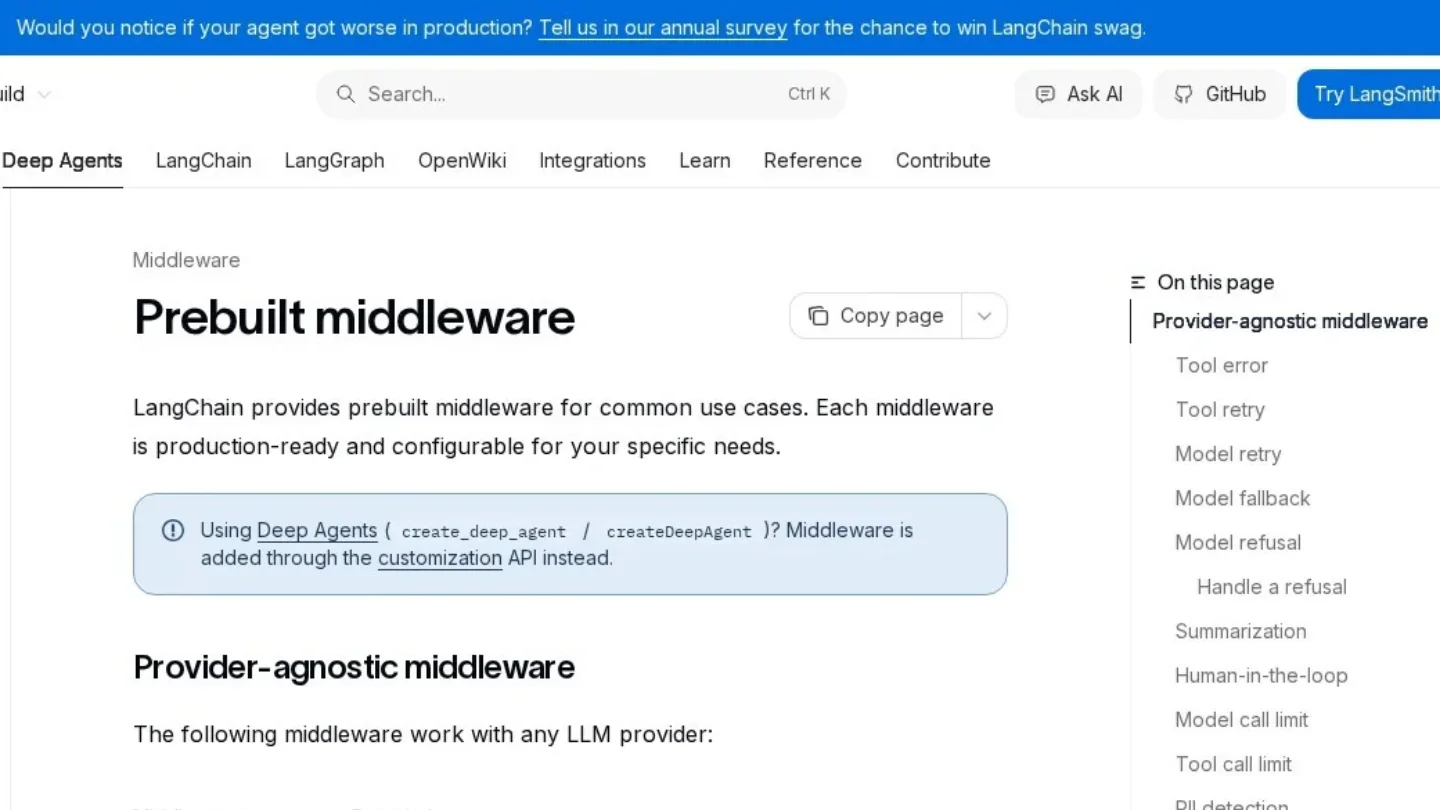
- LangChain middleware: ModelCallLimitMiddleware caps model calls per run or per thread. ToolCallLimitMiddleware caps calls to one tool or to all tools.
Neither middleware sets a limit for you. Model call limits default to no limit, so a missing setting means a missing brake.
Context Overflow
Long runs fill the context window. A big search result or a long email thread can do it in one turn. Claude then returns a stop reason of model_context_window_exceeded, and the reply should be treated as cut off. A max_tokens stop is similar, and if it cuts a tool_use block in half, you retry with a higher limit.
The fix is to shrink what goes back in. LangChain’s SummarizationMiddleware compresses older history once a token, message or fraction trigger fires, and it keeps the last 20 messages by default. Its context editing middleware clears old tool outputs instead. What to keep and what to drop is the subject of our context engineering guide.
Unsafe Input or Output
Guardrails sit at the edges of the loop. In the OpenAI Agents SDK, input guardrails check only the first agent’s input. Output guardrails check only the final answer. By default, input guardrails run in parallel with the agent, which is faster. However, the agent may already have spent tokens or run tools before a tripwire stops it. Set run_in_parallel to False when a tool has side effects. For a full menu of checks, see our AI agent guardrails guide.
Flaky Tools and Model Errors
APIs time out. LangChain’s ToolRetryMiddleware and ModelRetryMiddleware retry twice by default, for three attempts in total, with exponential backoff that starts at one second. ModelFallbackMiddleware moves the call to a backup model if the primary model errors out. Be careful with write tools, though. A retried create_event can send two invites unless the tool checks for a duplicate first.
How Three Frameworks Run the Same Agent Loop
The loop is the same everywhere. What changes is how much of it you write by hand. Claude’s SDKs also offer a tool runner that manages the tool_use loop, result formatting and retries for you. We compared three common ways to run the meeting agent.
| Stack | Who runs the loop | Turn brake | Approval pause |
|---|---|---|---|
| Claude Messages API, manual | Your code checks stop_reason and sends tool results | You write it | You write it |
| OpenAI Agents SDK | Runner.run handles tools, handoffs and final output | max_turns | needs_approval plus RunState |
| LangChain create_agent with LangGraph runtime limits | The agent calls tools until the task is complete | recursion_limit and call limit middleware | HumanInTheLoopMiddleware with a checkpointer |
We would write the loop by hand once, just to see every message. After that, a framework saves you from rebuilding turn limits, retries and pauses. Our agent frameworks category compares more options, and agent infrastructure covers the hosting and tracing around them.
Questions About How AI Agents Work
Does the Model Run the Tools Itself?
Not for tools you define. The model only writes a tool_use request, and your code runs it. Server tools are the exception. With Claude’s web search or code execution, Anthropic runs the tool and returns results in the same response.
How Many Turns Does a Typical Agent Task Take?
It depends on how many facts the agent must fetch and how many actions it takes. Our meeting trace needed four model calls for three tools. A research task that reads dozens of pages can run far longer, so set a turn cap that fits the job.
What Is pause_turn in the Claude API?
It appears when a server-side tool loop, such as web search, hits its iteration limit. The default limit is 10. You send the assistant content back unchanged, and Claude carries on. A wait for your own tool never produces pause_turn. That case is tool_use.
Is an Agent Just a Chatbot With Tools?
Close, but the loop is the difference. A chatbot with one tool call answers once. An agent keeps going on its own until the goal is met or a limit stops it. In practice, most agents are language models that use tools, read the results and repeat. Our comparison of AI agents vs AI chatbots covers the business side of that gap.
Related AI Agents



Read also: Supervisor vs Swarm Architecture for AI Agents
Explore Agent Categories
Related Articles
 GuidesHow AI Agents Learn From Execution Feedback
 GuidesSupervisor vs Swarm Architecture for AI Agents
 GuidesAI Agent Architecture Patterns for Production Applications
 GuidesAI Agent Middleware: Architecture and Use Cases
 GuidesAI Agent Architecture: The 6 Layers Inside Every Agent
 GuidesBest Rows AI Alternatives for AI Spreadsheet Work
