


An LLM is a model that predicts text. An AI agent puts an LLM in a loop with tools. That lets it take step after step until a task is done. An AI search engine sits in between. It runs web searches, reads the pages, and has an LLM write one answer with citations.
So ChatGPT, Perplexity, Google AI Mode and Copilot are not LLMs themselves. Each one is a product built around one or more LLMs. Most of them now switch between search mode and agent mode depending on what you ask.
The names blur because the parts overlap. Once you know the five parts, though, you can tell what any AI tool is doing from how it behaves.
The Five Parts Behind LLMs, AI Search and AI Agents
Every AI product mixes the same building blocks. Anthropic calls the base unit an augmented LLM, which is a model with retrieval, tools and memory added. Which parts a product switches on decides what kind of product it is.

| Part | What it does | Plain example |
|---|---|---|
| Model | Reads text and writes the next most likely text | Answering a question from what it learned in training |
| Retrieval | Pulls fresh documents into the prompt before the model answers | Fetching five news pages about a product launch |
| Tools | Lets the model ask software to do something | Calling a calendar API to book a slot |
| Loop | Feeds each result back to the model so it can pick the next step | Search, read, search again, then write |
| Memory | Keeps facts across turns or sessions | Remembering that you prefer aisle seats |
The Model
The model is the LLM itself, such as GPT, Claude, Gemini or Llama. On its own, it only turns text into more text. It knows what was in its training data, up to a cutoff date. Ask it about last week, and it will either refuse or guess.
A bare model also cannot act. It can write an email, but it cannot send one. It can describe a refund, but it cannot issue it.
Retrieval
Retrieval fixes the freshness problem. Before the model answers, the system fetches documents and pastes them into the prompt. Those documents can come from the web, a company wiki or a database.
This is the heart of AI search. The model still writes the answer. However, it now writes from pages it just read, so it can cite them.
Tools
Tools let the model do things. The model writes a structured request, such as a calendar check for Tuesday. Then the app runs that request and hands back the result. Tools can search, run code, click on a web page, send an email or update a CRM record.
The Loop
The loop is what makes an agent. After each tool call, the result goes back to the model. The model then decides the next step on its own. It keeps going until the job is done or a limit stops it.
Anthropic draws the line this way. In a workflow, code decides the order of steps ahead of time. In an agent, the model decides how to proceed and which tools to use. That freedom costs more time and money, and errors can compound across steps. So Anthropic’s advice is to use the simplest setup that works, which often means no agent at all.
Memory
Memory carries facts forward. Short-term memory is the chat history in the current session. Long-term memory saves facts across sessions, such as your name, your projects or your writing style. Search engines use little memory. Agents lean on it, because long tasks need to track what they already did.
What AI Search Engines Actually Do
AI search engines pair retrieval with an LLM. Each product handles the search step a bit differently, and the differences shape how far you can trust the answer.
Perplexity
Perplexity works in four steps. First, it interprets your question. Next, it searches articles, websites and journals, including live data like sports scores. Then it combines the most relevant material into one answer. Finally, it adds numbered footnotes that link to each source.
Pro Search runs a more thorough search across more sources. In Pro Search, you can also pick the model behind the answer. Free users get up to 3 Pro Searches a day.
ChatGPT Search
ChatGPT decides on its own when a question needs the web. You can also force a search with the web search icon. ChatGPT may share a short, disassociated version of your query with search partners such as Bing. It may also share a general location based on your IP address. Answers that use search carry inline citations. A Sources button at the end lists every page used.
Google AI Mode
Google AI Mode uses a custom version of Gemini inside Google Search. Its main trick is query fan-out. AI Mode breaks your question into subtopics and runs many searches at once. Then it writes one answer from all the results.
That is still search. The model gathers and writes, and you do the acting.
Microsoft Copilot
Microsoft 365 Copilot Chat turns your prompt into a short query and sends it to Bing. The query uses only a few words from your prompt or file, unless the prompt is already very short. Copilot then adds the web results to its answer. A Sources button shows the exact query sent to Bing and the pages it used. Admins can switch web search off for the whole organization.

When AI Search Turns Into an AI Agent
The line moves the moment a product starts looping or acting. Two kinds of features push search engines over that line.
The first is deep research. Here the loop runs on the search side. Perplexity Research runs dozens of searches, reads hundreds of sources and reasons through them in cycles. Then it delivers a report in about 2 to 4 minutes. Google’s Deep Search for AI Mode uses the same fan-out idea. It can issue hundreds of searches before it writes a cited report. Our page on Perplexity Deep Research covers that product in detail. These tools only read, so the risk stays low.
The second kind is action. Now the agent changes things in the world.
- ChatGPT agent: ChatGPT agent has a visual browser, a text browser, a terminal, direct API access and connectors such as Gmail and GitHub. It asks before actions with real-world effects, such as a purchase.
- Google AI Mode with agentic features: For event tickets, AI Mode can search across sites, check live prices and fill in forms. It leaves the final purchase to you.
- Gemini tasks: Gemini can browse to shop or book travel, and it can manage Gmail and Calendar. It always asks before sensitive steps like purchases or sending messages. You can run up to 15 tasks at once.
- Perplexity Comet: Perplexity Comet is a browser with an agent built in. So the company behind an answer engine also ships an agent that clicks for you.
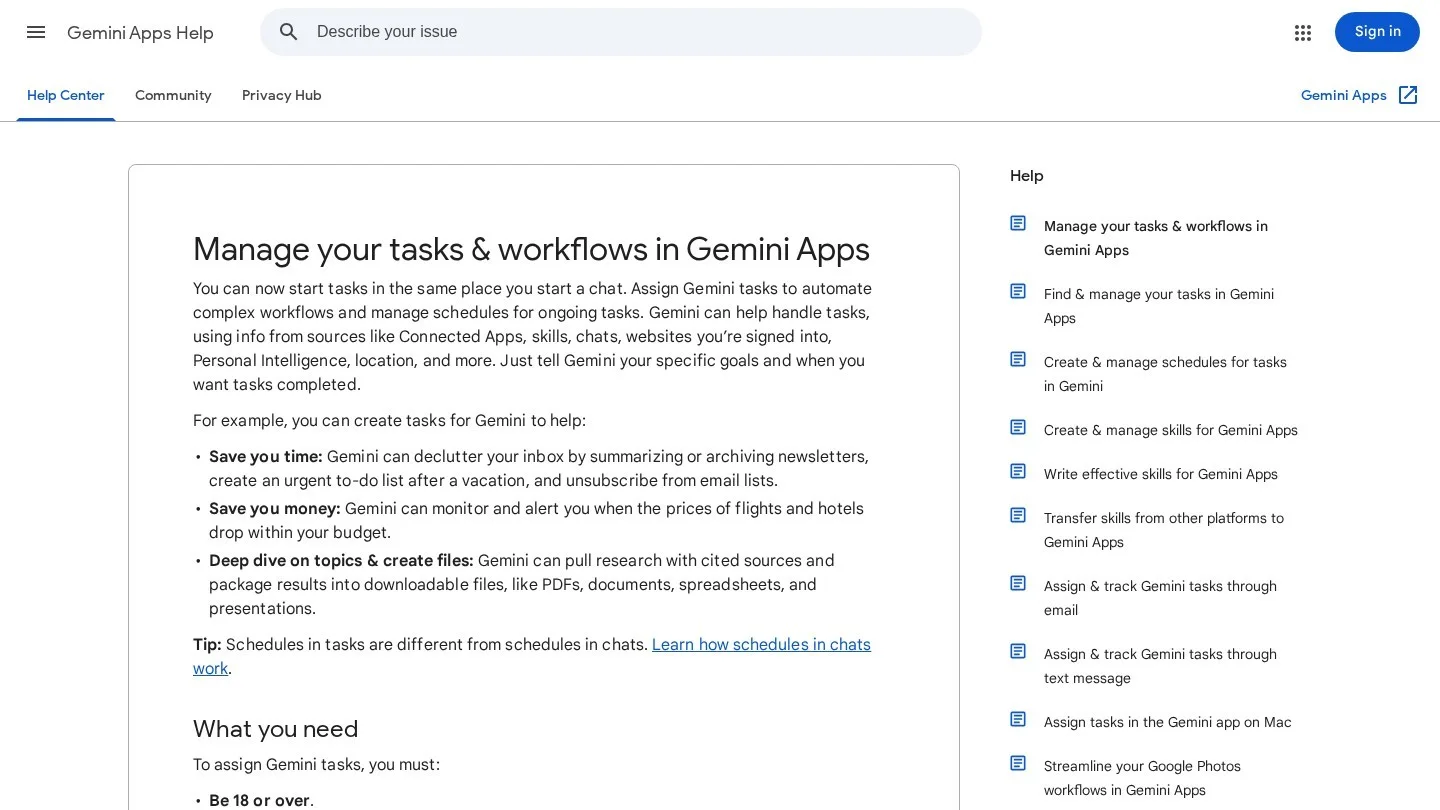
So one brand name can cover very different things. The Gemini model on its own only writes text, while Gemini tasks can book a table or send an email for you.
Read also: Dynamic Planning in LLM Agents: ReAct, Replanning and Tree Search
How to Tell Which Mode a Chat App Is In
Most chat apps now switch modes without telling you much. A few signs give it away.
- Plain model answer: There are no citations and no sources button. The answer arrives in a few seconds. Treat any recent fact in it as a guess until you check it.
- Search answer: You see numbered footnotes or a sources list under the reply. In Copilot, the sources panel even shows the exact query sent to Bing, so you can judge what was searched.
- Research run: A progress view shows many searches and pages over several minutes. The result is a long report with a source list.
- Agent run: You see a browser view, a list of steps or a request to connect an app. Above all, the tool pauses to ask before it buys, sends or submits something.
When you see an approval prompt, read it. That pause is the only point where you control what the agent does next.
LLM vs AI Search Engine vs AI Agent Compared
The table lines up the three on the traits that matter when you pick one.
| Trait | Plain LLM | AI search engine | AI agent |
|---|---|---|---|
| What it reads | Your prompt and its training data | Your prompt plus fresh web pages | Your prompt, web pages, files and app data |
| What it can do | Write text | Write text with citations | Click, type, call APIs, send and change things |
| Steps per request | One | One search round, or a few | Many, chosen by the model |
| Knows recent events | No, only up to its cutoff | Yes | Yes |
| Typical time | Seconds | Seconds, or minutes for deep research | Minutes to hours |
| Main risk | Made-up facts | Weak or wrong sources | Wrong actions in real systems |
| Examples | A model through an API with no tools | Perplexity, ChatGPT search, Google AI Mode, Copilot web search | ChatGPT agent, Gemini tasks, Perplexity Comet |
A Supplier Price Request Run Through All Three
Take one real request. You want to know which of your three cleaning suppliers raised prices this quarter. Then you want to email each one and ask for the old rate.
A plain LLM has no idea who your suppliers are. It cannot see their price lists or your invoices. At best, it writes a polite template email. At worst, it invents a price change.
An AI search engine can find the suppliers’ public price pages and cite them. That helps if the prices are online. Still, it cannot see your invoices. It also cannot send anything, so you copy the facts into your own email.
An AI agent with an email connector can search your inbox for the last two invoices from each supplier. Then it compares the totals and builds a short table. Next, it drafts three emails with the old and new prices filled in. Finally, a good agent stops and asks you to approve before it sends them.
The agent saved the most time. It also carried the most risk, since it read private mail and could send messages in your name. That is why approval prompts matter so much. Our guide on how AI agents work traces a request like this through each turn of the loop.
When You Need an LLM, AI Search or an AI Agent
Pick by what the task needs. Most people use all three in one week.
- Use a plain LLM for writing and thinking: Drafts, rewrites, brainstorming and summaries of text you paste in all work fine without the web. You get speed and low cost, and nothing leaves the chat.
- Use AI search for current facts: Prices, news, product specs and anything after the model’s cutoff belong here. Always click two or three citations, because a confident answer can still rest on a weak page.
- Use deep research for a long read: When a question needs 20 sources, a research mode saves hours. The output is a report, so check the sources before you quote them.
- Use an AI agent for multi-step work in your own tools: Booking, filing, updating records and inbox chores fit here. Give it the fewest permissions it needs, and keep approvals on anything that sends, pays or deletes.
- Use a fixed workflow for repeat jobs: If the steps never change, a workflow is cheaper and more predictable than an agent. Our post on AI agents vs AI assistants covers how the line moves when assistants gain agent modes.
Questions About LLMs, AI Agents and AI Search
Is Perplexity an LLM?
No. Perplexity is an answer engine that runs on top of LLMs. It searches the web, then has a model write the answer with footnotes. In Pro Search, you can even choose which model writes it.
Does Google AI Mode Count as an AI Agent?
Mostly no. Standard AI Mode searches and writes, which makes it AI search. Its agentic features for tickets and bookings cross into agent work, because they fill in forms on other sites. Even then, Google leaves the final purchase to you.
Can an LLM Browse the Web on Its Own?
No. A model can only ask for a search or a page. The app around it has to run the request and return the result. When a chatbot browses, the browsing comes from that wrapper.
Are AI Search Answers More Accurate Than Plain LLM Answers?
For recent facts, usually yes, because the answer comes from pages fetched for your question. Still, the model can misread a page or lean on a poor source. Citations let you check, so use them. For a wider look at agent types, see our guide to types of AI agents.
Related AI Agents



Read also: AI Agent Startups by Country: Where 349 Agent Makers Are Based
Explore Agent Categories
Related Articles
 GuidesDynamic Planning in LLM Agents: ReAct, Replanning and Tree Search
 GuidesBest CAMEL AI Alternatives and What They Cost
 GuidesParallel AI Alternatives: 8 Web Search APIs Compared
 GuidesSynthesia AI Video Usage Among Corporate Training Teams
 Guides100 AI Agent Statistics for Retail Companies
 GuidesCan You Trust an AI Agent?
