


Rows is no longer a place to build new spreadsheets. Superhuman, the company formerly called Grammarly, agreed to buy Rows in February 2026. The Rows team then planned a three-month sunset, with Rows.com fully winding down on May 31, 2026.
So anyone who used Rows AI needs a new home for that work. The closest Rows AI alternative is Quadratic. It is an AI spreadsheet with database connections and code in cells, and a Rows XLSX or CSV export drops straight into it. If you would rather stay in a mainstream spreadsheet, Google Sheets with Gemini costs $14 per user a month on an annual plan. Excel with Copilot comes in Microsoft 365 bundles from $23.50 per user a month.
The Rows team itself now works on Superhuman Docs, the product that used to be Coda. That makes Docs the natural pick for teams that liked Rows as a shared workspace more than as a calculator.
What Rows AI Did Before the Superhuman Deal
Rows was a spreadsheet built to pull data from business tools. Tables could pull live data from business tools through built-in integrations. On the Pro plan, that refresh ran every minute. The AI Analyst ran on top of the grid as a spreadsheet copilot.

The AI Analyst handled most of the jobs an analyst does in a sheet. These were the tasks people leaned on most:
- Analysis on request. You asked for averages, medians or the top product per region, and it built the result as a new table.
- Calculated columns. It added columns such as profit from revenue and cost. It also split, joined, trimmed and reformatted text.
- Lookups across tables. It did VLOOKUP and SUMIF style matches between two tables, so you did not write the formula yourself.
- AI enrichment. It classified text, scored sentiment and pulled concepts out of a column. It also fetched live stock prices, FX rates and company financials.
- Charts and merges. It built bar, column, combo and stacked area charts. It could also join or append tables with a column picker.
Rows charged by member, with AI tasks capped per plan. These were its last published plans:
| Rows plan | Price per month | AI tasks a month | Data refresh |
|---|---|---|---|
| Free | $0 | 5 | Manual import only |
| Plus | $8 per member, or $6 on annual billing | 200 | Daily |
| Pro | $79 plus $8 per member, or $59 plus $6 on annual billing | 1,000 | Every minute |
| Enterprise | Custom | Unlimited | Every minute |
Then came the deal. Superhuman announced it on February 23, 2026. The Rows team, based in Porto, joined to work on data analysis inside Superhuman Docs. Rows told customers it would gradually sunset the product over the next three months.
Rows AI Alternatives Compared by Price and AI Feature
Eight tools cover the gap Rows left. Some replace the AI Analyst. Others replace the shared, always-fresh data tables. The table gives the paid entry price for each one, plus its free option.
| Rows AI alternative | AI that replaces the AI Analyst | Live data it can pull in | Paid entry price | Free option |
|---|---|---|---|---|
| Quadratic | AI writes formulas, Python, SQL and charts | Postgres, Snowflake, BigQuery, MySQL, QuickBooks, Google Analytics, any REST API | Pro, $18 per user a month billed annually | Personal plan with limited AI |
| Julius AI | Data agent with notebooks and charts | Google Drive; Postgres, BigQuery and Snowflake on Business | Plus, $20 a month | 2,000 credits a month |
| GPT for Sheets (Autosheet) | Agent that plans and runs steps in your sheet, plus bulk AI per row | Your Google Sheets data | Pay per use from pooled credits | Free trial |
| Google Sheets with Gemini | Gemini side panel, AI function and smart fill | Google Workspace files | Business Standard, $14 per user a month on annual plans | None for Gemini in Sheets |
| Excel with Copilot | Copilot in Excel | Microsoft 365 files | Business Standard with Copilot, $23.50 per user a month billed yearly | None listed |
| Superhuman Docs | Docs AI inside docs and tables | Docs tables and the Superhuman suite | Pro, $12 per member a month billed annually | Free plan |
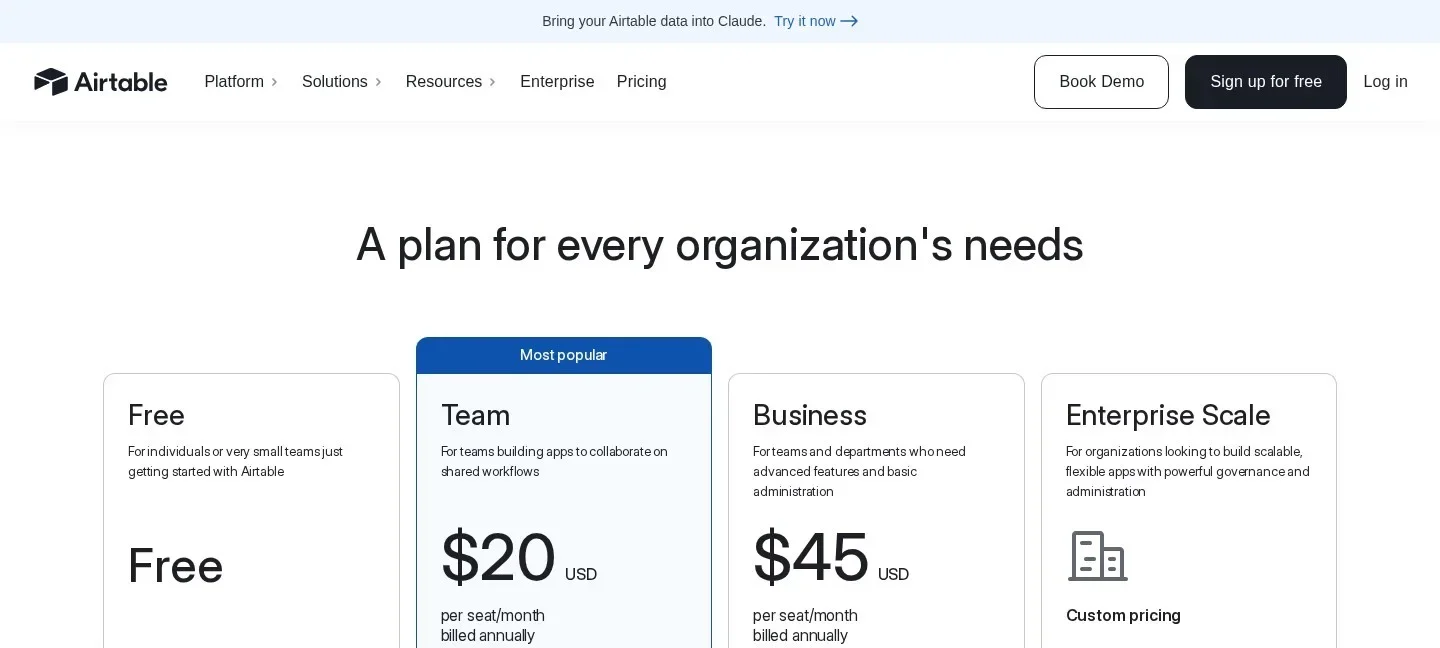
| Airtable | Omni, field agents and AI automations | Airtable bases | Team, $20 per user a month billed annually | 500 AI credits per editor |
| Notion | Notion Agent | Notion databases | Business, $20 per member a month | Limited AI trial |
Rows AI Alternatives for People Who Lived in the AI Analyst
These three tools come closest to asking a question and getting a table back. They differ in how much code they expose and in how they bill.
Quadratic
Quadratic looks like a normal grid, but each cell can run Python, SQL or JavaScript. You ask the AI a question, and it writes the formula, query or chart for you. It also shows the code behind each answer, so you can check the logic before you share it. Rows users who checked AI output by hand will find that useful.
Connections are where Quadratic most resembles Rows. It links to Postgres, Snowflake, BigQuery, MySQL, MSSQL, Supabase and a few more databases. It also has built-in links to QuickBooks, Google Analytics, Mixpanel, Plaid and live market data. For anything else, a few lines of Python in a cell can call a REST API.
Moving over is short work. You drag a Rows XLSX or CSV export into Quadratic, and tables, formulas and values come across. Live Rows integrations do not survive any export, though, so you rebuild those as Quadratic connections. Pro costs $18 per user a month on annual billing with $20 in AI credits. Business costs $36 with $40 in credits. Quadratic is SOC 2 Type II and HIPAA compliant. See our Quadratic AI review for more detail.
Julius AI
If Quadratic feels like too much code, Julius AI takes the opposite route. You upload a file or connect a source, then chat with a data agent. It answers with charts, tables and written findings. Behind the chat, it runs notebooks that you can open and rerun.
The plans scale by credits. Plus costs $20 a month with 2,000 credits and covers one seat. Pro costs $45 a month with 5,000 credits and more memory for larger files. Database connectors for Postgres, BigQuery and Snowflake arrive on Business, at $450 a month for 10 seats. That plan also adds scheduled report runs, which is the nearest thing to the Rows auto-refresh.
One limit matters for Rows users. Julius works on data you bring to it, and it is not a shared spreadsheet that a team edits together. Our Julius AI page covers its agents in more depth.
GPT for Sheets (Autosheet)
For teams that never wanted to leave Google Sheets, GPT for Sheets adds an agent to the sheet you already have. The add-on is now called Autosheet, and Talarian makes it. You describe a task, and the agent reads the sheet, plans the steps and does them. It writes and fixes formulas, cleans data, removes duplicates and builds pivot tables and charts.
Its other half is bulk work, one answer per row. That covers translation, categorizing, extraction and enrichment, much like the AI enrichment columns in Rows. Models come from OpenAI, Anthropic, Google and others. You can also reach the agent from Claude or ChatGPT through an MCP connector.
Billing is pay as you go from pooled credits, after a free trial. Some reviewers dislike that move to usage pricing, so budget for heavy bulk jobs. The add-on has more than 7 million installs and a 4.8 rating from 4,105 ratings on the Google Workspace Marketplace.
Read also: Strawberry AI Alternatives for Teams That Automate Web Work
Rows Alternatives Inside Google Sheets and Excel
Many Rows users came from Sheets or Excel in the first place. Going back is cheaper than it was, because both now have AI built in.
Google Sheets With Gemini
Gemini in Sheets gives you a side panel for questions, an AI function you type into cells, and an upgraded smart fill. The AI function is the closest match to Rows enrichment. You point it at a column and give it a task, such as tagging each review by topic.
The edition matters, though. Business Starter costs $7 per user a month on an annual plan, but it has none of these Sheets features. You need Business Standard at $14, or $16.80 on the flexible monthly plan. Business Plus costs $22 annually. Each edition also includes Gmail, Drive and Meet, so many teams already pay for one. Read more on our Gemini in Sheets page.
Excel With Copilot
On the Microsoft side, Copilot works inside Excel, Word, PowerPoint and OneNote. You can buy it two ways. Microsoft 365 Business Standard with Copilot costs $23.50 per user a month billed yearly, or $28.20 monthly. The Copilot Business add-on costs $25.20 monthly. On yearly billing it drops from $21 to $18 for the first year, for purchases from July 1 to December 31, 2026.
Excel is the safest landing spot for Rows exports. An XLSX file opens with its formulas and values. However, Rows-style live refresh has to be rebuilt with Excel data connections or a separate sync tool. Our Excel Agent Mode page covers the agent features in Excel.
Rows Alternatives for Team Workspaces and Shared Data
Some teams used Rows as a light database with a dashboard on top. For them, a workspace tool replaces Rows better than another spreadsheet.
Superhuman Docs (Formerly Coda)
Superhuman Docs is where the Rows team went. Coda became Superhuman Docs on July 8, 2026, and joined Grammarly, Mail and Go in the Superhuman suite. Docs mix pages and tables in one file, and Docs AI works inside them.
Pricing comes with the suite. The Free plan includes Grammarly, Docs and Go. Pro costs $12 per member a month billed annually, or $15 monthly. Business adds Superhuman Mail at $33 annually or $40 monthly. Existing Coda customers keep their pricing unless they join the bundle. Since the Rows team now builds data analysis features for Docs, this is the tool to watch if you liked where Rows was heading.

Airtable
Next, Airtable treats data as a base of linked tables. That structure beats a flat sheet once records point at each other, such as clients, projects and invoices. Its AI runs on credits. Omni answers questions about your base for 10 credits each, and building apps and agents with it uses no credits. Field agents fill columns, using about 1 credit to sort feedback, 10 for a web search and 200 to read a 10-page contract.
The Free plan gives 500 credits per editor each month. Team costs $20 per user a month billed annually with 15,000 credits per billable collaborator. Business costs $45 with 20,000 credits per paid user. Extra credits cost $20 per 10,000. Only people who can edit a base count as seats, so read-only viewers are free. More on our Airtable AI page.
Notion
Finally, Notion works for teams whose numbers live next to plans and notes. Its databases keep the records, and charts appear on the same pages. Notion Agent comes with the Business plan at $20 per member a month. That plan also adds AI meeting notes and Enterprise Search in beta.
Free and Plus only get a limited trial of Notion AI. Custom Agents cost $10 per 1,000 Notion credits after a free trial. Notion replaces the Rows workspace more than the Rows calculator, so heavy modeling still belongs in a spreadsheet. See our Notion Agent page for the agent side.
What a Five-Person Team Pays After Rows
Take a five-person team that paid for Rows on annual billing. On Plus, that cost $6 × 5 members × 12 months, or $360 a year. On Pro, it cost $59 × 12 plus $6 × 5 × 12, or $1,068 a year.
The same five people pay this on each alternative, at the entry paid plan:
| Alternative and plan | Math | Yearly cost for five |
|---|---|---|
| Superhuman Pro (annual) | $12 × 5 × 12 | $720 |
| Google Workspace Business Standard (annual) | $14 × 5 × 12 | $840 |
| Quadratic Pro (annual) | $18 × 5 × 12 | $1,080 |
| Airtable Team (annual) | $20 × 5 × 12 | $1,200 |
| Notion Business | $20 × 5 × 12 | $1,200 |
| Julius AI Plus, one seat each | $20 × 5 × 12 | $1,200 |
| Microsoft 365 Business Standard with Copilot (annual) | $23.50 × 5 × 12 | $1,410 |
| Quadratic Business (annual) | $36 × 5 × 12 | $2,160 |
Two of these land under the old Rows Pro bill, and Quadratic Pro lands within $12 of it. Also, the Google and Microsoft prices include email, storage and meetings. A team that already pays for Workspace or Microsoft 365 may need no new spend at all, only an upgrade to the right edition.
Rebuilding Rows Workflows in a New Tool
Files are the easy part. The live connections and AI columns take the real work. This order keeps the rebuild short:
- Open each XLSX export in the new tool. Check formulas on one sheet first, then move the rest.
- List every Rows integration you used. Note the source, the fields and how often it refreshed.
- Rebuild data pulls as native connections. Quadratic and Julius connect to databases directly. In Sheets or Excel, use their own data connections or an add-on.
- Recreate AI enrichment columns. Use the Gemini AI function, Autosheet bulk tools or Airtable field agents for per-row tasks.
- Set refresh schedules. Julius Business includes scheduled report runs. In other tools, decide who refreshes each data pull and how often.
- Compare one month of numbers. Run last month in the new tool and match totals against your Rows exports before you retire the old files.
More tools for this job are on our AI spreadsheet agents page, and our older Rows AI review shows what the product offered.
Rows AI Questions From Former Rows Customers
Is Rows Still Available?
No. Superhuman agreed to buy Rows in February 2026, and Rows.com was set to fully wind down on May 31, 2026. Questions go to support@rows.com.
Who Owns Rows Now?
Superhuman, formerly Grammarly, acquired Rows. The Rows team works on data features for Superhuman Docs, which used to be Coda.
What Is the Cheapest Rows AI Alternative?
Superhuman Docs has a free plan, and Pro costs $12 per member a month billed annually. Quadratic and Julius AI also have free plans with limited AI use.
Which Rows Alternative Connects to Databases?
Quadratic connects to Postgres, Snowflake, BigQuery, MySQL and more on every plan. Julius AI adds Postgres, BigQuery and Snowflake on its Business plan.
Can I Open Rows Files in Excel or Google Sheets?
Yes. Rows exported spreadsheets as XLSX, and tables as CSV. Both formats open in Excel, Google Sheets and Quadratic, but live integrations have to be rebuilt.
Related AI Agents


Read also: How AI Agents Work: Architecture, Components and Execution Flow
Explore Agent Categories
Related Articles
 GuidesStrawberry AI Alternatives for Teams That Automate Web Work
 Guides1,000 Pages From One Spreadsheet: Programmatic SEO With AI Agents
 GuidesHow AI Agents Work: Architecture, Components and Execution Flow
 GuidesWhat Is an AI Agent Orchestrator and How Does It Work?
 GuidesWhat Is Agent-to-Agent Communication? How A2A Lets AI Agents Work Together
 ComparisonsManus vs Genspark: Which General AI Agent Fits Your Work?
