


Trace One Week of Agent Runs Before You Cut Anything
To control the costs of AI agents, work out what one finished task costs, then go after the tokens each call carries, the price of the model doing the work, the number of steps the agent takes and the billing limits you set with each vendor. In our worked model of a support agent that handles 20,000 conversations a month, prompt caching and model routing cut the model bill from $2,520 to $349.
Founders setting the price of an agent they sell should read our guide to AI agent subscription pricing strategies. The steps on this page are for the team that runs agents and pays the model and vendor invoices.
Start with seven days of traces, logging each model call’s task ID along with its token count by token type. Keep cached input apart from fresh input, because Claude Sonnet 5.5 bills a cache hit at $0.10 per million tokens and fresh input at $2.
Tag Every Call With the Task and the Team That Owns It
A monthly total from your provider cannot tell you which agent or which customer ran up the bill, so add a task ID and a team tag to every request before you change anything else. LangSmith reads the provider and model from metadata fields called ls_provider and ls_model_name, then prices each call from its own table of model rates. Langfuse does the same job with model definitions that you can override inside each project.
Divide the week’s spend by the number of finished tasks, because cost per completed task is the figure to watch every week. Include failed runs in that figure, since a support conversation that the agent hands to a person still paid for every token it sent before the handoff.
Compare Token Prices Across Three Model Providers
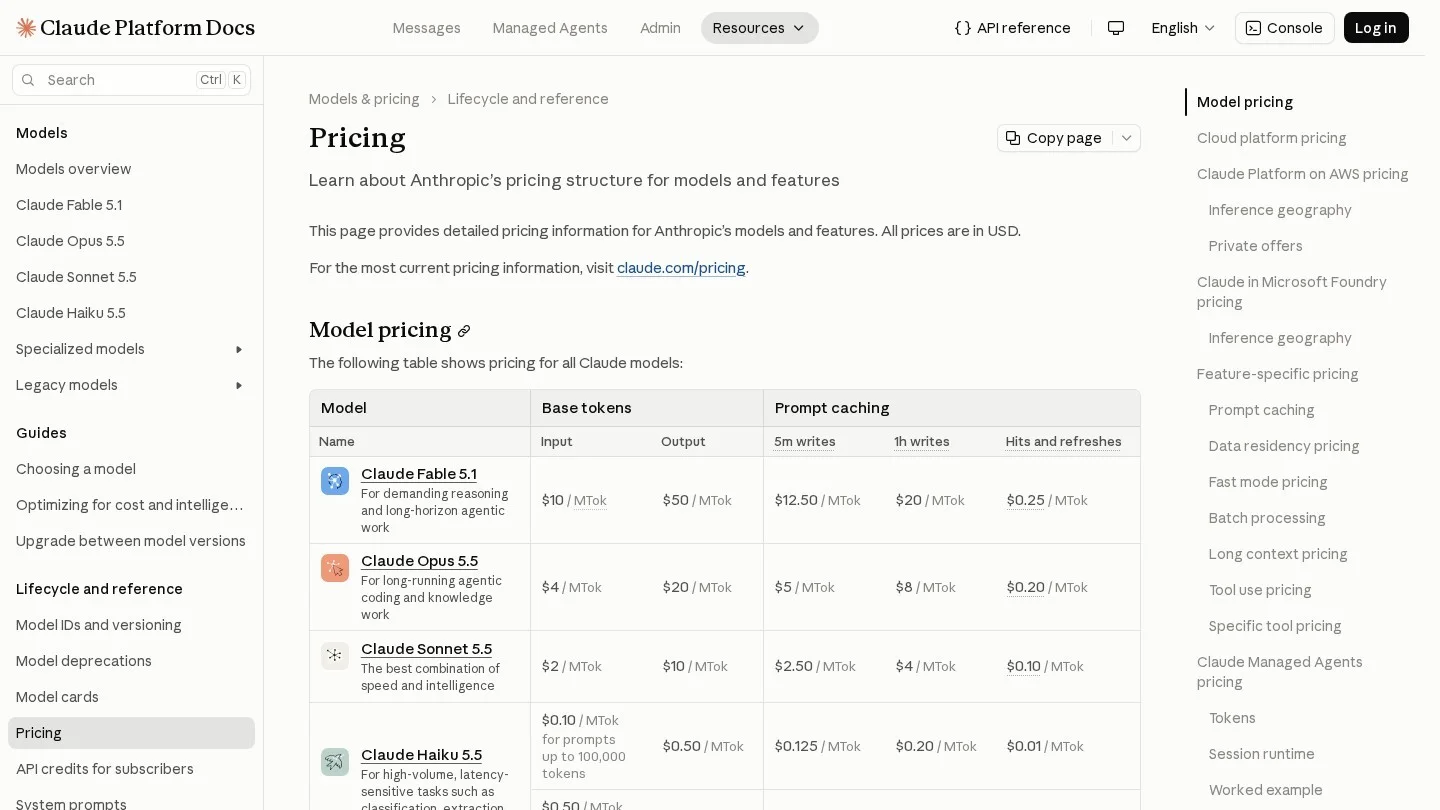
Model choice sets the price of every token the agent uses, and these standard-tier prices, in US dollars per million tokens, come from each provider’s official pricing page.
| Model | Input | Cached input (read) | Output | Batch or Flex price |
|---|---|---|---|---|
| Claude Opus 5.5 | $4.00 | $0.20 | $20.00 | Half price |
| Claude Sonnet 5.5 | $2.00 | $0.10 | $10.00 | Half price |
| Claude Haiku 5.5 (prompts up to 100,000 tokens) | $0.10 | $0.01 | $0.50 | Half price |
| GPT-6 Astra | $10.00 | $1.00 | $50.00 | Half price |
| GPT-6.1 Sol | $2.00 | $0.10 | $10.00 | Half price |
| GPT-6 Luna | $0.10 | $0.01 | $0.50 | Half price |
| Gemini 3.1 Pro Preview (prompts up to 200,000 tokens) | $2.00 | $0.20 | $12.00 | Half price |
| Gemini 3.8 Flash | $0.75 | $0.075 | $3.75 | Half price |
| Gemini 3.5 Flash-Lite | $0.30 | $0.03 | $2.50 | Half price |
Sonnet 5.5 input costs 20 times as much as Haiku 5.5 input, and the output price follows the same ratio. GPT-6.1 Sol and GPT-6 Luna sit at the same two price points, so a team that moves routine calls from the larger model to the smaller one cuts the cost of those calls by 95%.
Include Tool Fees and Regional Uplifts in the Estimate
Token prices are only part of the invoice, since web search costs $10 per 1,000 searches on the Claude API and on OpenAI’s API, plus the tokens of the search results. Google gives 5,000 free grounded searches a month across Gemini 3 and newer models, then charges $14 per 1,000.
Tool definitions add tokens to every request, and on the Claude 5.5 models turning on tool use adds 286 system prompt tokens with automatic tool choice. Anthropic’s computer use toolset adds about 4,500 input tokens per request by default, and its browser toolset adds about 6,600.
Data residency raises the rate as well. Pinning Claude 4.6 and later models to US-only inference bills every token category at 1.1 times the list price. OpenAI adds 10% for regional processing endpoints on models released on or after March 5, 2026.
Long prompts can also change the price tier. A Haiku 5.5 request with a prompt over 100,000 tokens pays $0.50 per million input tokens and $2.50 for output, five times the short-prompt rate. Gemini 3.1 Pro Preview doubles its input price above 200,000 tokens, while Claude Sonnet 5.5 and Opus 5.5 bill the full 1 million token window at the standard rate.
Cache the Prefix Your Agent Sends on Every Call
An agent resends its system prompt and tool schemas on every call, and many also attach a long policy or product document. Put that stable block at the front of the prompt and cache it, because on Sonnet 5.5 a cache read costs $0.10 per million tokens against $2 for fresh input, which is a 95% cut on that part of the prompt.
Writing to the cache costs extra, and Anthropic charges 1.25 times the base input price for a cache that lasts five minutes and two times the base price for one that lasts an hour. OpenAI also prices cache writes, with GPT-6.1 Sol charging $2.50 per million tokens for a 30-minute write and $5 for a 12-hour write, with reads at $0.10.
Google bills cache storage by the hour, and Gemini 3.1 Pro Preview charges $4.50 per million tokens per hour, so a 50,000-token cache kept for a full day costs $5.40. Gemini 3.8 Flash charges $0.50 per million tokens per hour.
Keep anything that changes at the end of the prompt. A timestamp or user name at the top of the system prompt breaks the cache on every call, and the trace will show it as a low share of cached input. The Claude Agent SDK caches the system prompt and tool definitions on its own, so most of the gain there comes from leaving that prefix alone between calls.
Send Routine Steps to a Cheaper Model
Many agent steps are small jobs, and pulling an order number out of a message or picking which tool to call does not need the largest model on your account. Send those steps to a small model such as Haiku 5.5 or GPT-6 Luna, and keep the larger model for the reply the customer reads or the code change that ships.
Set the route by step type first, because you can write that rule in code today. CrewAI gives each agent a function_calling_llm setting that overrides the crew’s main model for tool calls only. The Claude Agent SDK has an effort option whose “low” level uses fewer tokens per turn, and you can set it for the whole session or for each subagent.
Test every route before you switch it on by running 200 real tickets or tasks through both models for the step in question and compare the outputs side by side. Keep the cheaper model only where the results match, and watch the 100,000-token line on Haiku 5.5 as well, since a long-context step sent there can cost five times the price you planned for.
Shrink the Context Each Turn Rereads
Every turn adds tool output and replies to the history the model rereads. In our coding agent model, turn one carries 20,000 tokens and turn 30 carries 107,000, so without caching rereading that history is most of the bill.
- Hand side tasks to subagents. A Claude Agent SDK subagent returns only its final answer, so the main agent’s context grows by a summary and skips the whole transcript.
- Load tool schemas only when they are needed. The Claude Agent SDK defers MCP tool schemas by default, but when that tool search is off each MCP server adds all of its tool schemas to every request.
- Trim tool output before it reaches the model. Return the five fields the agent needs from an order lookup and drop the other forty.
- Let the framework summarize near the limit. CrewAI’s respect_context_window setting is on by default and summarizes history when it gets too long. The Claude Agent SDK compacts older history on its own and marks the point with a compact_boundary message.
Read also: Plinto AI Alternatives for Invoice Checks and AP Controls
Halt Runaway Loops With Hard Limits
A looping agent spends money until something stops it. Each of the four frameworks here has a stop setting, and the Claude Agent SDK leaves it open unless you set one.
Cap Turns in Your Framework
- Claude Agent SDK. The max_turns option has no limit by default. When the agent hits a limit you set, the run ends with an error_max_turns result that still reports the total cost.
- OpenAI Agents SDK. Pass max_turns to the runner, and a run that goes past it raises MaxTurnsExceeded. An error handler with the “max_turns” key can return a controlled final answer to the user.
- LangGraph. Set recursion_limit in the config when you invoke the graph. The GRAPH_RECURSION_LIMIT error often means two nodes keep sending work back to each other.
- CrewAI. The max_iter setting defaults to 20 iterations before the agent must give its best answer. The max_execution_time setting caps a task in seconds, and max_retry_limit defaults to 2.
Pick the number from your traces by setting the limit at about twice the 95th percentile of turns on tasks that finished well, then review every run that hits it.
Stop Each Task at a Dollar Ceiling
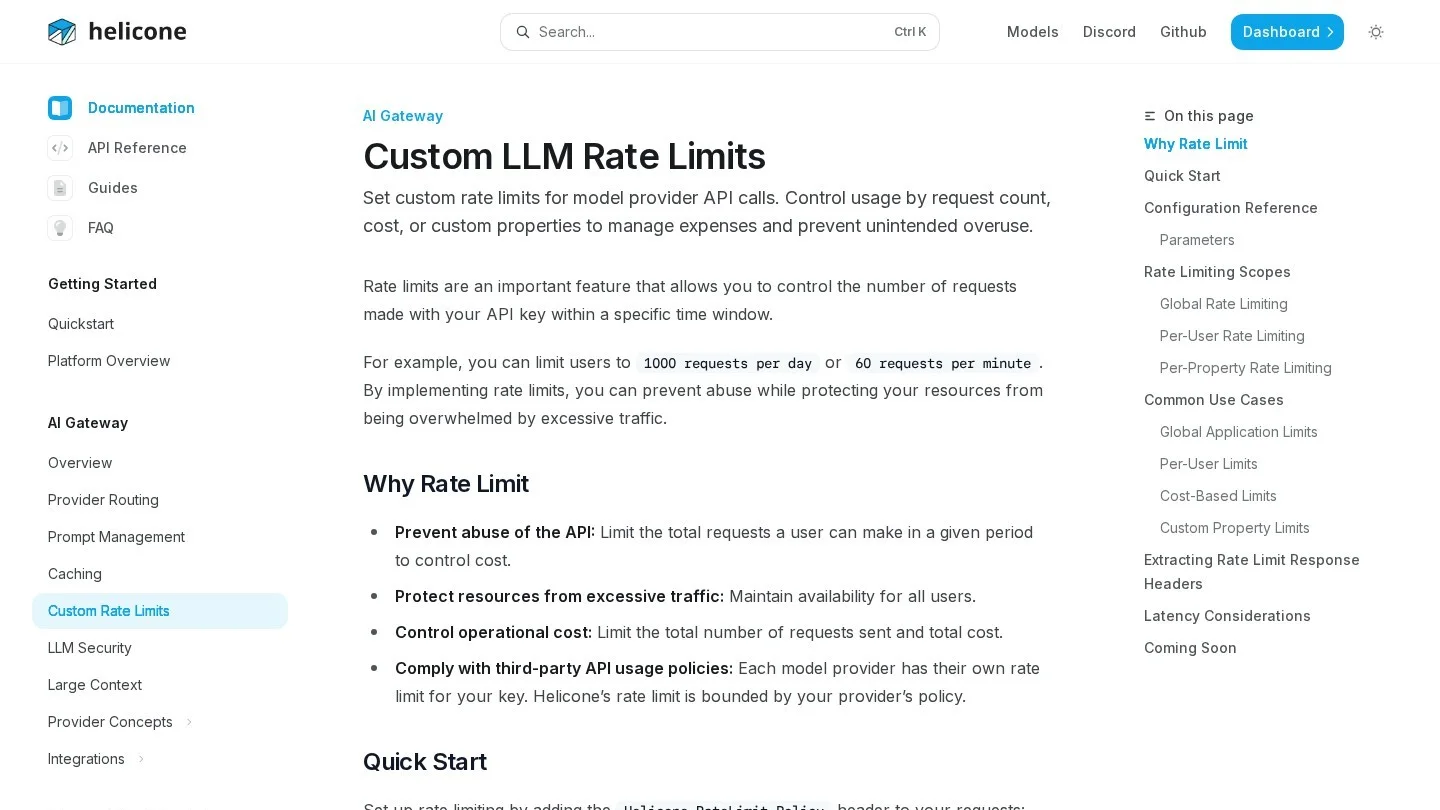
A turn limit does not stop a turn that reads a huge file. The Claude Agent SDK adds max_budget_usd, which stops the loop once estimated spend reaches the cap and counts spend by subagents toward the same total. The check happens after each model response arrives, so a run can pass the cap by the cost of one response, and you should leave headroom for that.
In our coding model, a normal 30-turn task on Sonnet 5.5 with caching costs $0.69. A stuck task that runs to 150 turns costs $5.97, and a $2 cap stops it at turn 71, and with 2% of tasks getting stuck, the cap saves about $250 a month for a 25-person team. The same 150-turn task on Opus 5.5 without caching would cost $148.50.

Throttle Spend per User at the Gateway
A gateway sits between your agents and the model providers, so it can cap spend for each user or customer. Helicone reads a Helicone-RateLimit-Policy header on each request. The policy “500;w=3600;u=cents;s=user” allows $5.00 per hour for each user, and a request over that limit gets an HTTP 429 error after a minimum window of 60 seconds.
CrewAI’s max_rpm setting caps requests per minute for an agent, which keeps a burst of tool calls from tripping the provider’s own rate limit. LangSmith’s LLM Gateway records the cost of calls routed through it and can also limit spend.
Defer Work That Can Wait to Batch and Flex Tiers
Anthropic’s Batch API halves both input and output prices for jobs that can run asynchronously. OpenAI’s Flex and Batch prices put GPT-6.1 Sol at $1 for input and $5 for output. Google’s Batch and Flex tiers cut Gemini 3.1 Pro Preview to $1 and $6 for prompts up to 200,000 tokens.
Good candidates are nightly ticket tagging, weekly account summaries, evaluation runs and backfills. Batch pricing, however, does not apply to Anthropic’s Managed Agents sessions, which are interactive.
Check the opposite setting too. Google’s Priority tier raises Gemini 3.1 Pro Preview to $3.60 for input and $21.60 for output, and Anthropic’s fast mode prices Opus 5.5 at $8 and $40. Find out who switched these on and for which workloads.
Block Overage in Each Vendor’s Admin Settings
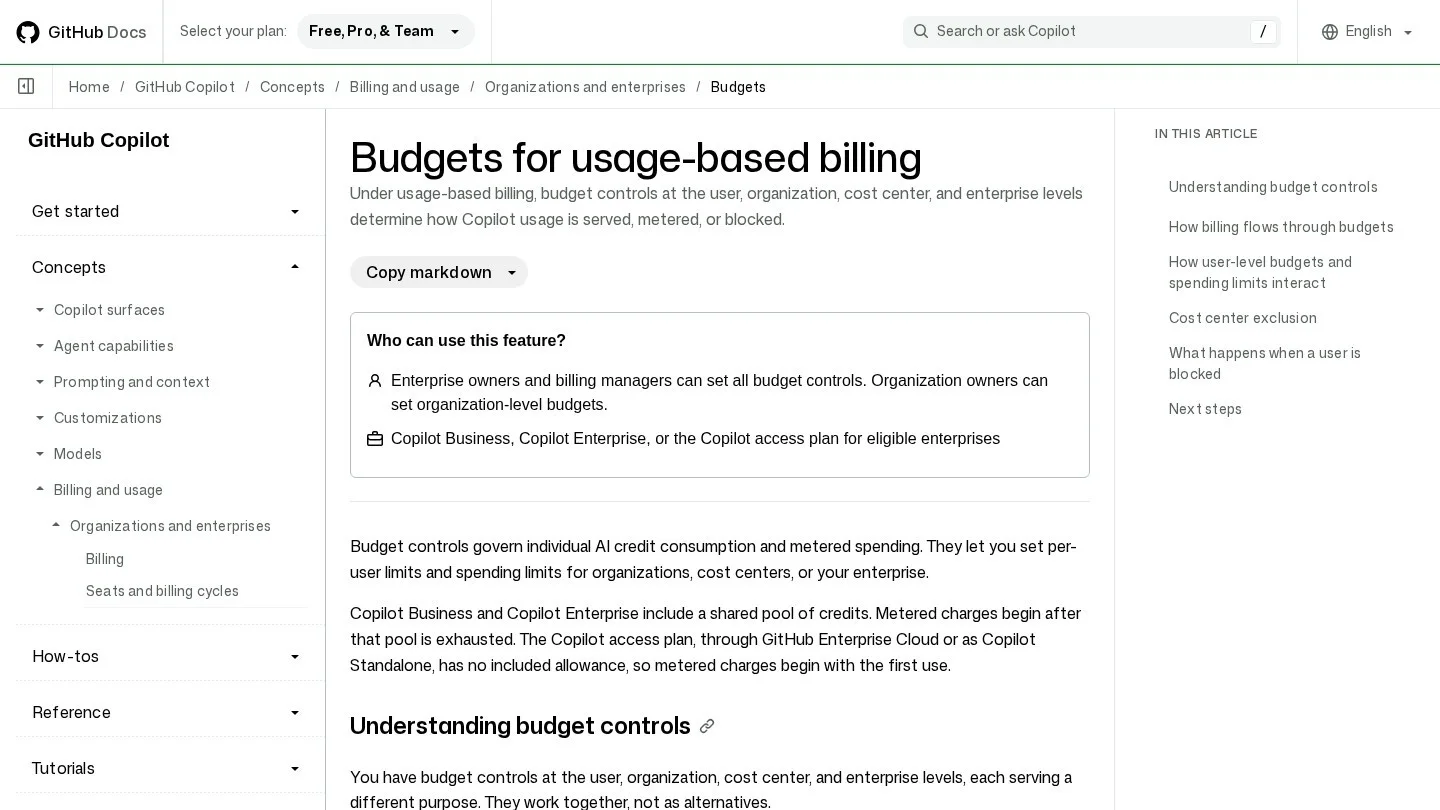
Agents bought as products need limits set in the vendor’s admin screens. GitHub Copilot lets admins set budgets for the enterprise, a cost center, an organization or a single user. The “Stop usage when budget limit is reached” option on the first three levels is off by default, so metered charges keep running without a cap until an admin turns it on. User-level budgets, by contrast, always stop usage at the limit.
Metered Copilot use costs $0.01 per AI credit once the shared pool runs out. Included usage controls cap how much of that pool a cost center can draw, up to 1,900 credits per Copilot Business license and 3,900 per Copilot Enterprise license. A user who hits a budget loses the features that spend AI credits until the next cycle or until an admin raises the budget, while code completions keep working.
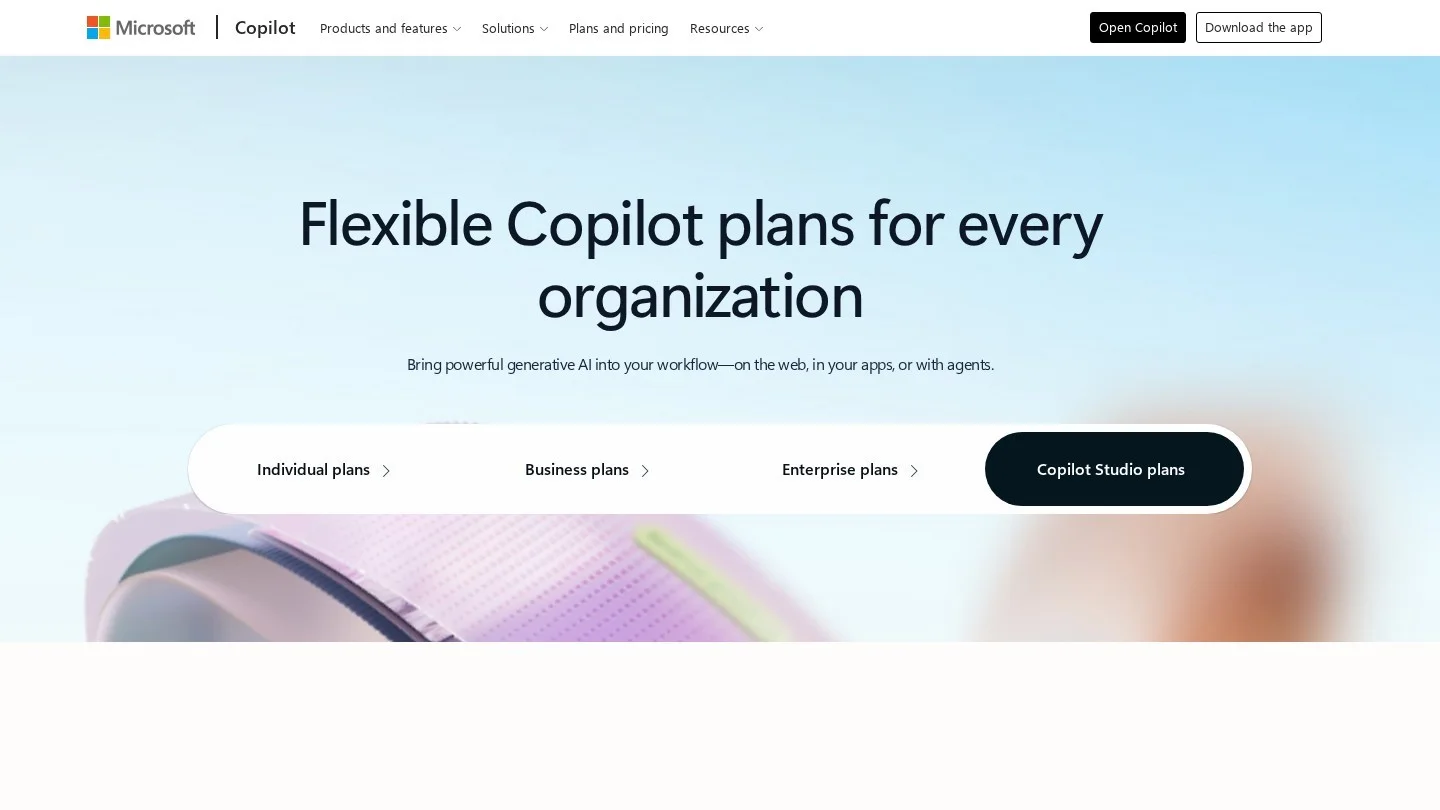
Microsoft Copilot Studio sells capacity packs at $200 a month for 25,000 Copilot Credits. That works out to $0.008 per credit, so a generative answer at 2 credits costs $0.016 and an agent action at 5 credits costs $0.04. Custom agents are switched off at 125% of prepaid capacity, and because a busy month can stop your agents, you should set alerts well under that line.
LangSmith’s free Developer plan pauses new runs once the monthly allowance is used. A pause like that suits a test project, since nobody gets a surprise invoice from an agent left running over a weekend.
Judge Seat and Outcome Billing by Your Monthly Volume
Agent products bill by the seat, by usage, by outcome or by a mix of these, and the right shape depends on how much work you send through them. Our explainer on AI tools pricing models covers each model in detail, while a buyer controlling costs mainly needs to know where each one hurts.
Intercom Fin charges $0.99 per outcome, and on any helpdesk it has a 50-outcome monthly minimum of about $49, and unused outcomes expire. Per-outcome billing ties spend to results, but the unit price stays fixed when model prices fall, so a team resolving 12,000 conversations a month would pay $11,880 in outcome fees.
That figure looks large next to the $317 token bill in our support model, although the comparison leaves out the engineering time to build and maintain your own agent, which can exceed the token bill. Run both numbers before you decide to build.
Devin sells Teams seats at $40 per full seat a month with an $80 monthly minimum, and extra usage runs on prepaid credits that roll over and never expire. Credit-based automation platforms work in a similar way, and our comparison of Lindy AI alternatives lists how each one counts credits.
Watch Daily Spend in an Observability Tool
Monthly invoices arrive too late to stop a runaway agent, so send traces to an observability tool and check spend every day.
LangSmith shows cost per run and per trace in the trace tree, with input and output split out. Project stats show total tokens and cost for every trace in a project, and the prebuilt dashboard charts cost over time. You can add your own model prices with a regex match pattern and an activation date, and attach non-model costs such as a paid tool call through a total_cost field.

Langfuse records cost on each generation either from the usage your code sends or from its own model definitions. Values you send take priority, and models you define take priority over the ones Langfuse maintains. Cached tokens sit in their own bucket so they are not counted twice, and reasoning tokens need to be sent in because Langfuse cannot see them. Alerts can notify the team when spend crosses a threshold.
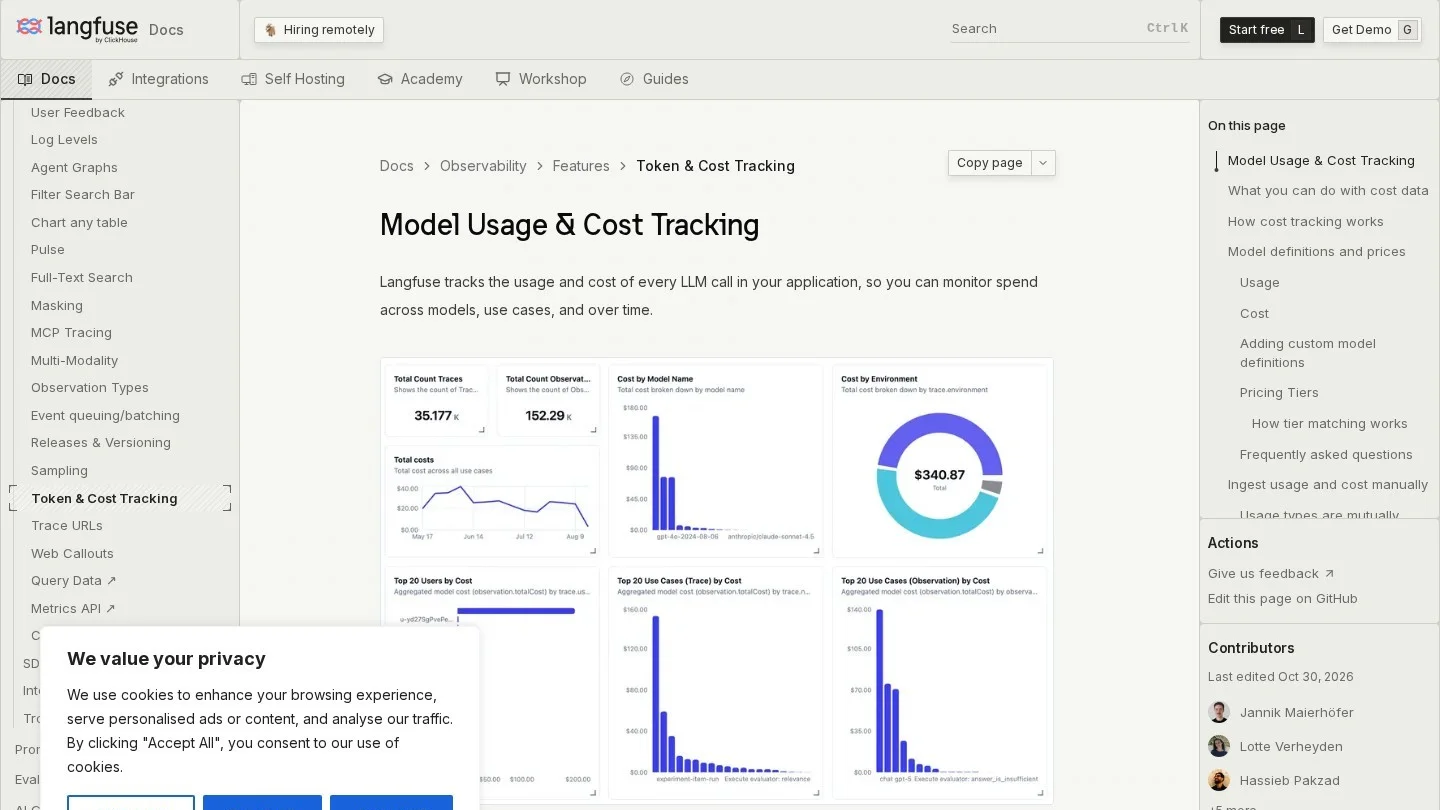
Set a daily alert at about 150% of the trailing seven-day average for each agent. When it fires, look first at the cache hit rate and at any prompt change shipped that day.
Negotiate Price and Credit Terms Before Renewal
Model prices change in both directions, and the contract decides who carries the change. Google raises Gemini 3.8 Flash from $0.75 to $1.50 per million input tokens and from $3.75 to $7.50 for output on January 1, 2027, which means a workload of 500 million input tokens and 50 million output tokens a month goes from $562.50 to $1,125. Gemini 4 Argon moves from $2 and $10 to $4 and $20 on December 1, 2026.

Raise these points before you sign or renew.
- Price notice. Ask for 60 to 90 days’ notice of any rate increase and a price lock for the contract term on committed volume.
- Credit expiry. Ask whether unused credits roll over, since Devin’s extra credits never expire, while Intercom’s unused Fin outcomes do.
- Minimums. Count the monthly minimum against a slow month, such as Fin’s 50 outcomes or Devin’s $80 floor.
- Overage rate. Get the rate per unit above your allowance in writing, the way GitHub publishes $0.01 per AI credit.
- Residency uplift. Ask whether the 10% regional uplift applies to your deployment and whether you need it.
- Model swaps. Keep the right to move a workload to a cheaper model without a new contract.
Model a Month of Spend for a Support Agent and a Coding Agent
This script prices two common agents with Anthropic’s list prices. Every volume and token count is an assumption we chose, so replace them with numbers from your own traces.
- Support agent. 20,000 conversations a month with 5 model calls each. Each call sends an 8,000-token stable prefix, 1,500 fresh input tokens and gets 350 output tokens back. With caching, 90% of calls read the prefix from cache. Without a step cap, 3% of conversations loop for 25 calls.
- Coding agent. 25 developers each run 6 tasks per workday for 21 workdays, or 3,150 tasks a month. Each task runs 30 turns, starting at 20,000 tokens of context and adding 3,000 per turn, with 800 output tokens per turn. With caching, each turn reads the earlier context from cache and writes the new part.
# List prices in USD per 1M tokens (Anthropic, 5-minute cache)
P = {
    "sonnet": dict(inp=2.00, write=2.50, hit=0.10, out=10.00),
    "haiku":  dict(inp=0.10, write=0.125, hit=0.01, out=0.50),
    "opus":   dict(inp=4.00, write=5.00, hit=0.20, out=20.00),
}
M = 1_000_000

# Support agent assumptions
convs, calls, prefix, fresh, out = 20_000, 5, 8_000, 1_500, 350
hit_rate, loop_share, loop_calls, cap = 0.90, 0.03, 25, 8

def call_cost(p, cache):
    if cache:
        pre = prefix * (hit_rate * p["hit"] + (1 - hit_rate) * p["write"])
    else:
        pre = prefix * p["inp"]
    return (pre + fresh * p["inp"] + out * p["out"]) / M

def support_month(haiku_share, cache, capped):
    per_call = (haiku_share * call_cost(P["haiku"], cache)
                + (1 - haiku_share) * call_cost(P["sonnet"], cache))
    looping = convs * loop_share
    n_calls = (convs - looping) * calls + looping * (cap if capped else loop_calls)
    return n_calls * per_call

# Coding agent assumptions
devs, tasks_per_day, workdays = 25, 6, 21
turns, start_ctx, growth, out_turn = 30, 20_000, 3_000, 800
tasks = devs * tasks_per_day * workdays

def task_cost(p, cache, n_turns=turns):
    total = 0.0
    for t in range(n_turns):
        ctx = start_ctx + growth * t
        if not cache:
            inp = ctx * p["inp"]
        elif t == 0:
            inp = ctx * p["write"]
        else:
            inp = (ctx - growth) * p["hit"] + growth * p["write"]
        total += (inp + out_turn * p["out"]) / M
    return total

for label, args in [("No caching, Sonnet only", (0, False, False)),
                    ("Caching", (0, True, False)),
                    ("Caching + 70% Haiku routing", (0.7, True, False)),
                    ("Caching + routing + 8-call cap", (0.7, True, True))]:
    print(f"Support | {label}: ${support_month(*args):,.0f}")

for label, model, cache in [("Opus 5.5, no caching", "opus", False),
                            ("Opus 5.5, caching", "opus", True),
                            ("Sonnet 5.5, caching", "sonnet", True)]:
    per_task = task_cost(P[model], cache)
    print(f"Coding | {label}: ${per_task:.2f} a task, ${per_task * tasks:,.0f} a month")
Cost Out 20,000 Support Conversations
| Setup for the support agent | Monthly model bill | Cost per conversation |
|---|---|---|
| Sonnet 5.5 only, no caching, no step cap | $2,520 | $0.126 |
| Add prompt caching | $1,033 | $0.052 |
| Add routing with 70% of calls on Haiku 5.5 | $349 | $0.017 |
| Add an 8-call step cap | $317 | $0.016 |

Caching cuts the bill by 59%, because the 8,000-token prefix makes up most of each call’s input. Routing does the most after that, since Haiku 5.5 handles 70% of calls at a twentieth of the Sonnet price. In the uncapped setup, the 3% of conversations that loop use 13% of the money, and the step cap matters more as a safety limit than as a saving, because one bad prompt change can push that looping share far above 3%. For a customer support agent that means the cap belongs in the first release.
Cost Out a 25-Developer Coding Agent Rollout
| Setup for the coding agent | Cost per task | Monthly bill for 25 developers | Per developer |
|---|---|---|---|
| Opus 5.5, no caching | $8.10 | $25,515 | $1,021 |
| Opus 5.5, with caching | $1.37 | $4,330 | $173 |
| Sonnet 5.5, with caching | $0.69 | $2,165 | $87 |

Caching matters even more for coding agents, because each turn rereads a context that keeps growing. Without it, the Opus setup pays full price for the same files 30 times in every task, and caching cuts that bill by 83% before a move to Sonnet 5.5 halves it again. Keep Opus for a short list of hard tasks and send everything else to Sonnet 5.5 with a dollar cap on each run.
Audit Agent Spend With This Monthly Checklist
| Control | Where to set it | What to check each month |
|---|---|---|
| Cost per finished task | Tracing tool with task and team tags | Trend by agent and by customer |
| Prompt caching | Stable prefix at the front of each prompt | Share of input tokens read from cache |
| Model routing | Per step in your agent code | Quality on 200 sample tasks per route |
| Context size | Subagents and trimmed tool output | Average input tokens per call |
| Turn limit | max_turns or max_iter in your framework | Runs that ended at the limit |
| Dollar cap per task | max_budget_usd or gateway policy | Tasks stopped by the cap |
| Batch and Flex tiers | Provider API settings | Jobs that could wait a few hours |
| Fast and Priority tiers | Provider API settings | Who turned them on and why |
| Vendor budgets | Admin billing pages | Hard stop on, alert under 100% |
| Contract terms | Order form or renewal | Price notice, rollover, minimums, overage |
Answer the Finance Team’s Questions on Agent Spend
What Will Our Agent Bill Look Like Each Month?
In our models, a support agent handling 20,000 conversations costs between $317 and $2,520 a month in model fees, or 1.6 to 12.6 cents per conversation. A coding agent for 25 developers costs between $2,165 and $25,515, and caching plus the choice of model explain most of that spread. Vendor seats and per-outcome fees come on top if you buy an agent product.
Does Prompt Caching Save Money on a Low-Traffic Agent?
Usually, yes, as long as the same prefix gets reused before the cache expires. On Sonnet 5.5 a five-minute write costs 1.25 times the input price and a read costs 0.05 times, so one write plus a single read costs 1.30 times the base price, against 2 times for sending the prefix fresh twice. A write that is never read costs 25% more than no caching at all.
Should We Run Models Locally to Cut Costs?
Local models swap the per-token bill for hardware and electricity. They fit steady workloads with strict data rules, and our guide to AutoGPT alternatives for local AI agents covers the hardware and power side of running models on your own machine. For uneven traffic, a small hosted model such as Haiku 5.5 at $0.10 per million input tokens needs no hardware at all.
What Turn Limit Should a Production Agent Use?
Start at about twice the 95th percentile of turns on tasks that finished well, and add a dollar cap on top. CrewAI defaults to 20 iterations, and Anthropic’s own Agent SDK example sets 30 turns for a bug-fixing agent. For the first month, review every run that hits the limit and raise the number only when the extra turns produced a finished task.
Read also: Autonomous AI Agents vs Workflow Automation: Cost, Risk and When to Use Each
Related AI Agents



Explore Agent Categories
Related Articles
 GuidesApple AI Agent for Device Control? All You Need to Know
 GuidesPlinto AI Alternatives for Invoice Checks and AP Controls
 GuidesBest CAMEL AI Alternatives and What They Cost
 GuidesAI Customer Support Agent Cost Reduction Statistics
 GuidesOpen-Source AI Agents vs Commercial Platforms: Licenses, Costs and Security
 GuidesAutonomous AI Agents vs Workflow Automation: Cost, Risk and When to Use Each
