


An AI assistant waits for you. You type or speak a request, it answers inside the app you are using, and it stops. An AI agent takes a goal or an event and runs a loop of tool calls on its own. It stops when the job is done or a rule stops it. Six technical differences sit behind that split. They cover who starts the work, how many steps run and whose permissions apply. They also cover what state is kept, where approvals sit and how the bill is counted.
The labels blur in product names. ChatGPT, Microsoft 365 Copilot, Gemini and Alexa+ all began as assistants, and all of them now ship agent features. So the useful question is which mode a feature runs in.
We went through the trigger, permission and billing docs for ChatGPT agent, Microsoft 365 Copilot, Copilot Studio, Google Workspace Studio, Alexa+ and Siri AI. Then we priced two per-outcome agents, Intercom Fin and Salesforce Agentforce, against a per-seat assistant. If you are weighing agents against scripted bots, our pieces on AI agents vs AI chatbots and AI agents vs RPA cover those splits.
AI Agents vs AI Assistants: Technical Differences
The table compares the two modes on the points that change how you build, secure and pay for them. Each row reflects how the named products work today.
| Point | AI assistant | AI agent |
|---|---|---|
| Who starts the work | A person, with a prompt or voice command | A goal, a schedule or a system event such as a new file |
| Steps per request | Usually one response, sometimes a short plan you review | A loop of model calls and tool calls until done |
| Tool permissions | The signed-in user’s access, inside one app | Its own connections, often across several systems |
| Identity | Acts as you, while you watch | Can act as a service account or the builder’s credentials |
| Autonomy | Suggests or edits, you accept | Decides the next step and acts, within set limits |
| State | The current chat or document | Run state, task history and sometimes a saved checkpoint |
| Approval gates | You are the gate on every turn | Gates must be designed in for risky actions |
| Typical failure | A wrong answer you can see and ignore | A wrong action that runs before anyone looks |
| Pricing model | Per seat or flat subscription | Per action, per conversation or per outcome |
| Examples | Microsoft 365 Copilot chat, Gemini in Gmail, Siri, Alexa | Copilot Studio agents with event triggers, Fin, Agentforce |
The last two rows decide most buying calls. An assistant is cheap to roll out because a person checks every output. An agent saves more time, but only after someone designs the limits that a person used to supply.
One Invoice Task, Run as an Assistant and as an Agent
Take a finance clerk who needs to flag every invoice over $10,000 in a weekly workbook. Both Microsoft tools can do it. The mechanics differ at every step.
The Assistant Path in Excel
The clerk opens the workbook and asks Copilot in Excel to highlight the large invoices. In plan mode, Copilot writes a step-by-step plan for review before it edits anything. In the default editing mode, it works straight in the workbook and checks the result against the request. A Stop button halts it at any point.
Notice who did what. The clerk started the work, watched it happen and could stop it. The work also stayed inside one file. Edit mode runs on Windows, Mac and the web, while the Android app offers chat only.
The Agent Path in Copilot Studio
Now the same job runs without the clerk. A builder creates a Copilot Studio agent with an event trigger set to fire when a file is created in OneDrive. Unlike topic triggers, event triggers need no user input, so the agent acts on its own when the weekly file lands.
Three technical facts change. First, event triggers authenticate only with the agent maker’s credentials. That means users of the agent may reach data through the maker’s access. Second, each trigger payload is processed like a user message and counts toward Copilot Credit use. So a timer that fires every 10 minutes bills like a user who writes in every 10 minutes. Third, frequent triggers can exhaust quota and cause throttling.
So the agent path needs things the assistant path never did. You scope the trigger with parameters, tell the agent how to treat payload data and test before publishing. Before publishing, the agent ignores triggers. After it, the agent reacts every time one fires.
Who Starts the Work: Prompts vs Triggers
The start signal is the cleanest test. If a human prompt starts every run, you have an assistant, even a very smart one. If a schedule, an inbox or a database row can start it, you have an agent.
The trigger options make the point. In Copilot Studio, a new SharePoint item can start a run. So can a new OneDrive file or a completed Planner task. A Dataverse row change or a recurrence timer can also start one. Google Workspace Studio agents work on incoming mail. Its sample agent decides which emails hold a question, labels them To respond and pings the owner in Chat. ChatGPT agent sits in between. A person starts the first run, and the finished task can then repeat on a schedule, such as a weekly metrics report.
Single Turn vs Agent Loop
An assistant reply is one model call, perhaps with one lookup. An agent repeats the cycle: call the model, run the tool it picked, feed back the result, call again. We traced that loop turn by turn in our guide on how AI agents work.
The loop changes cost and risk at the same time. Each extra turn adds tokens and waiting. It also adds a chance to call the wrong tool. That is why agent frameworks ship turn caps and assistants mostly do not need them.
Read also: AI Agent Middleware: Architecture and Use Cases
Tool Permissions and Identity
An assistant borrows your access while you sit there. An agent needs access of its own, and that access has to be planned.
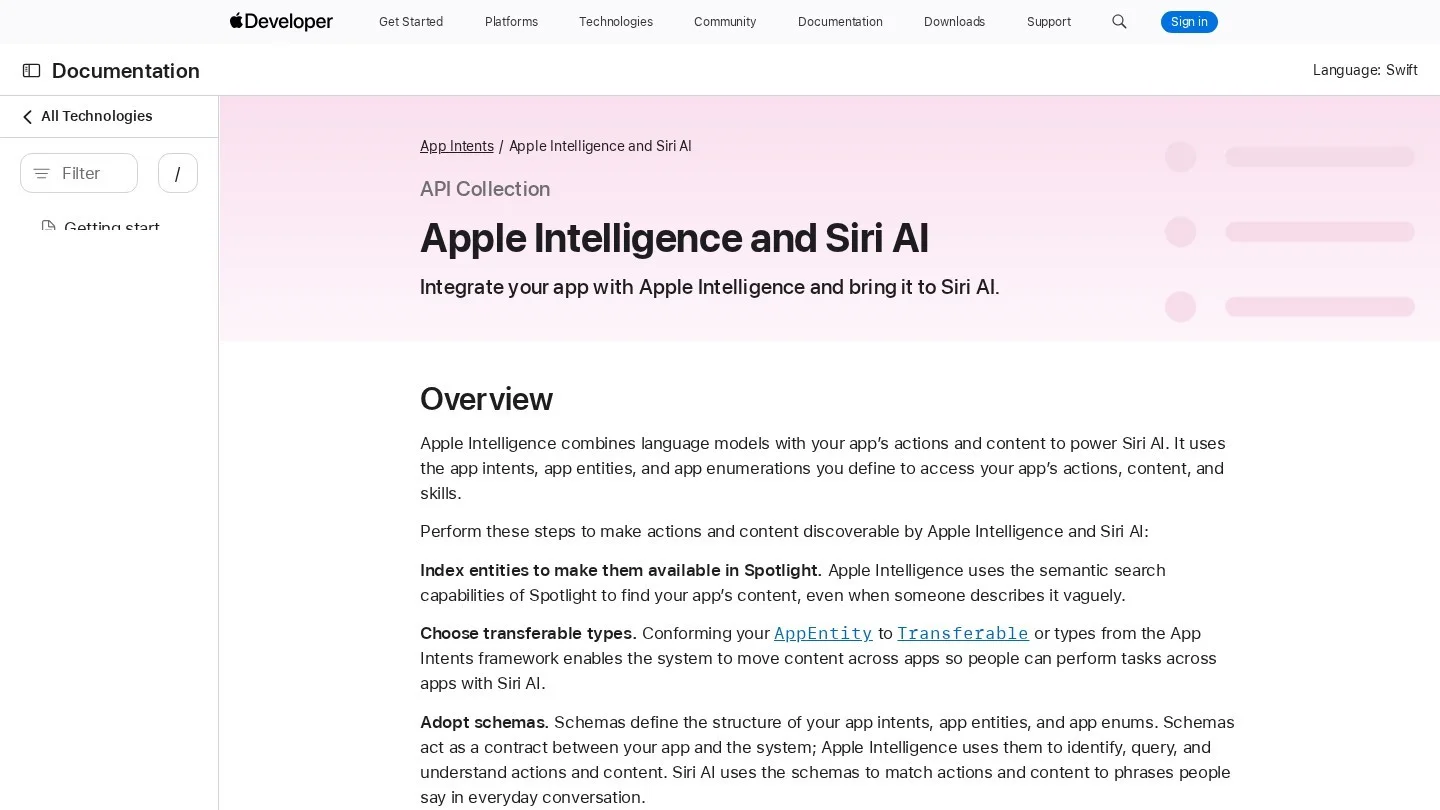
Siri AI shows the assistant model well. It can only use the app intents, app entities and schemas that each developer defines. Schemas act as a contract between the app and the system, so Siri matches spoken phrases to actions the app chose to expose. Apple’s sample code covers calendar, messaging, music and photo apps.
ChatGPT agent goes much further. It works on its own virtual computer with a visual browser, a text browser and a terminal. It also gets connectors to apps such as Gmail and GitHub, plus direct API access. That is a wide reach for one tool. As a result, the controls around it matter more than its model.
Approval Gates and How Each One Fails
Assistants fail in plain sight. A bad formula or a weak email draft sits on your screen, and you fix it. Agents fail out of sight, so their makers add gates at the risky points.
ChatGPT agent shows four such gates in one product.
- Permission first: it requests permission before actions of consequence.
- Takeover: you can interrupt, take over the browser or stop the task at any point.
- Watch Mode: critical tasks, such as sending email, need your active oversight.
- Refusals: the model is trained to refuse high-risk tasks such as bank transfers.
Prompt injection is the agent-only failure that worries security teams most. A web page can hide instructions aimed at the agent. ChatGPT agent is trained to resist them, and OpenAI adds monitoring plus explicit user confirmation before consequential actions. An assistant that only reads your own document carries far less of that risk.
For your own builds, our guides on human-in-the-loop orchestration and AI agent guardrails show how to place these gates in code.
Pricing: Per Seat for Assistants, Per Task for Agents
The billing models follow the technical split. Assistants help a person, so vendors charge per person. Agents do the work, so vendors charge per unit of work.
| Product | Mode | Billing unit | List price |
|---|---|---|---|
| Microsoft 365 Copilot | Assistant with agents | Per user | $30 per user per month, paid yearly, or $31.50 paid monthly on a yearly term |
| Alexa+ | Consumer assistant | Per household | Free with Prime, or $19.99 per month |
| Intercom Fin | Support agent | Per outcome | $0.99 per outcome, 50 outcomes a month minimum |
| Salesforce Agentforce | Business agents | Per action or per conversation | Flex Credits at $500 per 100,000 credits ($0.10 for a 20-credit action), or $2 per conversation |
| Copilot Studio | Agent builder | Copilot Credits | Each trigger payload counts like a user message |
The gap shows up fast at volume. We ran the numbers for a support team of 10 people that handles 3,000 conversations a month. The volumes and the four actions per conversation are our own assumptions.
- Assistant only: 10 Microsoft 365 Copilot seats cost $300 a month on the yearly price. People still handle all 3,000 conversations, with help drafting and searching.
- Fin resolves half: 1,500 outcomes at $0.99 come to $1,485 a month. That is on top of the helpdesk seats.
- Agentforce on actions: 1,500 conversations at four 20-credit actions each use 120,000 credits, or $600. Billed at $2 per conversation, the same volume costs $3,000.
Seat pricing stays flat as volume grows. Task pricing rises with every conversation. In fact, if Fin resolved all 3,000, the bill would double to $2,970. So agent pricing pays off only when each outcome replaces paid human time worth more than the fee. Our guide to AI tools pricing models compares these billing units in more depth.
Use Cases Where AI Assistants Win
Assistants win where a person already owns the task and needs speed. The human judgment stays in the loop for free.
- Drafting and editing: emails, briefs and slides, where taste matters and a person signs off anyway.
- Analysis in one file: formulas, pivots and charts in Excel or Sheets, where plan mode lets you check the approach first.
- Search across your own work: finding a contract clause or last week’s meeting notes.
- Hands-free personal tasks: timers, music, messages and calendar entries by voice.
In these jobs an agent adds cost and risk with little gain. The person would review every output anyway.
Use Cases Where AI Agents Win
Agents win where work arrives on its own, repeats often and follows rules you can write down.
- Inbound support: order status, returns and account changes, where per-outcome pricing ties cost to results. Our customer support agents category lists the main options.
- Inbox and file triage: labeling, routing and summarizing as items land, like the Workspace Studio email agent.
- Scheduled reports: the same pull and write-up each week, which ChatGPT agent can repeat on a schedule.
- Multi-step web errands: research that spans many sites, or forms that need filling, with a person approving the final submit.
Where AI Assistants Are Gaining Agent Modes
The products are converging, and the overlap is where most buyers get confused. Each big assistant now carries an agent mode next to its chat.
- ChatGPT: agent mode is part of the Plus and Pro plans, with more usage on Pro. Our ChatGPT agent page covers what it can do.
- Microsoft 365 Copilot: the license includes access to agents with advanced reasoning and custom agents grounded in work data. Copilot in Excel adds plan and edit modes for multi-step work.
- Google Workspace: Workspace Studio lets business users design, manage and share agents. It reached general availability last December and runs on Gemini 3. Prebuilt steps reach Asana, Jira, Mailchimp and Salesforce. Gemini in Gmail comes with every business plan, and Gemini in Docs, Sheets and Meet starts at Business Standard.
- Alexa+: beyond answers, it can place food orders, book restaurant tables, book rides and schedule home repairs. It runs on Alexa devices, Alexa.com and the Alexa app.
- Siri AI: it acts through the app intents developers expose, and a Siri AI Developer Preview lets apps bring custom actions to it.
So the product name tells you little. Check the start signal, the permission model and the billing unit of the exact feature you plan to use.

Choosing Between an AI Assistant and an AI Agent
We boiled our research down to five questions. Answer them for one task at a time, since a team often needs both modes.
| Question | If yes | If no |
|---|---|---|
| Does the work arrive without a person asking? | Agent with a trigger | Assistant |
| Does the task need more than one system? | Agent with scoped connections | Assistant inside that app |
| Would a person review every output anyway? | Assistant | Agent with approval gates on risky steps |
| Is volume high and the rule set stable? | Agent priced per task | Assistant priced per seat |
| Can a wrong action cost money or trust? | Agent only with confirmation before it acts | Either mode |
For personal productivity, browse our personal assistant category, which holds tools of both kinds.
Questions Buyers Ask About Agents and Assistants
Is ChatGPT an AI Assistant or an AI Agent?
Both. Normal chat is assistant mode, because each reply follows your prompt. Agent mode is an agent. It works through a task on a virtual computer with browsers, a terminal and connectors, and it asks before actions of consequence.
Is Microsoft 365 Copilot an Agent?
The chat inside Word or Excel works as an assistant. The license also includes access to agents, and teams can build custom ones in Copilot Studio. In Copilot Studio, event triggers are what let an agent act without a user prompt.
Are Siri and Alexa AI Agents?
They are voice assistants that now take some actions. Alexa+ can book rides, tables and home services, and Siri AI can act through app intents. A person still starts most requests, which keeps them on the assistant side of the line for now.
Which Costs Less, an AI Assistant or an AI Agent?
It depends on volume. Seat prices stay flat, while task prices climb with every conversation. In our 10-person example, seats cost $300 a month, while agent fees ran from $600 to $3,000 for 1,500 conversations. For spend caps worth setting, read our AI agent cost control guide.
Read also: Browser Use vs Playwright: AI Agent or Scripted Automation
Related AI Agents

Explore Agent Categories
Related Articles
 GuidesAI Agent Middleware: Architecture and Use Cases
 ComparisonsAI Agents vs AI Chatbots: Differences, Costs and When to Switch
 GuidesJSON-RPC in AI Agent Communication: How MCP and A2A Use It
 GuidesBrowser Use vs Playwright: AI Agent or Scripted Automation
 GuidesAutonomous AI Agents vs Workflow Automation: Cost, Risk and When to Use Each
 GuidesHow Many SEOs Use AI Agents? Our Study of 69 Agency Websites
